Space Cakes (an educational app) is FREE – thanks to the support of Eli’s Cheesecake in Chicago. Kids use number sense and early math skills to complete intergalactic baking missions. They find themselves in a bakery filled with alien ingredients. They must follow a recipe to add the correct amount of each ingredient. Then they choose a 3D shape for their levitating batter and bake it. Next a topper, frosting, and sprinkles are added to finish their creations. Time for delivery – they steer the cake delivery spaceship back to Earth. Finally they celebrate their safe arrival with starburst, fireworks, and colorful confetti! Kids can snap a photo of their creations to share them via email, save them in a gallery, or use them to inspire creative writing – descriptive paragraphs using math terms, a story about an intergalactic cake baking contest, etc. There is a section for parents/teachers which explains the educational value of the app and how it meets the CCSS. This app provides a fun way to work with math concepts AND a wonderful springboard for creative writing.
Category Archives: FREE apps for kids
Goodnight Safari
FREE for the iPhone/iPad, Goodnight Safari is a sweet bedtime story. Kids (ages 2-4) help the animals of the savannah complete their evening activities in 7 interactive scenes – a giraffe eating dinner, a monkey climbing into bed, a hippo taking a bath, etc. Optional counting & color activities are available as an in-app purchase. Very sweet story for a peaceful end to your child’s day. 🙂
Recommended!
MeeGenius
This summer MeeGenius is partnering with the PBS KIDS Summer Learning Project to offer free weekly e-books all summer long (from 5/25 to 8/24)! Kids can join the weekly book challenge on the website: http://www.meegenius.com/pbslearning. Then they click on the book of the week and start reading/listening. Your child can check off his/her completed books on the free progress report and at the end of the summer, a certificate can be printed out to celebrate your child’s achievement. Check it out!!
Also… If you have the latest version of the FREE MeeGenius app, you can access a free book of the day – every day this summer! With the app you can also join the MeeGenius Reading Club which gives you access an 700+ title library of new and classic audio e-books for children. The full reading club subscription is $4.99/month but you can try it FREE for 30 days. After you download it, you register with your email address. Books can be read to you or read on your own. Words are highlighted as the narrator reads them in the read-along version. The books are nicely done – colorful, cutely illustrated, and age-appropriate.
Check out these two great opportunities to access FREE e-books and encourage daily reading. 🙂
Shadow Puppet Edu and Shadow Puppet
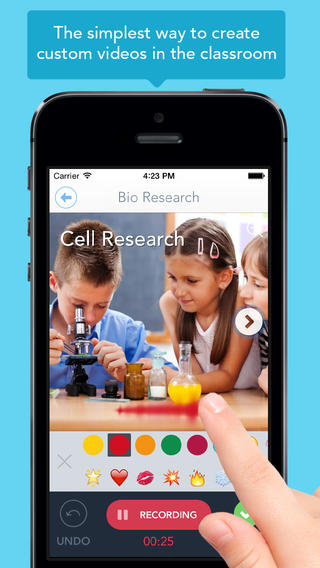
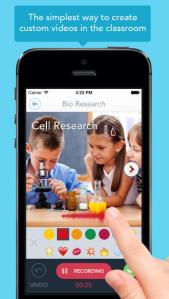
Just released yesterday – Shadow Puppet Edu, a FREE educational version of Shadow Puppet. Even kindergarten/first graders can create videos with this app which is very intuitive and easy to use. This educational version has a built-in, safe search that allows kids to search the Library of Congress, NASA Flickr Creative Commons, Yahoo Images, and Animated GIFs for images to add to their projects. And… it automatically adds the image credits to the end of the video. How cool as that? Kids can also add any photos that have been saved to their camera rolls. The possibilities for using this app are absolutely endless. Students can use it to create videos to: tell digital stories, explain concepts, present a project, describe an experience, show what they know, and more!! Teachers can create mini-lessons, share examples, enhance their lessons with imagery, etc. What a fabulous classroom tool!
Download link: https://itunes.apple.com/us/app/shadow-puppet-edu/id888504640?mt=8&uo=4
Recently updated and still FREE – Shadow Puppet, a photography app which has been featured by Apple as one of the “Best New Apps” for over 6 months! Using this app, it’s easy to create “puppets” – recorded explanations of your photos. First you choose your photos and put them in the order. Then you talk about your pictures. Everything is recorded. Finished “puppets” can be shared via email, SMS, Facebook and/or Twitter. There are so many ways for everyone to use Shadow Puppet: to teach something new, to share adventures with friends, to record children talking about their experiences, to tell the story behind old family photos, etc.
The update has many new features. Now you can include video clips, add music, search the web for images, overlay text/stickers, and more! The FREE version of the app permits you to include up to 10 photos/video clips. For $1.99 you can get Puppet Essentials which allows you to add up to 100 items to each video and have access to more drawing & decorating tools. The update made this great app even better!
The classroom uses for this app are only limited by your imagination: Take pictures of a child’s work and have him/her explain it to parents. Send pictures and voice recordings of the class field trip. Have kids give a step-by-step explanation of what happened in a science experiment. Draw & sequence pictures to retell a story. Make a “talking timeline” by sequencing photos of historical events. Have kids use it to present mini reports on any subject. Have virtual “pet day” – kids bring in pictures/recordings of their pets. Because you can use anything saved to your photo library, you can explain photos from the web, artwork created in other apps, and so much more. The possibilities for using this educational app are endless. For more suggestions go to http://get-puppet.com/education. What a fabulous resource!!
Download link: https://itunes.apple.com/us/app/shadow-puppet/id700902833?mt=8&uo=4
Typic Kids
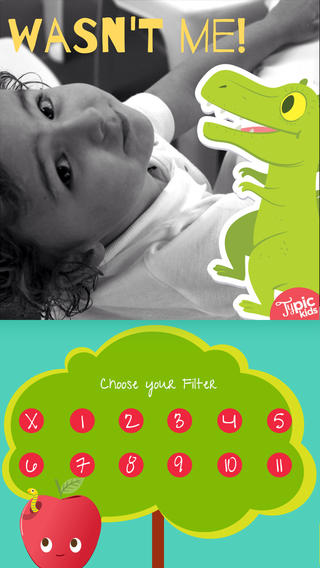
FREE app – Typic Kids, a fun photo editor for kids. The app is very easy to use. Just take or choose a picture, pick a filter, frame it, write a caption, choose a text color, add stickers, and share! This FREE app comes with 11 free filters, 6 free frames, 14 free fonts, and 10 free stickers. More options are available as in-app purchases. The wonderful Illustrations of Raeioul will make your family’s photos look fun and unique!
Download link: https://itunes.apple.com/us/app/typic-kids-fun-photo-editor/id806320241?mt=8&uo=4
Socrative
Socrative has been acquired by MasteryConnect. Read the press release here: https://www.masteryconnect.com/learn-more/press_releases/MasteryConnect-Acquires-Socrative.pdf
Still FREE and getting better with every upgrade – Socrative, an app that turns any device with a web browser into a student response clicker. I have been a fan of Socrative since I first discovered it two years ago. It’s one of those apps that I wish had been around when I was still in the classroom. Last July, Socrative added two additional quiz features. # 1 – Teachers can now add images to their questions. #2 – The system can now grade short answer questions. Teachers just input the acceptable answers and the system does the rest. 🙂
The Socrative website and app are unbelievably cool – they turn any device with a web browser (iPhone, iPad, laptops) into a student response clicker. If a teacher has access to any kind of wireless lab, he/she can engage the entire class in a game or quiz and watch the results in real-time. Teachers begin by using their teacher app or logging into t.socrative.com with their email and password. Once logged in, teachers are assigned a room number to share with their students. Students log in using their student app or at m.socrative.com and enter the “virtual room number” provided by the teacher. Teachers initiate an activity and students respond on their devices. Multiple choice and short answer quizzes are easy to create – types of questions can be mixed. Teachers can also choose to run the quiz as a Space Race game. The students’ responses are visible to the teacher in real-time. Teachers can see what each child answered individually as well as what the group answered collectively. And the best part is… the app grades, graphs the results, and generates a report as an Excel spreadsheet or an email.
What a powerful tool for teachers – a short quiz at the end of a lesson can pinpoint what students understand and what needs to be reviewed. Hours of grading and analyzing test results are done immediately. Every student is involved – wow!
Link to new user guide: http://www.socrative.com/materials/SocrativeUserGuide.pdf
Highly recommended!
Brainfeed – Educational Videos for Kids
FREE one week trial of all content! Check out this great resource. 🙂
FREE (with in-app purchases) – Brainfeed – Educational Videos for Kids, a collection of 1000+ educational videos for kids (7+), tweens, teens, and life-long learners. The videos in this collection were picked by a team of educators from around the globe. To be included in the app, the video had to be: under 10 minutes, documentary style, curriculum-based, entertaining & engaging, visually stimulating, age-appropriate, and child-friendly. The videos are categorized by topic: This is Your World, Tech & Design, English, Arts & Music, The Human Body, Social Studies, Math, and Make Your Future. I watched several videos (Yellowstone Super Volcano, The Evolution of Life on Earth, Fun with Fractals, and How the Brain Works) and enjoyed all of them. The free version includes more than 100 titles – a great introduction to what the subscription ($14.99) has to offer. Teachers, this app could be a great source of video clips to supplement your curriculum. You can contact team@brainfeed.org to request a discounted teachers’ version to use in the classroom. Parents, your kids (and you) can learn interesting things about the world in your home, on the road, or any place that has a 3G or wireless connection. And, new videos added each week to spark children’s curiosity about their world. What a great resource!
Download link: https://itunes.apple.com/us/app/brainfeed-educational-videos/id727189716?mt=8&uo=4
TED – TED conferences and TEDiSUB – Enjoy TED videos with Subtitles!
Parents/Teachers – here is an app for you and the kids!
TED started in 1984 as a conference bringing together people from three worlds: Technology, Entertainment, and Design. It is now a nonprofit devoted to ideas worth spreading. Here is information on 2 apps that will bring the world of TED to the device of your choice!
Riveting talks by remarkable people and FREE to the world. Connect with the official TED app for iPhone/iPad. Access more than 1,400 TEDTalk videos with more added every week! When you open the app, you will see a wide variety of featured talks – Where is Google going next? by Larry Page, A new way to grow bone by Molly Steven, Teach teachers how to create magic by Christopher Emdin, and so on. There are about 60 talks to choose from. Click on a title that interests you to get additional information about that talk: the length of the talk, a short synopsis, related talks, and related tags. Then you can watch the talk, save it, bookmark it, or share it. The app permits you to browse the entire library at any time – even when you are offline. You can browse by tag or by language. TEDTalks are subtitled in over 100 languages! You can create your own playlist or the app can create one for you based on your mood and how much time you have to listen. A fabulous resource for lifelong learners!!
FREE for a limited time – TEDiSUB – Enjoy TED videos with Subtitles! This app enhances the TED experience with added control features. It also allows you to see two subtitles at once – great for a language classes.
Too Noisy Lite
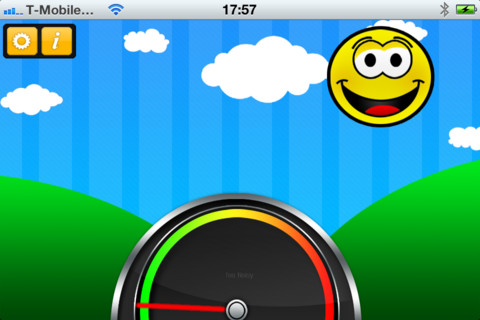
Too Noisy Lite is a FREE noise meter for iPhone/iPad. It measures the level of noise in a room and graphically displays whether it is at an acceptable level or not. If the level is acceptable, a smiling face is displayed. If the noise level increases beyond a level of acceptability, the graphic changes to indicate that the noise level is NOT acceptable. In the settings, a teacher/adult can adjust the sensitivity of the meter to go with the activity. A testing situation could be set at a 99% sensitivity level and group work could be set at a much lower sensitivity level. The meter worked when I tried it but, I was not in a large room with a group of kids. By using an Apple Digital AV adapter or a VGA adapter, Too Noisy can be projected on a TV or monitor so kids can learn what noise level is acceptable – cool idea! I would think that the LITE version is worth a try to see if it works for your situation. There is also a PRO version and themed versions available for $.99 each. Check out this great FREE educational app!
Fizzy’s Lunch Lab Fresh Pick
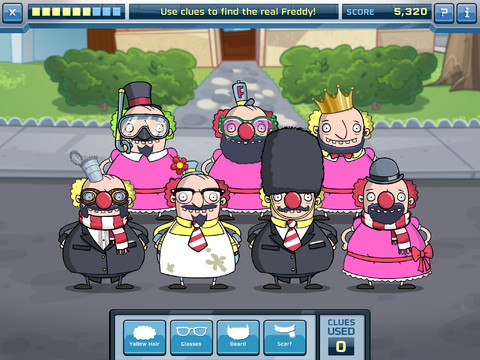
Fizzy’s Lunch Lab Fresh Pick (an educational app based on the PBS KIDS web series) is FREE ! It was developed by PBS with funding from a Ready to Learn Grant from the U.S. Department of Education. Professor Fizzy is holding a competition for 6 – 8 year olds to see who qualifies to be the next Lunch Labber. The app includes 8 challenges that use math and problem solving skills – deductive reasoning, mapping, sorting and classifying. Kids must navigate their way through a grocery store, buy groceries, count out the correct change in a check-out line, successfully serve the correct food to hungry customers, use reasoning to find Freddy, and more. This educational app supports multiple users with self-leveling games that make the challenge specific to each child. FUN!!