0

Spelling Star

spelling star

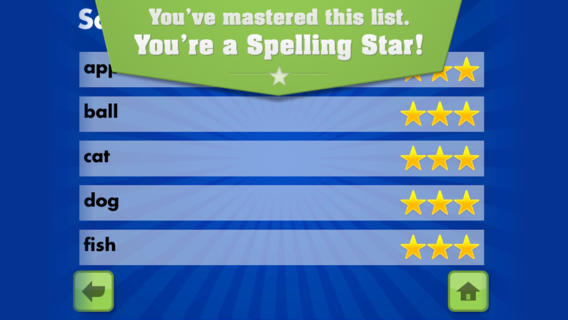
FREE for  limited time – Spelling Star, an educational app for practicing spelling lists. The app is simple to use – just type in and record the words. You may also include sentences to clarify the words’ meanings. Kids must spell each word correctly three times to become a Spelling Star.  Words are presented in random order. As kids practice, they can get a hint – a quick look at the word spelled correctly. When they spell a word without a hint, they earn a star. Spelling Star provides feedback after each word is spelled with the option to “try again” when an error is made. This educational app is great for home and/or school. Parents can use it to input spelling lists for multiple kids. Kids may enjoy inputting their own lists at the beginning of the week which would be GREAT practice! Teachers can create lists on one device and share those lists with anyone who has the Spelling Star app. Simple to use, effective, and tracks progress – what more do you need? 🙂

Download link: https://itunes.apple.com/us/app/spelling-star/id557070660?mt=8&uo=4

1

Wonderopolis

Wonderopolis

FREE – Wonderopolis, a fabulous educational app. Now you can explore Wonderopolis (the website) with your mobile device.

Wonderopolis (Wonderopolis | Where the Wonders of Learning Never Cease) is a fantastic website that provides a daily Wonder of the Day®.  A fun & intriguing question is featured every day. The website/app includes a written explanation of the answer, vocabulary words, and a gallery of images & videos – all to foster learning and inspire curiosity about the Wonder of the Day®. Other daily features include a “Try It Out” section which suggests activities based on the day’s question, a “Still Wondering” section which gives additional/related information, and a quiz. There is even a section for teachers/parents called the “Educator Sandbox” with additional resources and opportunities to connect with the Wonderopolis community. It’s such a fascinating and wonderful resource – I enjoy reading it myself!

Using this website/app would be a fabulous addition to a daily classroom routine. Kids could read (or listen to) the daily Wonder of the Day® as part of their independent work time. They could journal about what they learned and/or what they are still wondering about. A class discussion could be scheduled for later. What a great way to encourage THINKING! Wonderopolis is a fabulous resource to ignite the natural curiosity and imagination of kids!

Download link: https://itunes.apple.com/us/app/wonderopolis/id505247028?mt=8&uo=4

0

World’s Worst Pet – Vocabulary

world's worst pet

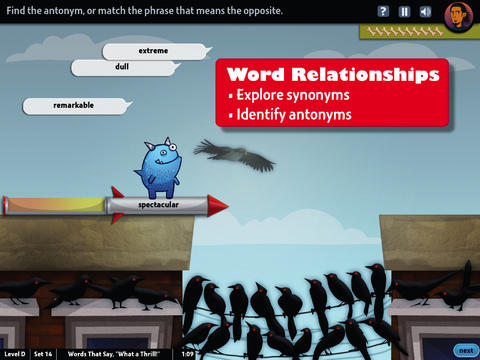
FREE & fabulous – World’s Worst Pet-Vocabulary, an educational app for kids in grades 4 – 8.  Snargg, a cute blue pet needs kids to use their vocabulary skills to get him out of trouble. The app’s four games teach context, word sorts, synonyms, & antonyms as they expose kids to over 1000 words across 5 levels: grades 4 – 8. Words are taught in sets – 10 conceptually related words per set. Kids are encouraged to replay each word set to improve their scores. Other features of the app include: clearly explained definitions with examples of how the word is used, multiple exposures to words, writing prompts, and… a really fun narrative with rewards. The app allows multiple players which makes it perfect for the classroom. Teachers can use it to differentiate instruction, as part of a center, for individual or group assignments, as homework, etc. There are so many great things about this app – meaningful content, a fun interface, and it meets CCSS. It’s fantastic, wonderful, remarkable, tremendous, amazing … 🙂

Common Core Standards met:

  • 4.L.5 – Demonstrate understanding of figurative language, word relationships, and nuances in word meanings. c.Demonstrate understanding of words by relating them to their opposites (antonyms) and to words with similar but not identical meanings (synonyms).
  • 5.L.5 – Demonstrate understanding of figurative language, word relationships, and nuances in word meanings. c. Use the relationship between particular words (e.g., synonyms, antonyms, homographs) to better understand each of the words.

Download link: https://itunes.apple.com/us/app/worlds-worst-pet-vocabulary/id730540095?mt=8&uo=4

0

Drawnimal

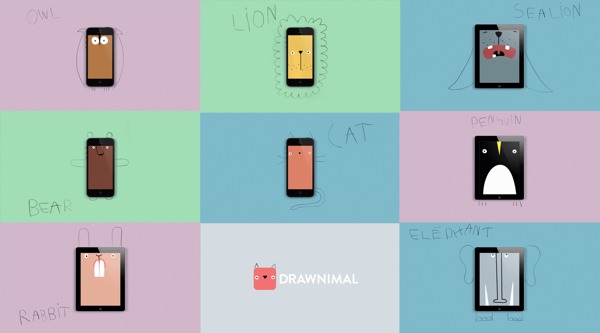
Just named Apple’s App of the Week and FREE for a limited time – Drawnimal, an ABC app for kids that has them thinking (and drawing) outside the box. Kids begin by placing the device on a piece of paper or other drawing surface. Then they draw around the device (as shown above) to complete the drawing of an animal. When they press play, the app identifies the animal. Finally, they tap the animal for a delightful surprise! Kids will love the animal animations that they helped to create. It’s the perfect combination of an alphabet app and a drawing app for little ones. And, it’s in 5 languages – English, Spanish, Dutch, Italian, and French. It’s super cute and super fun!

Download link: https://itunes.apple.com/us/app/drawnimal/id586239095?mt=8&uo=4

0

Thesaurasize

thesaur

Looking for the perfect word? Check out Thesaurasize, a new FREE resource for teachers, students, and others lovers of the English language. According to the app, thesaurasize is a verb meaning: 1. to look up in a thesaurus 2. to completely ruin an essay by referring to a thesaurus for every other word, thus inserting words that you don’t really understand the definition of to make yourself appear smarter to the reader. I think some teachers may be able to relate to meaning #2. 🙂

Thesaurasize offers a quick way to look up synonyms for traditional and nontraditional words of the English language. The initial list of synonyms and the definitions came from the Wiktionary. The Princeton WordNet dictionary was also searched. So how does it work? Just type in a word and Thesaurasize generates a “clickable” list of synonyms with their definitions. The app also provides examples for many of the entries. Highlighted words within definitions can also be “clicked” for their definitions. Click your way to a better word choice today by using Thesaurasize.  And… it’s FREE!!

Download link: https://itunes.apple.com/us/app/thesaurasize/id840193912?mt=8&uo=4

0

The Bear Went Over the Mountain and 5 other LoeschWare Apps

bear

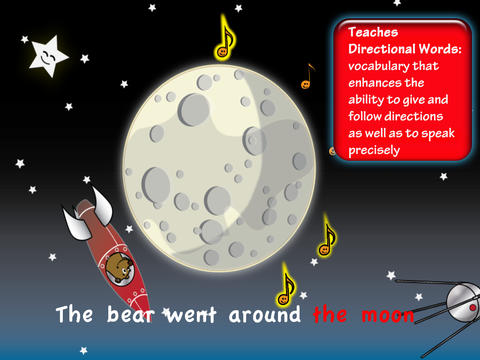
FREE for a limited time – The Bear Went Over the Mountain, a cute educational app based on the classic song by the same name. Kids join Bernie Bear as he travels over the mountain, across the desert, in a cave, under the ocean, around the moon – 8 locations in all. As they travel and sing along, kids learn about directional words. Once they arrive in a particular scene, they will learn about its geographical differences and the diversity of wildlife found there. The app also encourages kids to care for the environment and its inhabitants. Another fun feature of this app is the scrapbook. Kids can take & collect photos of their adventures with Bernie. This app has blended musical fun with academics for preschool/kindergarten aged kids!

Download link: https://itunes.apple.com/us/app/bear-went-over-mountain-hd/id595159957?mt=8&uo=4

Also from LoeschWare for preschoolers/kindergarteners and FREE for a limited time:

Od McDonald HD: https://itunes.apple.com/us/app/old-macdonald-hd/id396818866?mt=8&uo=4

Five Little Monkeys HD: https://itunes.apple.com/us/app/five-little-monkeys-hd/id483498657?mt=8&uo=4

Big Top Circus: https://itunes.apple.com/us/app/big-top-circus/id423485408?mt=8&uo=4

My ABC Train HD: https://itunes.apple.com/us/app/my-abc-train-hd/id707630889?mt=8&uo=4

Word Wheel: https://itunes.apple.com/us/app/word-wheel/id378429438?mt=8&uo=4


0

Bluster

Recently updated for iOS 7, Bluster is a FREE app for the iPad developed by McGraw-Hill. This educational app was designed to teach vocabulary and word development to students in grades 2 – 4. Topics covered are rhyming, prefixes & suffixes, word roots, synonyms, homophones, and adjectives. There are 3 modes of play – single, team, and versus. Team mode permits collaboration with a friend. Versus mode allows head-to-head play with the ability to disrupt your opponent by causing weather related attacks. Kids start by choosing their mode of play, grade level, and word match type. They then swipe through the list to match 3 words with the same meaning, rhyme, prefix, suffix, or word root. There are 10 groups of 3 to match in each round of play. Bluster presents 800+ vocabulary words in a fun way!

Common Core Standards met:

  • 2.L.4 – Determine the meaning of the new word formed when a known prefix is added to a known word (e.g., happy/unhappy, tell/retell). Use a known root word as a clue to the meaning of an unknown word with the same root (e.g., addition, additional).
  • 3.L.4 – Determine the meaning of the new word formed when a known affix is added to a known word (e.g., agreeable/disagreeable, comfortable/uncomfortable, care/careless, heat/preheat). Use a known root word as a clue to the meaning of an unknown word with the same root (e.g., company, companion).
  • 4.L.4 –  Use common, grade-appropriate Greek and Latin affixes and roots as clues to the meaning of a word (e.g., telegraph, photograph, autograph).
  • 4.L.5. Demonstrate understanding of words by relating them to their opposites (antonyms) and to words with similar but not identical meanings (synonyms).

Recommended!

Bluster! - McGraw-Hill School Education Group

0

News-O-Matic

news

Check out a FREE trial of News-o-Matic, an educational newspaper app for kids 7 – 11 years old. A new edition is published every Monday through Friday. Each edition features 5 articles from the news – sports, science, world news, wacky events, etc. The articles are kid-friendly and age-appropriate. Kids can read on their own or have the articles read to them. Important vocabulary words are underlined and linked to their definitions. The articles also include fun facts, a map for locating where the news is happening, videos, and games. Once registered, kids can connect to the News Room to draw pictures, express opinions, or ask questions about the news. This app helps kids become informed citizens of the world!

The FREE trial lasts for 2 weeks. After that, you must subscribe: yearly – $19.99. monthly – $1.99, or weekly – $0.99. If you subscribe before the end of your free trial, you get a special rate. Teachers, there is also a News-o-Matic School Edition. It comes with a teacher’s guide which includes discussion prompts, comprehension questions, Lexile reading levels, and more. And, it’s a great resource for non-fiction reading!

Download link: https://itunes.apple.com/us/app/news-o-matic-daily-reading/id578023255?mt=8&uo=4


0

Dic-Dic

Dic-Dic

FREE for a limited time – Dic-Dic. Multilingual dictation to practise spelling, writing and sound-letter matching. This educational app helps kids learn to spell common words in four different languages (English, Spanish, Russian, French) and has 3 levels of difficulty. It’s great for kids who are beginning readers/spellers in their native language and/or for kids learning a new language. All words are read by native speakers of the language. Then the child tries to spell the word by typing its letters into the blanks – great for beginning word processing. Clues can be turned on or off depending on the level of the child. If a student misspells a word, the app urges him/her to try the word again. If the word is misspelled a second time, the app spells it correctly. I love this feature – positive encouragement to try again! The app tracks the child’s progress in albums (one for each level and language) so that parents/teachers can monitor success. It also includes an extra game to reward successful players. This app is suitable for a wide range of kids – check it out while it’s free. 🙂

Download link: https://itunes.apple.com/us/app/dic-dic.-multilingual-dictation/id643656920?mt=8&uo=4

0

Find the Synonym

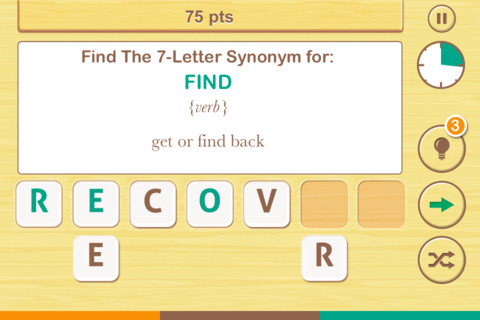
FREE  – Find the Synonym, an app designed for the iPhone/iPad. This app is listed as a game rather than an educational app but it would be great for kids in upper elementary school/junior high. A word is shown with its part of speech and definition. Kids are challenged to create a 4 – 7 letter synonym of that word using the letters provided. Points are awarded based on the length of the word, the time involved, whether clues are used, and/or if any mistakes are made. Badges are earned as the game is played. It’s simply designed  – not a lot of bell & whistles but it is heavy on content. There are a total of 1600 synonyms in the app. After you find 250 of them, the antonyms are unlocked. There are 700 antonyms in the app.

I realize that this app was not necessarily designed for students but it could easily be used for educational purposes. More flexibility in the settings would make it more suitable for classroom use. I could not find a way to restart the game. The game picks up where it left off & points are cumulative, so only one person can play. Also, having access to both synonyms and antonyms would be a plus. Regardless, I am sure that teachers will come up with creative ways to use this resource. 🙂

Recommended!

Find The Synonym - FreshLogo