0

The Opposites

The Opposites is currently FREE for the iPhone/iPad. Designed for kids 7+, this app requires the matching of increasingly difficult pairs of opposite words. There are two sections of the app: dictionary and play. In the dictionary section, words are listed next to their opposites. To learn the meaning, students just tap on the word and a definition appears. There are 10 levels with 100+ words per level. In the play section, words are pronounced by a boy or a girl as they appear in bubbles and float towards the top of the screen  Kids are to tap pairs of opposites as they appear – which makes the words turn a color then pop. The goal is to match 12 sets of opposites  – which completes the level. A bonus round then appears in which the student has 20 seconds to match up an entire  board full of opposites. This app starts off simply but becomes quite challenging in the later levels. It could be used for differentiating a lesson and/or for helping students grow their understanding of antonyms.

Common Core Standards met:

  • 4.L.5 – Demonstrate understanding of figurative language, word relationships, and nuances in word meanings. c.Demonstrate understanding of words by relating them to their opposites (antonyms) and to words with similar but not identical meanings (synonyms).
  • 5.L.5 – Demonstrate understanding of figurative language, word relationships, and nuances in word meanings. c. Use the relationship between particular words (e.g., synonyms, antonyms, homographs) to better understand each of the words.

Recommended!

The Opposites - Mindshapes Limited

0

iRiddles for Kids!

This FREE app for the iPhone/iPad is simple to use. Scroll through the 100 + riddles within the app and double tap to reveal the answer. You may already know many of these riddles – they are not necessarily new. But… they are kid appropriate. The only one that was a bit “off” is: If a fire hydrant has H2O on the inside, what does it have on the outside? K9P. The app has an index to the riddles included. There is also an option to email a riddle to a friend. I have always been a fan of riddles because they make kids think – brain exercise for elementary-aged kids with a smile or two along the way. 🙂

iRiddles for Kids! - D. Noel Keshwar

0

My Editing Buddy

This iPad app is a FREE simple to use word processor designed for use in elementary classrooms. But…there is so much more to this app. Kids can share their work with classmates and learn to edit using this app. To create an account, you need to provide an email address. The app can be used without an account but it will not save documents. After the account is created, just log in and create your document. Then it’s time to share your work with someone who will edit it. You can choose: “pass & edit” or “add to sharing network.” If you choose “pass & edit” you literally hand your work to someone for editing. Symbols and sticky notes are along the bottom of the screen when the app is in the editing mode. The “editor”  just drags the appropriate symbol in place to edit the document. A glossary of symbols is available by tapping the question mark. Sticky notes are available for more detailed feedback. When finished, your “editor” saves then returns your work. You can now swipe from your word processing version to the edited version and make revisions. If you choose “add to sharing network” your work will posted to your class for anyone to edit. Teachers need to set up a class for their students and provide students with the class password. Be aware that anyone who has an account can set up “a class” so teachers may have to monitor this option. What an awesome way to get kids involved in and excited about peer editing!!

Common Core Standards met:

  • K.W.5 /1.W.5/2.W.5/ – With guidance and support from adults, respond to questions and suggestions from peers and add details to strengthen writing as needed.
  • 3.W.5/4.W.5/5.W.5 – With guidance and support from peers and 5. adults, develop and strengthen writing as needed by planning, revising, and editing.

Highly Recommended!

My Editing Buddy - Interactive Elementary

0

Lists for Writers – ideas for creative writing

Designed for the iPhone/iPad this app is $1.99 but was FREE last week. As the name suggests, this app has many lists that would be helpful to writers as they brainstorm/develop their stories. Categories of lists included: CHARACTER (common first & last names, clothing, occupations, people’s roles & relationships), PERSONALITY (phobias, philias, obsessions, character traits, hobbies, emotions), PLOT (7 basic plots, 36 dramatic situations, conflicts, issues), SETTING (locations, cities, landforms/geography, weather), WORDS (verbs, nouns, etc.) and 7 miscellaneous lists. Several of the lists (such as phobias, 7 basic plots, & color words) include definitions. The updated version includes a notepad for writers to collect, edit, email, and/or print their ideas. This app would be a valuable tool for anyone trying to write a story. The lists would also provide great examples when teaching the elements of a story (characters, setting, etc.), character traits, parts of speech, etc. Great resource!!

Keep reading my blog to find out when apps are offered for FREE!

Recommended!

Lists for Writers - ideas for creative writing - Thinkamingo

0

Wee Sing & Learn ABC

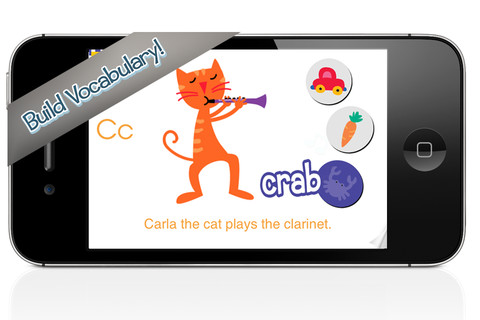
FREE today (August 24, 2012), this app for the iPhone/iPad normally sells for $2.99. Wee Sing has been around for over 30 years. When my children were small, we always had a Wee Sing tape in our car. This app teaches toddlers the alphabet in a musically fun way. Every letter has a page with its own song featuring an animal with an instrument (both beginning with that letter). There are also three additional words for each letter which are pronounced and spelled. The real sound of every animal and each instrument are also included in the app. This app is well done with great attention to detail – a must have for every toddler 🙂

Highly recommended!!

Wee Sing & Learn ABC - zuuka incorporated

0

Spellosaur

This app is FREE for the iPhone/iPad so that you can see how it works before purchasing the premium version for $3.99. What makes this app different from others is that you are able to input your own words to study. In the FREE version you can input 5 words and have 1 user. In the premium version, you can input many words and have multiple users (with their own lists). After the words are added, there are 4 activities for kids to do with their list: listen & choose the correct word, complete the word by adding the missing letters, rearrange the scrambled word, spell the word. Then kids can take a test over their words. There are 2 voices to choose from – US English & English or kids/parents can record their own words. If the words are homonyms kids can also add a meaning to differentiate one word from another. In the premium version, lists can be saved so that kids can go back and review previously studied/learned words. The ability to add your own words adds a lot of flexibility to this app. It could be used for word study: word families, letter sounds, making plurals, prefixes and suffixes, etc.  Nicely done!!

Common Core Standards met:

  • K.RF.3/1.RF.3/2.RF.3/3.RF.3/4.RF.3/5.RF.3 – Know and apply grade-level phonics and word analysis skills in decoding words.

Recommended!

Spellosaur - Simulant

0

ABC Spelling Magic Short Vowel Words


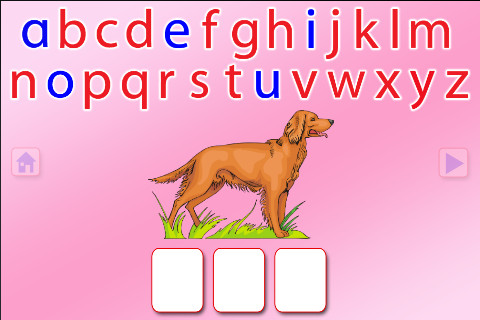
This FREE app for the iPhone/iPad concentrates on teaching kids to spell short vowel words with 3 sounds. There are 2 ways to play. Word Jumble provides the  child with the letters of the word and the child puts them in order. Moveable Alphabet has the entire alphabet across the top of the page and the child must find the correct letters to spell the word. If a child touches a picture, the app reads the word. If a child touches a letter, the app gives the sound for that letter. Each vowel is taught in isolation but there is also a shuffle option which provides mixed practice. Vowels are printed in blue and consonants are in red so you can reinforce the CVC (consonant, vowel, consonant) pattern. This app does a nice job with the phonics of short vowel words.

Common Core Standards met:

  • K. RF.3 – Know and apply grade-level phonics and word analysis skills in decoding words. Demonstrate basic knowledge of one-to-one letter-sound correspondences by producing the primary sound or many of the most frequent sounds for each consonant. Associate the short sounds with common spellings (graphemes) for the five major vowels.

Recommended!

ABC SPELLING MAGIC Short Vowel Words - PRESCHOOL UNIVERSITY

0

Photo Touch Sight Words

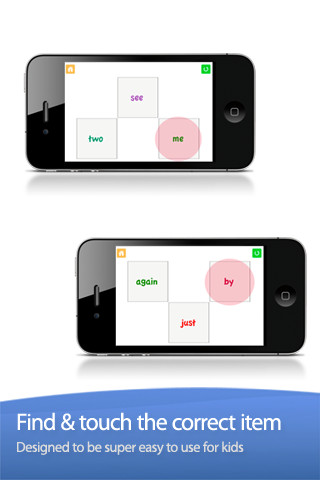
Photo Touch Sight Words is another FREE app for iPhone/iPad from Grasshopper Apps (see August 3 Rhyming Words review). At its simplest level, it allows you to choose grade level sight words for your child to practice (preschool – grade 3). Kids must touch the word that is read – it starts with 3 word choices and increases in difficulty to 10. What makes this app stand out is the ability to customize it to your child’s needs. You can turn on/off individual words. You can select multiple lists. You edit the words to be read in your child’s voice. There is the ability to add additional cards –  but, making the cards match the programmed cards seems to be a challenge. I emailed customer support to ask about this option and about the source of their sight words lists. I will update this post as I receive more information 🙂

Recommended.

Sight Words by Photo Touch - GrasshopperApps.com

0

JibJab Junior

From the folks at JibJab comes a FREE app for your iPad that puts your child as the star of his/her own books. JibJab has been around since 1999. During the 2004 presidential election their Flash movie, This Land, featured George Bush and John Kerry singing a parody of the Woodie Guthrie song, This Land is Your Land. It became a huge success, received millions of hits, and was featured on several major news channels. The company has continued to make videos but added a commercial site several years ago where you can find 1000+ Make & Share eCards and 500+ Starring You videos. Their videos are made for adults so you will want to use the app for your kids rather than explore the website.

The kids’ app was updated in January of 2012 and it is very easy to use. Just choose a picture of your child from the photo library, Facebook, or take one with your camera. Place your child’s face in the opening, adjust it to fit the space, and then add his/her name. Make sure you choose the correct gender so that the pronouns are correct. If you have more than one child, you can create books starring each of them. The book has animations on each page. There is not a read along option because your child’s name is inserted in the text. The first book, The Biggest Pizza Ever, is free. After that you may purchase individual books ($7.99) or join the book of the month club ($3.99, but be aware that it automatically renews until you cancel). I have been a fan of JibJab for years so was excited to see them come out with products for kids – fun stuff!!

Learn more here: http://www.jibjab.com/kids

Highly Recommended!

JibJab Jr. Books - JibJab Media Inc.

0

Wonder Kids

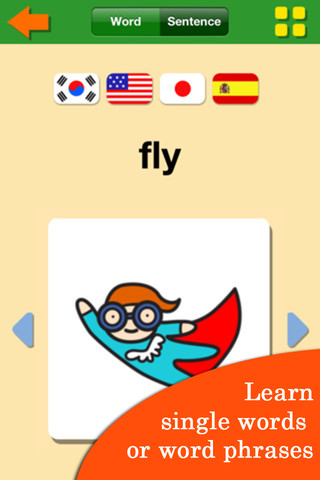
This app is designed for the iPhone/iPad for toddlers and preschoolers. I downloaded it for FREE – it usually costs $1.99. It is supported in 5 languages (English, Korean, Chinese, Japanese & Spanish) and can be easily changed from one language to another by clicking on the flags. The version I have included about 40 animal flashcards. Additional in-app purchases are available. The animals are presented in abc order (for the English version of the word). For each animal you can opt to hear the word pronounced or an entire sentence using the word. I really like this feature – it makes this app stand out. There are 5 activities available for each animal – coloring, jigsaw puzzles (3 levels of difficulty), matching (3 levels of difficulty), bingo, and drawing. Each of these activities repeats the word or sentence containing the word and the colorful illustrations become animated when the activity is completed. This app is very appealing and nicely done!

Although this app is designed for young kids, it could be used to teach foreign language vocabulary to older students! However since I am not a foreign language expert, I cannot speak to how the sentence structure might translate.

Keep reading my blog for app alerts which will let readers know when the apps that I have reviewed are available for FREE  🙂

Recommended!

Wonder Kids - zibann