0

Oh No Fractions!

on no fractrions

Updated again! This app keeps getting better and better because the developer encourages teacher input. How wonderful is that –  a developer willing to listen to teachers’ needs!

Oh No Fractions! is a great FREE iPhone/iPad app for comparing and exploring fractions. The app is simple to use – kids just swipe to the right or the left to indicate whether one fraction is “greater than” or “less than” or “equal to” a second fraction. As they work, kids can tap above each fraction to see if it can be reduced/simplified – a great feature. But, one of the best features of this app is the “peek”/”prove it” feature. Kids can use a manipulative to “peek” at an answer before they commit to it or they can use the manipulative to “prove” their answer later. This feature is fabulous because it allows the child to visualize his/her answer. Kids can also use this app to practice finding the common denominator. Then they can use it for addition, subtraction, multiplication, and division of fractions. The app also generates corresponding decimals/percentages for each answer. What a great tool for helping kids to understand fractions!! It’s no wonder that it received the 2013 Children’s Technology Review Editor’s Choice Award.

Common Core Standards met:

  • 3.NF.3 – Explain equivalence of fractions and compare fractions by reasoning about their size. Understand two fractions as equivalent (equal) if they are the same size. Recognize and generate simple equivalent fractions, e.g., 1/2 = 2/4, 4/6 = 2/3).

Oh No Fractions! - Curious Hat Lab - Curious Hat

0

Math Animations Grades (1 – 8)…

math animations

FREE for a limited time – Math Animations (Grades 1-8): Includes numbers, decimals, fractions, addition, subtraction, multiplication, division, geometry (perimeter and area of parallelograms, triangles, trapezoids), measurement, algebra. Elementary and Middle School Mathematics. The title says it all! The purpose of this app is to show kids how math works – visually. The app features 55 animations that explain everything from counting to beginning algebra. There are no words used. Math concepts are visually explained in step-by-step illustrations. If you have kids that need to “see” how things work, you may want to add this app to your list of teaching resources!

Download link: https://itunes.apple.com/us/app/math-animations-grades-1-8/id579825429?mt=8&uo=4

0

Counting Dots

Counting Dots

FREE again – Counting Dots, an educational app for young iPad users. Kids learn to recognize/count numbers by popping colorful dots in this simple but visually appealing game. The app has three settings – counting by one, fives, or tens. There are also settings for sound, hinting, and enabling vibrations (iPhone only). The app is advertised as helping kids count from one to a million. I counted by ones to 20 and by tens to 100  – didn’t quite make it to a million. 🙂 This app is by the same developer that did Rain Dots (see my March 1, 2013 review). Recommended!

Counting Dots - Helping kids count from one to one million! - Ellie's Games, LLC

0

MyScript Calculator

myscript

Named by Apple as 1 of  10 Apps That WOW and FREE  – MyScript Calculator is an amazing app. It performs mathematical operations literally by hand! You write the problem … it solves the problem! The app is very simple to use. Just write the mathematical equation on the screen. MyScript technology converts the symbols and numbers to digital text and delivers the answers. It supports the following operations: basic operations (+, -, x, ÷, +/‒, 1/x), additional operations ( %, √, x!, |x|), powers/exponentials (ℯx, xy , x2), trigonometry, and more. Winner of the Mobile App Showdown at CES 2013, MyScript Calculator has been redesigned to work with iOS7. The update also allows automatic calculation to be disabled and replaced by a “calculate” button. Love this app – numbers have to be written somewhat legibly for it to work. 🙂

MyScript Calculator - Vision Objects

0

Grandmas Loves Bugs

grandma

FREE for a limited time – Grandmas Loves Bugs, another adorable educational app for preschoolers by Fairlady Media. Kids join dancing grandma in her garden to learn all about bugs. The app features 10 educational games – all thematically linked. Kids will love helping grandma in her garden and they will be learning math & reading as they do. The app also features short videos of real bugs in action. Some of the educational content in the games include: colors, observation (spot the difference), numbers (recognition & counting), letters (upper & lower case), memory, problem solving, and vocabulary. This app is nicely done for little ones – educational content covered in a fun way with a dancing Grandma to celebrate a job well-done!

Download link: https://itunes.apple.com/us/app/grandma-loves-bugs/id666526099?mt=8&uo=4

0

Wee Kids Math

wee kids math

FREE for a limited time – Wee Kids Math, an educational app that features a variety of activities for beginning math students. There are 20 activities in all – each activity presented in a new brightly colored scene. Kids can order numbers on a caterpillar, match number words/numerals/pictures on ocean liners, practice addition on a farm, practice subtraction in the ocean, etc. A definite strength of this app is its variety. Number skills (0 – 20) included are matching, counting, ordering, identifying equalities & inequalities, identifying > & <, adding, and subtracting. The app jumps right into each activity without any sort of instructions. Most of the activities are fairly intuitive. But if kids can’t figure what they are supposed to do, they can go back & press the help button. Then they will find visual instructions for each activity. This app would be a good one to use WITH your child. There is no progress tracking so you will want to see what your child understands. 🙂

Download link: https://itunes.apple.com/us/app/wee-kids-math/id638457112?mt=8&uo=4

0

The Lonely Beast 123

lonely beast

FREE for a limited time – The Lonely Beast 123, an educational app based on Chris Judge’s well-loved children’s book. Every day, the Beast counts the things in his house. Kids join him on his counting adventure which features 12 fun & interactive scenes. Every number has something to count – 4 eggs to fry, 6 flowers to water, 9 cakes to eat, 11 stars to tap, etc. The app is top-notch with lots of attention to detail. I love how the numbers are drawn – they show kids what to count on that page. The app is visually appealing with great sound effects – really fun for little ones! Highly recommended.

Download link: https://itunes.apple.com/us/app/the-lonely-beast-123/id646406000?mt=8&uo=4

0

Operation Math

operation math

FREE again for a limited time – Operation Math, a great educational app from Spinlight StudioKids will have fun practicing basic addition, subtraction, multiplication, & division tables in this interactive “spy” game. The object of the game is to stop Dr. Odd’s quest to eliminate the world’s even numbers. In order to do so, kids must complete 105 missions by solving equations. Missions can be selected based on a child’s skill level and/or the operation (+, -, +/-, x, ÷, x/÷  or +/-/x/÷).  Of course, time is of the essence so kids have to answer problems in 60 seconds or less. By doing so, they lock doors along their escape routes. And as they complete missions, they earn the gear of a seasoned spy. What a great game – I love how the app integrates math practice into a really cool game for kids. I especially like the modes which permit kids to practice multiple operations at a time. It makes kids pay attention to operation signs and quickly switch their thinking. What a fun way for kids to practice facts and meet CCSS! No wonder Operation Math was given a 2012 Parents’ Choice Award. Get it today – kids will LOVE it!

Common Core State Standards met:

  • 1.OA.6 – Add and subtract within 20, demonstrating fluency for addition and subtraction within 10.
  • 2.OA.2 – Fluently add and subtract within 20 using mental strategies. By end of Grade 2, know from memory all sums of two one-digit numbers.
  • 3.OA.7 – Fluently multiply and divide within 100, using strategies such as the relationship between multiplication and division or properties of operations. By the end of Grade 3, know from memory all products of two one-digit numbers.

Download link: https://itunes.apple.com/us/app/operation-math/id487387270?mt=8&uo=4

0

Make-a-Mosaic

Make a mosaic

FREE for a limited time – Make-a-Mosaic, an educational app for creating beautiful mosaic pictures/patterns. The app has 3 modes: create a picture/pattern, vertical symmetry, horizontal symmetry. The “create a picture/pattern” mode is for free play. Both of “symmetry” modes display a line of symmetry on the board. As kids add tiles to one side of the board, the app automatically adds them to the other side to create perfectly symmetrical patterns. What a fabulous tool for teaching symmetry in the classroom! Kids can really see what it means to be symmetrical. All modes have kids placing tiles (14 different shapes/14 different colors) on a board to create their pictures/patterns. The user can also change the background color of the tiles to create more detailed pictures. Creations can be saved to the camera roll. Once they are in the camera roll, they can be pulled into other apps to write about them. Teachers can also use this app to teach kids about patterns. Nicely done!

Download link: https://itunes.apple.com/us/app/make-a-mosaic/id517593184?mt=8&uo=4

0

Quick Math – Arithmetic & Times Tables

quick math

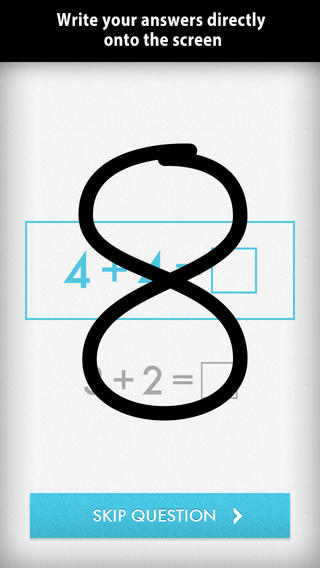
FREE for a limited time – Quick Math – Arithmetic & Times Tables, an educational app that encourages math fluency in addition, subtraction, multiplication, division, & mixed operations. Kids race against the clock to improve their scores. Handwriting recognition allows the players to write the answers directly on the screen – a very slick feature. There are 4 game levels: beginner, intermediate, advance, and extreme. This app features LOTS of great practice for multiple levels of math students. It can be shared among students and it tracks each student’s progress – perfect for the classroom. The math gets progressively harder as students improve their skills. I love how the app encourages self-improvement and legible writing! Teachers could assign 10 minutes of practice each day for their students. I am sure the results would be significant. What a fabulous tool for the classroom – perfect for a daily warm-up, at a math center, or for fluency practice after completing an assignment.

Common Core Standards met:

  • 1.OA.6 – Add and subtract within 20, demonstrating fluency for addition and subtraction within 10.
  • 2.OA.2 – Fluently add and subtract within 20 using mental strategies. By end of Grade 2, know from memory all sums of two one-digit numbers.
  • 3.OA.7 – Fluently multiply and divide within 100, using strategies such as the relationship between multiplication and division or properties of operations. By the end of Grade 3, know from memory all products of two one-digit numbers.

Download link: https://itunes.apple.com/us/app/quick-math-arithmetic-times/id537802071?mt=8&uo=4