0

Sail Through Math

sail through math

Ahoy there!! FREE again (normally $1.99), Sail through Math from McGraw Hill – a fun way for students to practice their math facts/skills. There are 3 levels of play for addition, subtraction, multiplication, and division facts. Other areas covered are addition equations. subtraction equations, multiplication equations, two-step equations, names for numbers, patterns/factors/multiples, and compare numbers. This app provides of great practice built around a pirate theme – complete with music and firing cannonballs! At the end of each game, the child can see what problems he/she missed as well as a percentage score. What a fun way to learn basic facts – in the classroom, at home, in the car on a way to an evening activity. I used to tell my students to practice during commercials – 10 to 15 minutes a day works wonders. This app provides a fun way to accomplish that goal 🙂

Common Core Standards met:

  • 1.OA.6 – Add and subtract within 20, demonstrating fluency for addition and subtraction within 10.
  • 2.OA.2 – Fluently add and subtract within 20 using mental strategies. By end of Grade 2, know from memory all sums of two one-digit numbers.
  • 3.OA.7 – Fluently multiply and divide within 100, using strategies such as the relationship between multiplication and division or properties of operations. By the end of Grade 3, know from memory all products of two one-digit numbers.

Sail Through Math - McGraw-Hill School Education Group

0

3 FREE Virtual Math Manipulatives

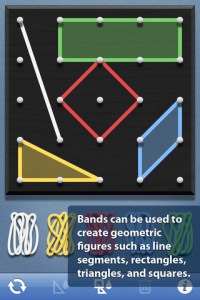
Geoboard by The Math Learning Center (a nonprofit organization dedicated to K – 12 education) is a FREE app that turns your iPhone/iPad into a virtual geoboard. Geoboards can be used as tools to teach mathematical concepts such as polygons, perimeter, area, line segments, angles, congruent shapes, symmetry, fractions, etc. Shapes are created by stretching bands on the geoboard’s pegs. There are 5 colors of bands in the iPhone version and 8 in the iPad version. There is also a tool to fill in shapes. On the iPad version, you can switch from the standard 25 peg board to a 150 peg board to create more complex shapes. This is a great app with the potential to be used in so many ways.

Highly recommended for your virtual math tool kit!

Geoboard, by The Math Learning Center - Clarity Innovations

FREE for the iPad, Virtual Manipulatives contains math manipulatives for teaching fractions, decimals, and percents. Included are tiles/circles divided into halves, thirds, fourth, fifths, sixths, eighths, tenths, and 12ths AND their corresponding decimals and percentages! The manipulatives are color coded across the settings so that 1/2 is blue as is .50 and 50%. Kids drag tile pieces onto the work area to compare fractions/decimals/percentages. In the settings you can change from tiles to circles, make the pieces transparent, and hide the numbers on the pieces. Completed work can be easily saved to photos. Finding equivalent fractions has never been so slick – WOW!!

Common Core Standards

  • 3.NF.3 – Explain equivalence of fractions in special cases, and compare fractions by reasoning about their size. Understand two fractions as equivalent (equal) if they are the same size, or the same point on a number line.
  • 4.NF.1 – Explain why a fraction a/b is equivalent to a fraction (n Ă— a)/(n Ă— b) by using visual fraction models, with attention to how the number and size of the parts differ even though the two fractions themselves are the same size. Use this principle to recognize and generate equivalent fractions.

Highly Recommended!
Virtual Manipulatives! - ABCya.com

equivalent fractions

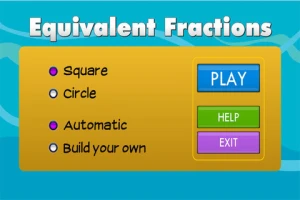
From the National Council of Teachers of Mathematics comes a FREE app called Equivalent Fractions. Kids create equivalent fractions by dividing and shading squares or circles. Circles can be divided into 24ths. Squares can be divided into 144ths. In the play mode, a fraction is shown and kids must create 2 additional fractions that are equivalent. All 3 fractions must have different denominators. The app also places the fractions on a number line – a great visual for comparing! There is also a “build your own” mode which would be fabulous to use for guided exploration & practice. Kids could also use this section as a virtual manipulative when working independently. This app is an excellent resource for the classroom !!

Common Core Standards met:

  • 3.NF.3 – Explain equivalence of fractions and compare fractions by reasoning about their size. Understand two fractions as equivalent (equal) if they are the same size, or the same point on a number line. Recognize and generate simple equivalent fractions, e.g., 1/2 = 2/4, 4/6 = 2/3). Explain why the fractions are equivalent, e.g., by using a visual fraction model.

Highly Recommended!

Equivalent Fractions - National Council of Teachers of Mathematics

0

Fractions – by Brainingcamp

fractions

FREE again – Fractions by Brainingcamp, an excellent educational app for teaching fractions. The app covers 7 topics: introduction to fractions, equivalent fractions, common denominators, comparing/ordering fractions, adding/subtracting fractions, multiplying fractions, and dividing fractions. Each topic includes: a narrated lesson (with visual models), virtual manipulatives for kids to explore, practice questions to check understanding, and a challenging game for additional practice. Kids earn badges as they work through the components of each topic.

WOW – I love everything about this app. The lessons are wonderful. The manipulatives are designed to promote understanding of the concepts presented. The practice questions give students and their teachers a check of their understanding. And, the challenging games helps kids further master the topic. It would be a fabulous for grades 3 and beyond!

Common Core State Standards met:

  • 3.NF.1. Understand a fraction 1/b as the quantity formed by 1 part when a whole is partitioned into b equal parts; understand a fraction a/b as the quantity formed by a parts of size 1/b.
  • 3.NF.3 – Explain equivalence of fractions and compare fractions by reasoning about their size. Understand two fractions as equivalent (equal) if they are the same size. Recognize and generate simple equivalent fractions, e.g., 1/2 = 2/4, 4/6 = 2/3).
  • 4.NF.3 – a. Understand addition and subtraction of fractions as joining and separating parts referring to the same whole.
  • 5.NF.3 – Interpret a fraction as division of the numerator by the denominator (a/b = a Ă· b).

Highly Recommended!

Download link: https://itunes.apple.com/us/app/fractions-by-brainingcamp/id471353363?mt=8&uo=4

0

Adding Apples

FREE For a limited time – Adding Apples from the creators of Subtracting Sardines. This educational app is geared for preschoolers/grades (K-1) and it meets Common Core Standards for kindergarten and first graders in the area of addition. Kids add (up to 18) using apples. The apples are displayed on a keyboard with domino-like keys – numbers on the left/pictures on the right. The child chooses an addition problem and the apples appear at the top of the screen. If a child chooses 6 + 7, 6 green apples appear then 7 yellow apples appear. As the child counts the apples to find the answer, they are wrapped in purple paper. Children earn gold coins as they work through the problems. This nicely done app helps kids understand the beginning concepts of addition.

Common Core Standards met:

  • K.OA.2  – Add and subtract within 10, e.g., by using objects or drawings to represent the problem.
  • 1.OA.6 – Add and subtract within 20, demonstrating fluency for addition and subtraction within 10.

Recommended!

Adding Apples HD - Operatio

0

Fizzy’s Lunch Lab Fresh Pick

Fizzy's Lunch Lab Fresh Pick

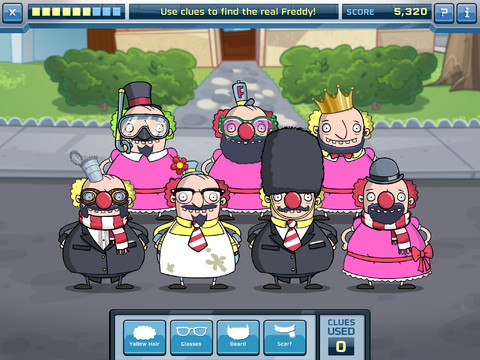
Fizzy’s Lunch Lab Fresh Pick (an educational app based on the PBS KIDS web series) is FREE ! It was developed by PBS with funding from a Ready to Learn Grant from the U.S. Department of Education. Professor Fizzy is holding a competition for 6 – 8 year olds to see who qualifies to be the next Lunch Labber. The app includes 8 challenges that use math and problem solving skills – deductive reasoning, mapping, sorting and classifying. Kids must navigate their way through a grocery store, buy groceries, count out the correct change in a check-out line, successfully serve the correct food to hungry customers, use reasoning to find Freddy, and more. This educational app supports multiple users with self-leveling games that make the challenge specific to each child. FUN!!

Fizzy's Lunch Lab Fresh Pick - PBS KIDS

0

Dinorama

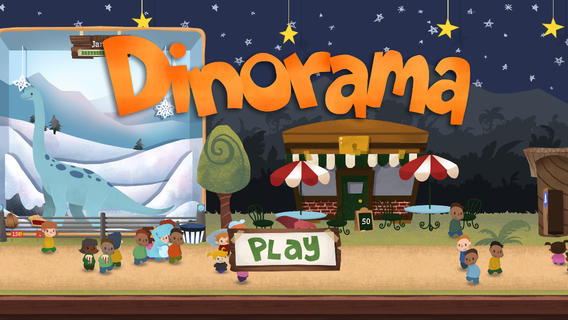
DinoramaOn sale for $.99 – Dinorama, an educational game app. Kids learn about money and time management as they build and maintain their own dinosaur theme parks. They start with one dinosaur and a few visitors. As they earn money, kids can add additional dinosaur displays, a popcorn stand, a photo booth, etc. They are in charge of everything – buying food, keeping the park clean, selling popcorn, hiring employees. Kids learn to save for unpredictable events: rainstorms that affect ticket sales, crop shortages that raise food prices, and flat tires that maroon valuable tourists. Interactive features include: feeding the dinosaurs with your finger, hiring a tour guide to learn more, popping popcorn, inflating balloons, photographing visitors, and more. There are many fun things to do! There’s even a virtual bank where kids can earn interest. It’s no wonder that this educational app was named New & Noteworthy by Apple, an Editor’s Choice of USA Today, an Editor’s Pick of Common Sense Media, and rated 5/5 Awesome by MacLife Magazine. Very cool, very fun, and educational!!

Teachers – this app would not only be great for math but you could also use it to encourage journal writing. Have kids keep “the books” and write daily entries about the status of their parks. They also could make up ads for their parks. There are lots of possibilities for integrated learning. 🙂

Download link: https://itunes.apple.com/us/app/dinorama/id611016610?mt=8&uo=4

0

Hands-On Equations 1 – The Fun Way to Learn Algebra

hands-on

FREE for a limited time – Hands-On Equations 1 – The Fun Way to Learn Algebra. This educational app introduces algebra to elementary and middle school students. Dr. Henry Borenson developed and received a patent for Hand-On Equations after teaching math to both low-achieving & Math Olympiad students in New York City. His Hands-On Equations program uses physical game pieces on a balance to represent algebraic equations. Hands-On Equations, Level 1 consists of 6 lessons and a review lesson. Each lesson begins with a video introduction that is followed by two examples and ten exercises. In the first lesson, students use a guess-and-check strategy to figure out the value of pawn that makes the sides balance. In lesson 2, students place the game pieces on the balance scale to represent both sides of the equation. Each lesson becomes more challenging. This method is fantastic for young students who are learning algebra as well as older students who have struggled with algebra. The visual representation of the equations will help all students understand key concepts of algebra. Check it out while it’s FREE. If you like what you see, Hands-On Equations 2 and Hands-On Equations 3 are available for $3.99 each. 🙂

Download link: https://itunes.apple.com/us/app/hands-on-equations-1-fun-way/id505948222?mt=8&uo=4

0

MathLands – Kids Logic Game & Brain Builder for Math and Critical Thinking

MathLands

All I can say is WOW! MathLands is a completely FREE educational math app that makes kids THINK! Kids have to use logic, problem solving skills, and critical thinking to solve multiple levels of 6 different puzzles. Each puzzle is timed, has hints available, and has a section that tells the history of the puzzle. Kids can choose to start over. They can try again to get a better score or they can try again to get the BEST score. The app reveals the best possible score for each puzzle and challenges kids to achieve at that level. There is also a Math Comics section – problems are written in comic strip form. Kids solve the word problems by using the interactive manipulatives on the page. In a word full of math apps that stress practice and drill, this app is like a breath of fresh air. LOVE it!!!!

MathLands - Kids Logic Game & Brain Builder for Math and Critical Thinking - Mamanijo

0

BuzzMath Middle School

Buzz Math

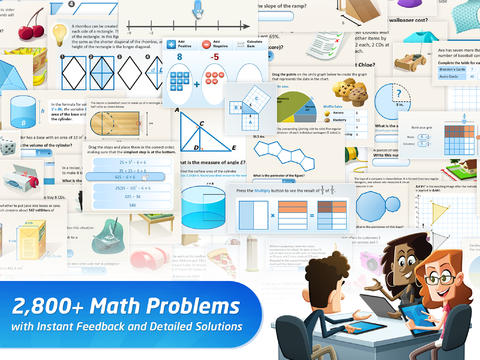
FREE with an option to upgrade to premium features – BuzzMath Middle School, a math practice app for 6 – 8th graders based on the Common Core State Standards. All you need to use this educational app is an iPad 2 or higher and an internet connection. The app has 2800+ problems arranged by topic – number sense & operations, fractions & decimals, geometry, measurement, data & probability, patterns, algebraic equations, and more. Parents can register their kids individually or teachers can register their classes. Teachers who register are given a class code to distribute to their students. Once students register with the teacher’s code, the teacher can make a class assignments. The teacher also has the ability to make assignments specific to individual needs. And, as the students work, their data is being tracked and reported! Wow, individualized practice across all of the math strands, all of the work graded and reported – what’s not to love? 🙂

Download link: https://itunes.apple.com/us/app/buzzmath-middle-school/id593186620?mt=8&uo=4


0

Fractions – by Brainingcamp

fractions

FREE until January 17  – Fractions by Brainingcamp, an excellent educational app for teaching fractions. The app covers 7 topics: introduction to fractions, equivalent fractions, common denominators, comparing/ordering fractions, adding/subtracting fractions, multiplying fractions, and dividing fractions. Each topic includes: a narrated lesson (with visual models), virtual manipulatives for kids to explore, practice questions to check understanding, and a challenging game for additional practice. Kids earn badges as they work through the components of each topic.

WOW – I love everything about this app. The lessons are wonderful. The manipulatives are designed to promote understanding of the concepts presented. The practice questions give students and their teachers a check of their understanding. And, the challenging games helps kids further master the topic. It would be a fabulous for grades 3 and beyond!

Common Core State Standards met:

  • 3.NF.1. Understand a fraction 1/b as the quantity formed by 1 part when a whole is partitioned into b equal parts; understand a fraction a/b as the quantity formed by a parts of size 1/b.
  • 3.NF.3 – Explain equivalence of fractions and compare fractions by reasoning about their size. Understand two fractions as equivalent (equal) if they are the same size. Recognize and generate simple equivalent fractions, e.g., 1/2 = 2/4, 4/6 = 2/3).
  • 4.NF.3 – a. Understand addition and subtraction of fractions as joining and separating parts referring to the same whole.
  • 5.NF.3 – Interpret a fraction as division of the numerator by the denominator (a/b = a Ă· b).

Highly Recommended!

Download link: https://itunes.apple.com/us/app/fractions-by-brainingcamp/id471353363?mt=8&uo=4