0

Math Magician

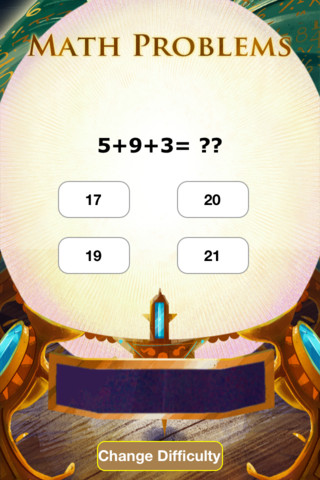
This app for the iPhone/iPad was just launched on August 7, 2012 and it has already been offered for FREE twice. There are 3 levels with several math concepts covered within each level. The easy level covers counting 1-120, skip counting by 2 & 5, addition 1-20, subtraction 1-20, and greater/less than 0-20. The medium level covers: skip counting (10 and 100), addition 0-100, subtraction 0-100, add/subtract by 10, greater/less than 0-100, multiplication 1-10, and division 1-10. The hard level covers: addition 100-500, subtraction 50-200, multiplication facts 0-12 and division facts, 0-12.

Kids earn treasure from the magician as they solve problems in the magic crystal ball. As kids answer correctly, the magic meter bar fills so they can keep track of their progress. Correct solutions are shown in the meter bar after the question is answered. Kids have to answer about 30 questions correctly in order to earn a treasure – which seems a little high to me. The other concern I have is that the answers do not reflect common mechanical mistakes. Kids can arrive at the correct answer by just adding or subtracting one’s place. Example:  386 + 199 = ?? and the 4 answers are 586, 585, 587, 589. If a student knows that 6 = 9 is 15, he/she will pick the answer with the 5 in one’s place. The more common error that kids make is forgetting to move the 10 over. So… 4 better answer choices might be 485, 585, 575, 475. That being said… there is a lot of good practice in this app.

Common Core Standards met:

  • 1.OA.6 – Add and subtract within 20, demonstrating fluency for addition and subtraction within 10.
  • 2.OA.2 – Fluently add and subtract within 20 using mental strategies. By end of Grade 2, know from memory all sums of two one-digit numbers.
  • 3.OA.7 – Fluently multiply and divide within 100, using strategies such as the relationship between multiplication and division or properties of operations. By the end of Grade 3, know from memory all products of two one-digit numbers.

Keep reading my blog to find out when apps are offered for FREE.

Math Magician - abcteach

0

Counting Numbers 123

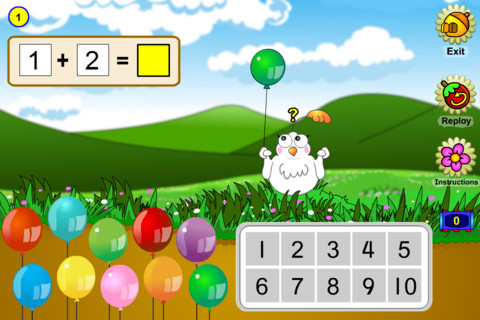
This cute little app for the iPhone/iPad sells for $.99 is sometimes offered for FREE. Geared towards preschoolers/kindergartners, it has 5 activities which teach counting to 10, symbols and words for the numbers 1 – 10, the concept of one more, and the concepts of  adding & subtracting. Kids help Molly, a friendly little bird, by dragging and popping her balloons to arrive at a number between 1 and 10. Also included is in the app is a catchy sing-along called The Numba Rumba which features dancing polar bears and penguins – very cute and fun!

Common Core Standards met:

  • K.OA.2 – Add and subtract within 10, e.g., by using objects or drawings to represent the problem.
Keep reading my blog to find out when apps are offered for FREE.
Counting 123 - Learn to count challenge for kids - TabTale LTD
0

Freefall Time

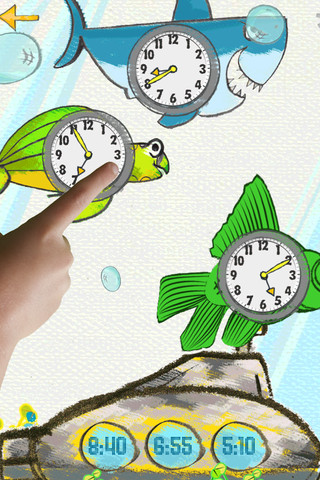
This iPhone/iPad app sells for $.99 but  I downloaded it on a FREE day. Kids practice matching the analog clocks with correct times, choose the correct time for a clock, or practice setting a clock – all while earning items to add to their interactive fish tank. The settings can be adjusted in different increments: 30 minutes, 15 minutes, 10 minutes, 5 minutes, and 1 minute. 24-hour format is also available. Simply done – it provides kids with practice they need reading and setting clocks.

Common Core Standards met:

  • 1.MD.3 – Tell and write time in hours and half-hours using analog and digital clocks.
  • 2.MD.7 – Tell and write time from analog and digital clocks to the nearest five minutes, using a.m. and p.m.
  • 3.MD.1 – Tell and write time to the nearest minute (first portion of the standard).

Keep reading my blog to find out when apps are offered for FREE!

Freefall Time - Merge Mobile

0

Math Dictionary for Kids

This iPad app normally sells for $2.99 but was available for FREE when I downloaded. It is an excellent resource for students in grades 3 – 9. There are more than 400 illustrated terms with definitions and examples. Subjects covered are measurement, algebra, geometry, fractions & decimals, statistics & probability, and problem solving. The Quick Reference Guide provides step-by-step instructions for solving problems with decimals, fractions, multiplication, division, and percents. This reference section also includes: formulas, measurement conversion tables, and charts & tables on factors, multiples, prime numbers, square roots. Kinds of math tools/equipment and learning with manipulatives are also explained  – giving parents a better understanding of how concepts are taught in the schools.

I looked at the operations guide for multiplication to get a feel for how that operation was being taught. There were 7 ways of multiplying presented with examples: algorithm multiplication (traditional), break apart (similar to partial products in Everyday Math), count by (multiples), crossed lines (similar to arrays), draw a picture, and window pane (like lattice in Everyday Math) – quite a thorough list!  Because this book is not connected to any specific program, there could be some different terms associated with a particular methodology. Regardless, this app would be a wonderful resource to have at home when kids need help with their homework.

Keep reading my blog to find out when apps are offered for FREE!

Recommended!

Math Dictionary for Kids - Prufrock Press, Inc.

0

Math Racer®

FREE for a few days – this iPhone/iPad app normally sells for $4.99. Math Racer times how fast kids can answer 10, 20, 50 or 100 problems in 7 different games: addition, subtraction, multiplication, division, add/subtract, multiply/divide, or all operations. I like kids being able to practice related operations together – it makes them pay attention to operational signs & see connections. The app keeps high scores for all areas. It shows which problems were missed and how long it took to answer each question (to the hundredth of a second). Teachers and parents can use this tracking system to document kids’ progress. To compliment the tracking, I wish the app could then be programmed for kids to work specifically on the facts that are giving them trouble.

This app provides a simple but fun way for kids to practice their facts. I can’t imagine that they won’t love racing the clock to improve their scores. If it is loaded on an iPhone, kids could easily practice their facts in the car on their way to after school lessons. 🙂

Common Core Standards met:

  • 1.OA.6 – Add and subtract within 20, demonstrating fluency for addition and subtraction within 10.
  • 2.OA.2 – Fluently add and subtract within 20 using mental strategies. By end of Grade 2, know from memory all sums of two one-digit numbers.
  • 3.OA.7 – Fluently multiply and divide within 100, using strategies such as the relationship between multiplication and division or properties of operations. By the end of Grade 3, know from memory all products of two one-digit numbers.

Recommended!

Math ® - i4software

0

Happi 123 HD – A Math Game by Happi Papi

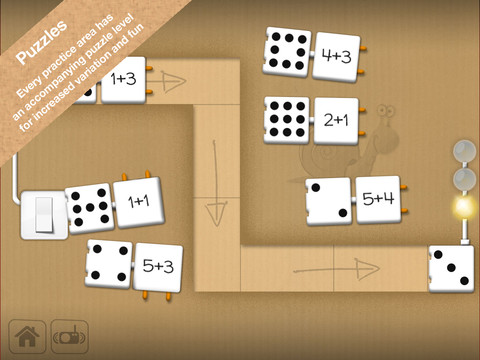
This iPad app for 4 – 7 year olds was FREE when I downloaded. It is currently $1.99 but through August 31 the developer is doing a buy one get one free promotion. Happi 123 teaches counting, adding, subtracting, number series, and patterns. The lessons do not have to be done in order so kids can choose what they would like to work on. Each level has practice followed by a puzzle to further reinforce the concept. There is also a combination level where all concepts are mixed and timed. Kids earn badges and disguises for Papi the Tiger as they learn. Several languages are included in the game: English, Swedish, Danish, Norwegian, Italian, German. In the settings, parents can reset the game and disable audio help (which makes the problems more difficult but also less confusing). If the audio help is not disabled, the child has to count the objects at the top of the page in order: top row, left to right followed by bottom row, left to right. Otherwise the counting is not in order and might sound like this: one, two, three, four, five, eight, seven, six. Suggestion for the next update  – make counting the objects (along the top) work like the fingers (along the bottom). The fingers count in order no matter which one is touched first. Nicely done!

Common Core Standards met:

  • K.CC.4 – Understand the relationship between numbers and quantities; connect counting to cardinality. When counting objects, say the number names in the standard order, pairing each object with one and only one number name and each number name with one and only one object. Understand that the last number name said tells the number of objects counted. The number of objects is the same regardless of their arrangement or the order in which they were counted.
  • K.OA.1 – Represent addition and subtraction with objects, fingers, mental images, drawings, sounds, acting out situations, verbal explanations, expressions, or equations.

Happi 123 HD - A Math Game for Kids by Happi Papi - Serendipity

0

Virtual Manipulatives

FREE for the iPad, this app contains math manipulatives for teaching fractions, decimals, and percents. Included are tiles/circles divided into halves, thirds, fourth, fifths, sixths, eighths, tenths, and twelveths AND their corresponding decimals and percentages! The manipulatives are color coded across the settings so that 1/2 is blue as is .50 and 50%. Kids drag tile pieces onto the work area to compare fractions/decimals/percentages. In the settings you can change from tiles to circles, make the pieces transparent, and hide the numbers on the pieces. Completed work can be easily saved to photos. Finding equivalent fractions has never been so slick – WOW!!

Common Core Standards met:

  • 3.NF.3 – Explain equivalence of fractions in special cases, and compare fractions by reasoning about their size. Understand two fractions as equivalent (equal) if they are the same size, or the same point on a number line.
  • 4.NF.1 – Explain why a fraction a/b is equivalent to a fraction (n × a)/(n × b) by using visual fraction models, with attention to how the number and size of the parts differ even though the two fractions themselves are the same size. Use this principle to recognize and generate equivalent fractions.

Highly Recommended!

Virtual Manipulatives! - ABCya.com

1

Chalkboard Math

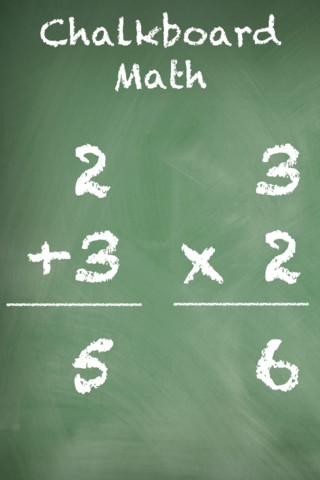
This FREE app for iPhone/iPad Helps kids practice their basic facts for addition, subtraction, multiplication, and division. First kids choose numbers (1-12) to work with, then the math operation/operations. The app generates practice in 2 modes: answer mode (enter the answers & get feedback) or flashcard mode (answer verbally then check). The game has no built-in sounds but there is positive reinforcement written at the top of the page. If a child misses a problem, it shows the correct answer. What I really like about this app is the ability to choose specific numbers to work on. Facts can be practiced in the order they are taught. I also like the ability to choose more than one operation to practice – it makes kids pay attention to the signs of operation and see the relationships between operations. This app is simple but effective – if you loaded this app on your iPhone, kids could easily practice flashcards on their way to after school lessons 🙂

Common Core Standards met:

  • 1.OA.6 – Add and subtract within 20, demonstrating fluency for addition and subtraction within 10.
  • 2.OA.2 – Fluently add and subtract within 20 using mental strategies. By end of Grade 2, know from memory all sums of two one-digit numbers.
  • 3.OA.7 – Fluently multiply and divide within 100, using strategies such as the relationship between multiplication and division or properties of operations. By the end of Grade 3, know from memory all products of two one-digit numbers.

Recommended!

Chalkboard Math - 22nd Century Software LLC

0

Love to Count by Pirate Trio

This iPhone/iPad app is FREE today. Designed for 4 – 7 years olds, it introduces math concepts (such as counting, ordering, addition, subtraction, shapes) using a pirate theme. Kids earn and collect rewards for their treasure chest as they progress through the 700 math tasks included in this app. More than one child can be added to the program and parents or teachers can monitor their children’s progress. The statistics section shows what tasks have been completed and which were completely correctly on the first attempt. Nicely done app!

Common Core Standards met:

  • K.CC.2 – Correctly name shapes regardless of their orientations or overall size.
  • K.CC.4 – Understand the relationship between numbers and quantities; connect counting to cardinality.
  • K.OA.1 – Represent addition and subtraction with objects, fingers, mental images, drawings, sounds (e.g., claps), acting out situations, verbal explanations, expressions, or equations.
  • K.G.2.  – Correctly name shapes regardless of their orientations or overall size.

Recommended!

Love to Count by Pirate Trio - Next is Great

0

Giggle Ghosts

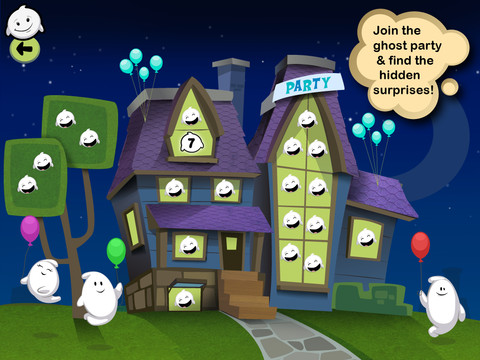
This counting iPad app for toddlers costs $.99 but I was able to download it on a day that it was FREE. The giggle ghosts are very cute – kids will love to hear them laugh. Kids help 20 ghosts get the party by bouncing them across rooftops. In the first level the sky is clear and they have to bounce 5 ghosts. The app counts to 5 and shows the written numbers. The second level is the same but there are leaves blowing in the sky. The third level is the same but  there are clouds in the sky. And in the fourth level it is raining, but the counting task remains the same. At the end the app counts all 20 ghosts at the party. I was hoping that the 4 levels would count:1 – 5, then 6 – 10, then 11 – 15, and 16 – 20 rather than all be the same. Cute and simply done – it might be fun for Halloween!

Keep reading my blog to find out when apps are offered for FREE!

Giggle Ghosts - by Busy Bee Studios - Busy Bee Studios