0

Virtual Math Manipulatives

Geoboard by The Math Learning Center (a nonprofit organization dedicated to K – 12 education) is a FREE educational app that turns your iPhone/iPad into a virtual geoboard. Geoboards can be used as tools to teach mathematical concepts such as polygons, perimeter, area, line segments, angles, congruent shapes, symmetry, fractions, etc. Shapes are created by stretching bands on the geoboard’s pegs. There are 5 colors of bands in the iPhone version and 8 in the iPad version. There is also a tool to fill in shapes. On the iPad version, you can switch from the standard 25 peg board to a 150 peg board to create more complex shapes. This is a great app with the potential to be used in so many ways.

Highly recommended for your virtual math tool kit!

Geoboard, by The Math Learning Center - Clarity Innovations

FREE for the iPad, Virtual Manipulatives, an educational app that features math manipulatives for teaching fractions, decimals, and percents. Included are tiles/circles divided into halves, thirds, fourth, fifths, sixths, eighths, tenths, and 12ths AND their corresponding decimals and percentages! The manipulatives are color coded across the settings so that 1/2 is blue as is .50 and 50%. Kids drag tile pieces onto the work area to compare fractions/decimals/percentages. In the settings you can change from tiles to circles, make the pieces transparent, and hide the numbers on the pieces. Completed work can be easily saved to photos. Finding equivalent fractions has never been so slick – WOW!!

Common Core Standards

  • 3.NF.3 – Explain equivalence of fractions in special cases, and compare fractions by reasoning about their size. Understand two fractions as equivalent (equal) if they are the same size, or the same point on a number line.
  • 4.NF.1 – Explain why a fraction a/b is equivalent to a fraction (n × a)/(n × b) by using visual fraction models, with attention to how the number and size of the parts differ even though the two fractions themselves are the same size. Use this principle to recognize and generate equivalent fractions.

Highly Recommended!

Virtual Manipulatives! - ABCya.com

equivalent fractions

From the National Council of Teachers of Mathematics comes a FREE educational app called Equivalent Fractions. Kids create equivalent fractions by dividing and shading squares or circles. Circles can be divided into 24ths. Squares can be divided into 144ths. In the play mode, a fraction is shown and kids must create 2 additional fractions that are equivalent. All 3 fractions must have different denominators. The app also places the fractions on a number line – a great visual for comparing! There is also a “build your own” mode which would be fabulous to use for guided exploration & practice. Kids could also use this section as a virtual manipulative when working independently. This app is an excellent resource for the classroom !!

Common Core Standards met:

  • 3.NF.3 – Explain equivalence of fractions and compare fractions by reasoning about their size. Understand two fractions as equivalent (equal) if they are the same size, or the same point on a number line. Recognize and generate simple equivalent fractions, e.g., 1/2 = 2/4, 4/6 = 2/3). Explain why the fractions are equivalent, e.g., by using a visual fraction model.

Highly Recommended!

Equivalent Fractions - National Council of Teachers of Mathematics

0

Counting Bees

Counting Bees

Pi’ikea apps are FREE this weekend!

Kids lead bees to flowers and learn to count (to 20) using Counting Bees, an educational app for preschoolers. Counting is taught in ranges of increasing difficulty: 1-5, 1-10, 1-15, and 1-20. Using this app, kids also can learn to count in multiple languages – English, Spanish, French, Italian, German, Mandarin Chinese, Cantonese Chinese, and Japanese. Simple to use and nicely done!

Download link: https://itunes.apple.com/us/app/counting-bees/id481053635?mt=8&uo=4

0

Mask Jumbled Animals

Mask Jumble AnimalsPi’ikea educational apps are FREE this weekend!

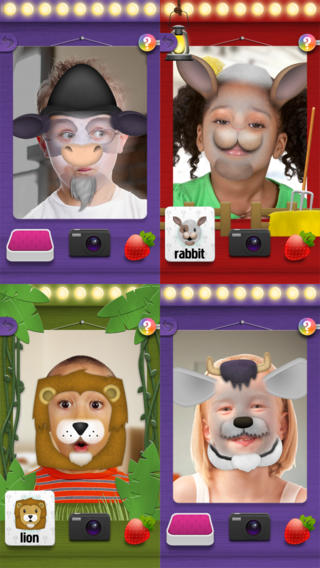
Mask Jumbled Animals is a fun educational game for kids. It turns their faces into animal faces! Kids look into the app’s mirror and animal parts will appear on their faces. They tap to match the ears, nose, chin, and hair in order to complete 1 of 20 different animal masks. When the mask is complete, kids catch strawberries in their mouths to unlock a new mask. The mask puzzles are really cute for preschoolers who will be delighted to be an elephant, a lion, a panda, etc. But… the best part of this app is the ability to take pictures of kids in their masks which makes this app a fabulous resource for creative writing! Pull those pictures into a story writing app and off you go. 🙂

Download link: https://itunes.apple.com/us/app/mask-jumble-animals/id548763608?mt=8&uo=4

Mask Jumble Halloween

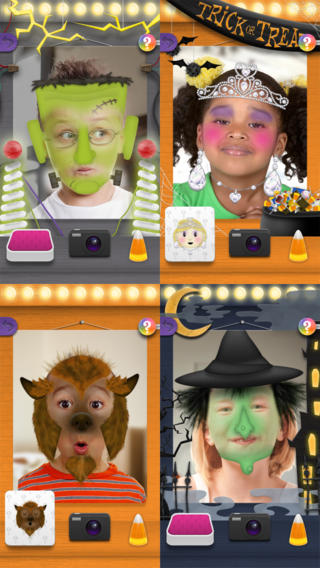
Also free this weekend from the same developer – Mask Jumble Hallween. Download now for creative writing in October. 🙂

0

Memory Train

Memeory Train

Pi’ikea educational apps are FREE this weekend!

Memory Train is fun game of concentration and focus for preschoolers and primary students. Kids hop on the train with Spacey the elephant to help him remember what he sees on his way to the circus. They earn stars, badges, and peanuts (of course) as they advance through 10 different levels. This educational app includes slots for 4 players so that friends & family can join the fun. There are no words spoken (just music) so this app can be used by children of all languages. Another excellent educational app from Pi’ikea!

Download Link: https://itunes.apple.com/us/app/memory-train/id465224643?mt=8&uo=4

1

Interactive Alphabet ABCs

Interactive Alphabet ABCs

Pi’ikea apps are FREE this weekend!

Interactive Alphabet is one of the best alphabet apps that I have seen for babies, toddlers, & preschoolers. It’s so cute and well designed! To start you choose an accent (American or British) and a mode. It has 3 modes for your developing child – baby, explore, and trace. The baby mode takes your child on a guided, touchable tour of the alphabet. The explore mode lets children discover the sights & sounds of the alphabet at their own pace. It features fun activities that kids will want to explore multiple times. In the trace mode, kids learn to properly trace letters (lower case, upper case, or mixed) and words. The app keeps track of your child’s progress by starring the letters & words that are traced most often. The app can also be personalized by adding your own words and pictures. Your child can learn to trace his/her own name as well as the names of other family members, family pets, etc. This educational app truly lays the foundation for reading and spelling! Fabulous – this developer seems to have thought of everything!

Download link: https://itunes.apple.com/us/app/interactive-alphabet-abcs/id383967580?mt=8&uo=4

0

BuzzMath Middle School

Buzz Math

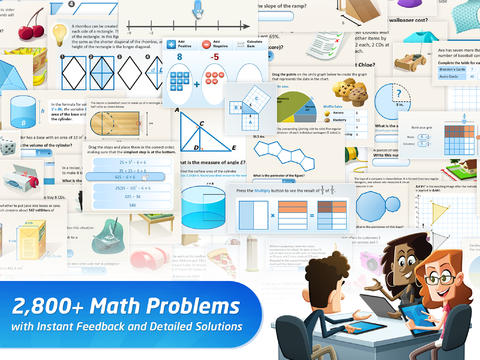
FREE with an option to upgrade to premium features – BuzzMath Middle School, a math practice app for 6 – 8th graders based on the Common Core State Standards. All you need to use this educational app is an iPad 2 or higher and an internet connection. The app has 2800+ problems arranged by topic – number sense & operations, fractions & decimals, geometry, measurement, data & probability, patterns, algebraic equations, and more. Parents/Homeschoolers can register their kids individually or teachers can register their classes. Teachers who register are given a class code to distribute to their students. Once students register with the teacher’s code, the teacher can make a class assignments. The teacher also has the ability to make assignments specific to individual needs. And, as the students work, their data is being tracked and reported! Wow, individualized practice across all of the math strands, all of the work graded and reported – what’s not to love? 🙂

0

Fraggle Friends Forever

Fraggel Rock

FREE for a limited time – Fraggle Friends Forever. Celebrate Fraggle Rock’s 30th Anniversary with this story app from The Jim Henson Company and Cupcake Digital. There are 3 ways to enjoy this educational app – Read & Play, Read to Me, or Just a Book. Kids will find animations on every page and silly special effects throughout the story. At the end, there are fun games and coloring pages. There is also a Grown-Up’s Corner with suggested questions to get your kids thinking and talking about the story. The Common Core State Standards for ELA Literacy that are met by this app are also listed in the Grown-Up’s Corner. If you grew up with Fraggle Rock, you may enjoy this app as much as your children do. 🙂

Download link: https://itunes.apple.com/us/app/fraggle-friends-forever/id641259280?mt=8&uo=4

0

Science 360 for iPad

Science 360

FREE from the National Science Foundation comes Science 360 for iPad – scientific images and videos from around the world. This educational app covers a range of topics and breaking news from NSF-funded institutions.  New content is added weekly. Users can browse the app’s unique 360 display board to learn about something new or they can find specific content by searching keywords. It’s easy to save images and videos for later use right within the app – perfect for teachers who are gathering resources for a unit. The quality of the images is spectacular and they are available in HD for download to your iPad. Keep abreast of the latest scientific discoveries with this app – a great resource!!

Download link: https://itunes.apple.com/us/app/science360-for-ipad/id439928181?mt=8&uo=4

0

Cultiwords

Cultiwords

FREE for a limited time – Cultiwords, an educational app for systematically building your vocabulary. The app comes with a 40-words set which includes definitions, anecdotes, and review questions. There are 3 additional sets of words available as in-app purchases. The app introduces each new word by posing a multiple-choice question with 3 possible answers. After you answer, it tells you if you were correct, gives the word’s definition, and provides additional clarifying information about that word. Words are then added to your personal dictionary. The review mode quizzes you on words in your dictionary. Review questions test a deeper understanding of the word – synonyms/antonyms, contextual settings, etc. Once you answer 3/3 questions about a word correctly, that word moves to the Acquired List. Well-organized and simple to use – this app would be great for kids in upper elementary and beyond. My only wish is that it had more words!!

Download link: https://itunes.apple.com/us/app/cultiwords/id585437267?mt=8&uo=4

0

Tellagami

Telegami

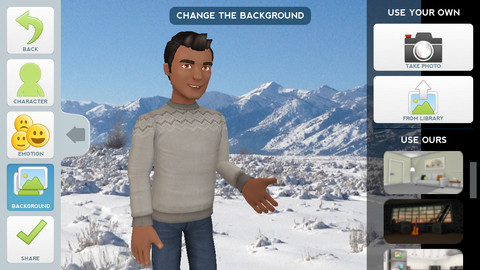
Currently FREE, Tellagami (rhymes with origami) is a unique storytelling app. Short stories called gamis are easy to create. First you select and customize a character by choosing his/her skin tone, eye color, hair color, and clothing. Then you choose an emotion – happy, sad, surprised, angry, scared, silly. Next you choose a background from the app, from your photo library, or create one by using your camera. You are now ready to create your gami. You can record your gami in you own voice or choose the text button to type in what your character will say  – the limit is 450 characters. Gamis can be shared via email, messaging, Facebook, or Twitter.

This educational app is fabulous!! Its uses are only limited by your imagination!! Kids can use gamis to introduce themselves at the beginning of the year. They can customize gamis to look like themselves and be reporters, scientists, teachers, etc. They can create the character (and setting) from a book they are reading. They can message or email a parent to explain what they are learning in class. Teachers could use gamis as interactive exit slips. The list is endless. Kids will LOVE creating gamis!

Tellagami ™ - Tellagami Inc.