0

3 FREE Virtual Math Manipulatives

Geoboard by The Math Learning Center (a nonprofit organization dedicated to K – 12 education) is a FREE app that turns your iPhone/iPad into a virtual geoboard. Geoboards can be used as tools to teach mathematical concepts such as polygons, perimeter, area, line segments, angles, congruent shapes, symmetry, fractions, etc. Shapes are created by stretching bands on the geoboard’s pegs. There are 5 colors of bands in the iPhone version and 8 in the iPad version. There is also a tool to fill in shapes. On the iPad version, you can switch from the standard 25 peg board to a 150 peg board to create more complex shapes. This is a great app with the potential to be used in so many ways.

Highly recommended for your virtual math tool kit!

Geoboard, by The Math Learning Center - Clarity Innovations

FREE for the iPad, Virtual Manipulatives contains math manipulatives for teaching fractions, decimals, and percents. Included are tiles/circles divided into halves, thirds, fourth, fifths, sixths, eighths, tenths, and 12ths AND their corresponding decimals and percentages! The manipulatives are color coded across the settings so that 1/2 is blue as is .50 and 50%. Kids drag tile pieces onto the work area to compare fractions/decimals/percentages. In the settings you can change from tiles to circles, make the pieces transparent, and hide the numbers on the pieces. Completed work can be easily saved to photos. Finding equivalent fractions has never been so slick – WOW!!

Common Core Standards

  • 3.NF.3 – Explain equivalence of fractions in special cases, and compare fractions by reasoning about their size. Understand two fractions as equivalent (equal) if they are the same size, or the same point on a number line.
  • 4.NF.1 – Explain why a fraction a/b is equivalent to a fraction (n × a)/(n × b) by using visual fraction models, with attention to how the number and size of the parts differ even though the two fractions themselves are the same size. Use this principle to recognize and generate equivalent fractions.

Highly Recommended!

Virtual Manipulatives! - ABCya.com

equivalent fractions

From the National Council of Teachers of Mathematics comes a FREE app called Equivalent Fractions. Kids create equivalent fractions by dividing and shading squares or circles. Circles can be divided into 24ths. Squares can be divided into 144ths. In the play mode, a fraction is shown and kids must create 2 additional fractions that are equivalent. All 3 fractions must have different denominators. The app also places the fractions on a number line – a great visual for comparing! There is also a “build your own” mode which would be fabulous to use for guided exploration & practice. Kids could also use this section as a virtual manipulative when working independently. This app is an excellent resource for the classroom !!

Common Core Standards met:

  • 3.NF.3 – Explain equivalence of fractions and compare fractions by reasoning about their size. Understand two fractions as equivalent (equal) if they are the same size, or the same point on a number line. Recognize and generate simple equivalent fractions, e.g., 1/2 = 2/4, 4/6 = 2/3). Explain why the fractions are equivalent, e.g., by using a visual fraction model.

Highly Recommended!

Equivalent Fractions - National Council of Teachers of Mathematics

0

Fractions – by Brainingcamp

fractions

FREE again – Fractions by Brainingcamp, an excellent educational app for teaching fractions. The app covers 7 topics: introduction to fractions, equivalent fractions, common denominators, comparing/ordering fractions, adding/subtracting fractions, multiplying fractions, and dividing fractions. Each topic includes: a narrated lesson (with visual models), virtual manipulatives for kids to explore, practice questions to check understanding, and a challenging game for additional practice. Kids earn badges as they work through the components of each topic.

WOW – I love everything about this app. The lessons are wonderful. The manipulatives are designed to promote understanding of the concepts presented. The practice questions give students and their teachers a check of their understanding. And, the challenging games helps kids further master the topic. It would be a fabulous for grades 3 and beyond!

Common Core State Standards met:

  • 3.NF.1. Understand a fraction 1/b as the quantity formed by 1 part when a whole is partitioned into b equal parts; understand a fraction a/b as the quantity formed by a parts of size 1/b.
  • 3.NF.3 – Explain equivalence of fractions and compare fractions by reasoning about their size. Understand two fractions as equivalent (equal) if they are the same size. Recognize and generate simple equivalent fractions, e.g., 1/2 = 2/4, 4/6 = 2/3).
  • 4.NF.3 – a. Understand addition and subtraction of fractions as joining and separating parts referring to the same whole.
  • 5.NF.3 – Interpret a fraction as division of the numerator by the denominator (a/b = a ÷ b).

Highly Recommended!

Download link: https://itunes.apple.com/us/app/fractions-by-brainingcamp/id471353363?mt=8&uo=4

0

Imagination Box

FREE for a limited time – Imagination Box, a creative art app for kids. What child doesn’t love creating with play dough? Hours of creative play awaits your child and there is no mess to clean up! It’s perfect for a trip to the doctor, a ride in the car, etc. The app includes 62 pieces of play dough (in 9 colors) including uppercase letters, numbers, and shapes. There are 12 backgrounds available for your child’s creations. Or, you can use your own photos as a background. Make a hat for the family dog or a play dough mustache for grandpa – how fun! There are also 10 markers available in the app adding even more possibilities for creativity. The app could also be used as a take-along “design center” for play dough. Kids could design their creations on the iPad, then actually recreate it with the real stuff. So many possibilities… get it today! 🙂

Download link: https://itunes.apple.com/us/app/imagination-box-colors-shapes/id698092635?mt=8&uo=4

0

Fergus Ferry HD

FREE for a limited time – Fergus Ferry HD. This educational app includes the adventures of Fergus Ferry and his friends. Fergus is not the biggest boat in the harbour but he is friendly, brave, and helpful. He helps rescue others and stands up for what is right! Kids from 2 – 6 years old can choose to read along with the 24 narrated stories or read them on their own. The app also includes a game and an “explore the harbour” section. Check out these stories that encourage kids to face challenges. 🙂

Download link: https://itunes.apple.com/us/app/fergus-ferry-hd/id503731996?mt=8&uo=4

0

Adding Apples

FREE For a limited time – Adding Apples from the creators of Subtracting Sardines. This educational app is geared for preschoolers/grades (K-1) and it meets Common Core Standards for kindergarten and first graders in the area of addition. Kids add (up to 18) using apples. The apples are displayed on a keyboard with domino-like keys – numbers on the left/pictures on the right. The child chooses an addition problem and the apples appear at the top of the screen. If a child chooses 6 + 7, 6 green apples appear then 7 yellow apples appear. As the child counts the apples to find the answer, they are wrapped in purple paper. Children earn gold coins as they work through the problems. This nicely done app helps kids understand the beginning concepts of addition.

Common Core Standards met:

  • K.OA.2  – Add and subtract within 10, e.g., by using objects or drawings to represent the problem.
  • 1.OA.6 – Add and subtract within 20, demonstrating fluency for addition and subtraction within 10.

Recommended!

Adding Apples HD - Operatio

0

Fizzy’s Lunch Lab Fresh Pick

Fizzy's Lunch Lab Fresh Pick

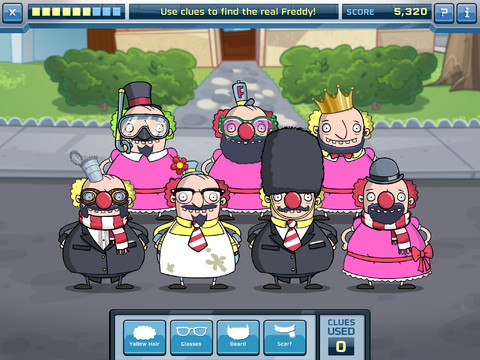
Fizzy’s Lunch Lab Fresh Pick (an educational app based on the PBS KIDS web series) is FREE ! It was developed by PBS with funding from a Ready to Learn Grant from the U.S. Department of Education. Professor Fizzy is holding a competition for 6 – 8 year olds to see who qualifies to be the next Lunch Labber. The app includes 8 challenges that use math and problem solving skills – deductive reasoning, mapping, sorting and classifying. Kids must navigate their way through a grocery store, buy groceries, count out the correct change in a check-out line, successfully serve the correct food to hungry customers, use reasoning to find Freddy, and more. This educational app supports multiple users with self-leveling games that make the challenge specific to each child. FUN!!

Fizzy's Lunch Lab Fresh Pick - PBS KIDS

0

My A – Z

My A - Z 1

My A - Z 2

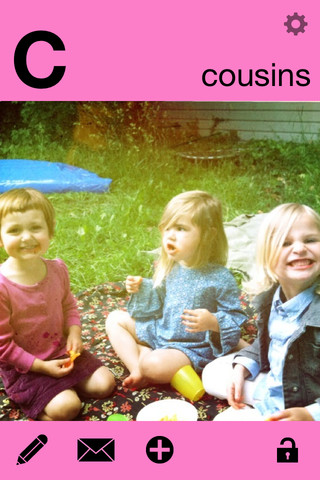
FREE for a limited time – My A – Z, a fully customizable alphabet app. Using this educational app, you can easily create alphabet flashcards for your kids with personal pictures and personal recordings of up to 30 seconds! The app comes with words & pictures for each letter of the alphabet but you have the ability to edit those and/or add your own. Just use already existing photos from your photo albums or use your device’s camera to take new photos. Easy!!

There are so many fun uses for this app. You can help kids make alphabet cards of their family, friends, or a family vacation. They can include recorded greetings from the people pictured! The app can also be used to make alphabet cards for another language, to teach math terms, or make holiday editions of alphabet cards. Obviously, the audience for this app is not just limited to toddlers. It would be fun for older kids to create their own ABC flashcards in any subject area. The possibilities are endless!

My A-Z - Night & Day Studios, Inc.

0

PJ’s PJs -Giraffe!

FREE today – PJ’s PJs- Giraffe!, an adorable app from Ink Robin Inc. From England comes the story of Percival Jenkins, a little boy with approximately 329 pairs of pyjamas. Choosing the ones to wear is the most important decision of his day. When he puts them on, his adventures begin. In this interactive tale, he chooses to wear his giraffe pyjamas. Kids learn what it’s like to be a giraffe as they travel to Africa with Percival. Cute illustrations add to the appeal of this educational app – a fun addition to your digital library! Other titles are also available in this series.

Download link: https://itunes.apple.com/us/app/pjs-pjs-giraffes!/id776058142?mt=8&uo=4

0

Sandbox Web Browser & RabbleBrowser from Float Mobile Learning

FREE for a limited time – 2 great web browsing/sharing tools from Float Mobile Learning. Check them out while they are FREE. 🙂

sandbox

Sandbox Web Browser allows teachers/administrators to customize the appearance of the user interface on students’ devices. By using Sandbox, teachers can restrict students to a predetermined list of websites (called a whitelist) – perfect for classroom research. Bookmarks for approved sites can also be added. A passcode is set to prevent students from changing the settings. Sandbox also returns to a preset home page when the device goes idle. This app can be used to configure an individual device or it can be used to configure multiple devices by using a property list file. The app includes extensive instructions for configuring Sandbox to meet the specific your needs. It also includes instructions for restricting access to Safari, the App Store, You Tube, and other built-in apps through your device.

Download link: https://itunes.apple.com/us/app/sandbox-web-browser/id562054411?mt=8&uo=4

rabble

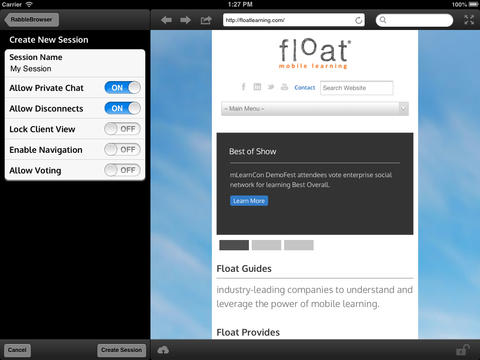
RabbleBrowser is a collaborative web browsing and file sharing tool. A teacher or student leader can facilitate a shared web-browsing/file-sharing experience with an unlimited number of locally connected others in their group. Other features of this app include: integrating chats, saving bookmarks, sharing of personal files, social sharing via email/Facebook/Twitter, and printing. This app looks fantastic for teacher collaboration – meetings, professional development days, college classes, etc.

Download link: https://itunes.apple.com/us/app/rabblebrowser/id432616026?mt=8&uo=4

0

Toca Hair Salon 2

Toca Hair 2

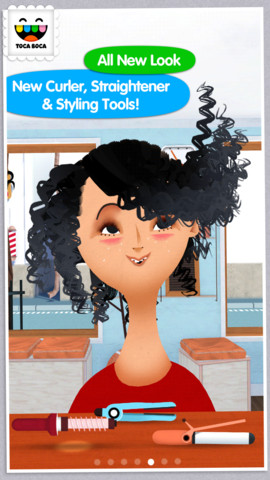
5,905 reviews can’t be wrong so you don’t want to miss this one. Toca Hair Salon 2, a creative educational app, is on sale for only $.99. This app is the sequel to the original – Toca Hair Salon. In this app, kids go back into the salon to groom NEW characters in this app. Using the tools in the salon, they cut hair, comb it, curl it, straighten it, make it grow, shave it, color it, etc. Great sound effects are also included in this fantastically fun app. Kids or parents can take a photo of the finished creation and save it to the camera roll. If parents wish, creations may be posted on the Toca Boca Facebook page. The developers have also built-in options to turn off sounds, pictures, and news. What a great springboard for creative writing – give a character a whole new look and write a story to go with it. Use this app to inspire creative writing on Wacky Hair Day!!

Toca Hair Salon 2 - Toca Boca AB