I LOVE Toca Boca apps!! They make learning what it should be – fun, creative, and joyful!
12 of their apps are on sale for $.99 each. These apps are usually $2.99.
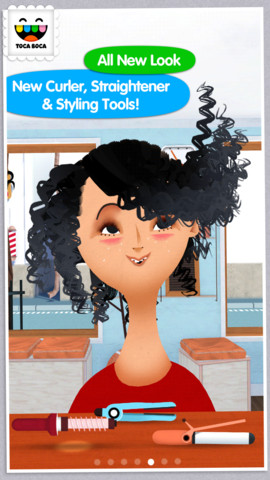
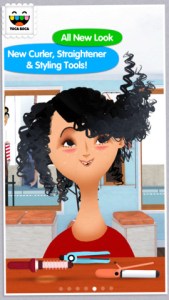 22,198 reviews can’t be wrong so you don’t want to miss this one. Toca Hair Salon 2, a creative educational app, is $.99 for a limited time. This app is the sequel to the original – Toca Hair Salon. In this app, kids go back into the salon to groom NEW characters in this app. Using the tools in the salon, they cut hair, comb it, curl it, straighten it, make it grow, shave it, color it, etc. Great sound effects are also included in this fantastically fun app. Kids or parents can take a photo of the finished creation and save it to the camera roll. If parents wish, creations may be posted on the Toca Boca Facebook page. The developers have also built-in options to turn off sounds, pictures, and news. What a great springboard for creative writing – give a character a whole new look and write a story to go with it. Use this app to inspire creative writing on Wacky Hair Day!!
Download Link: https://itunes.apple.com/us/app/toca-hair-salon-2/id569632660?mt=8&uo=6&at=&ct=
 Only $.99 – Toca Hair Salon Me, the newest addition to the popular Toca Hair Salon apps. Using this app, kids can create a whole new look for themselves and/or their family & friends. They simply import a picture from the camera roll and “the styling” can begin. The salon is equipped with all the right tools to style hair. They can cut it, comb it, make it grow, shave it, color it, etc. They can also wash it, blow it dry, curl it or straighten it. Great sound effects add to the fun! After they finish the styling, they can add fun accessories – glasses, bow, mustaches, etc. They can even use their own photos for the background. Kids or parents can take a photo of the finished creation and save it to their camera roll. What a great springboard for creative writing – give yourself a whole new look and write a story to go with it. What a fun activity for a Wacky Hair Day!!
Download Link: https://itunes.apple.com/us/app/toca-hair-salon-me/id730873197?mt=8&uo=4
 Also $.99 – Toca Builders, another wonderfully creative app from Toca Boca. Kids (ages 5+) create things with the help of 6 builder friends: Blox, Cooper, Vex, Stretch, Connie, and Jum-Jum. Each builder has unique skills which kids can control with simple gestures. The builders help move, stack, drop, spray, smash, paint, & lift blocks as kids create/construct new objects.The educational app also has a snapshot feature and an autosave feature to share & save the world that your child has created. If your child can imagine it, he/she can build it with the help of the Toca Builders – creative fun for your budding engineer/builder!
Download Link: https://itunes.apple.com/us/app/toca-builders/id652077009?mt=8&uo=4
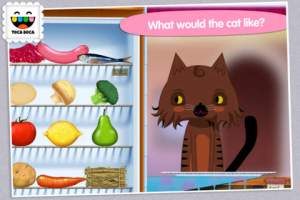
Also on sale – Toca Kitchen, another fun educational app from Toca Boca. Kids take to the kitchen to cook for four lovable characters. In the frig they will find 12 different foods that they can prepare 180 different ways. They can slice, blend, boil, fry, microwave, and/or mix the foods together. They can also add seasoning to the food; but they need to be careful not to add too much. Once the food is prepared they plate it up, serve it to the character, and wait for a reaction. Kids will learn which foods each character prefers in a fun creative way. I love the questions and conversations that Toca Boca apps inspire. It’s no wonder that this app was a Gold Winner of the Parent’s Choice Awards in 2012. Teachers – use this app to inspire creative writing. Write stories or poems about being a cook and the preferences of your consumers. Or, you could have kids compare and contrast the food preferences of the different characters on a graphic organizer. This app also inspires conversation about healthy eating. There are lots of possibilities for learning while having fun!
Download link: https://itunes.apple.com/us/app/toca-kitchen/id476553281?mt=8&uo=4
Toca Kitchen 2: https://tunes.apple.com/us/app/toca-kitchen-2/id943869618?mt=8
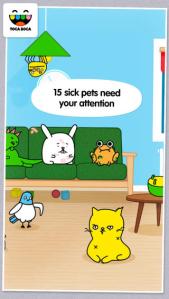
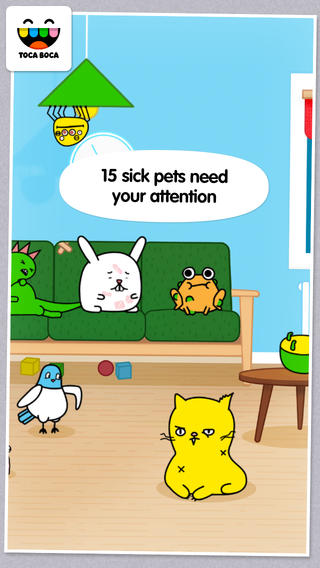
Toca Pet Doctor is another creative app for preschoolers from Toca Boca. The app guides kids (ages 2 – 6) through activities that teach them to care and feel for animals. Fifteen animals need some tender loving care. Kids come to their rescue in a variety of ways. They help to clean & medicate Rascal’s ear, flip over Tarzan the upside down turtle, untie the knotted worm, and more. After the animals are cured, kids feed them and they go back to sleep. If your child likes the other Toca Boca apps, you’ll want to add this one to your collection today. These apps do not go on sale or free that often. Another great app from a developer that makes learning fun. 🙂
Download link: https://itunes.apple.com/us/app/toca-pet-doctor/id808108897?mt=8&uo=4
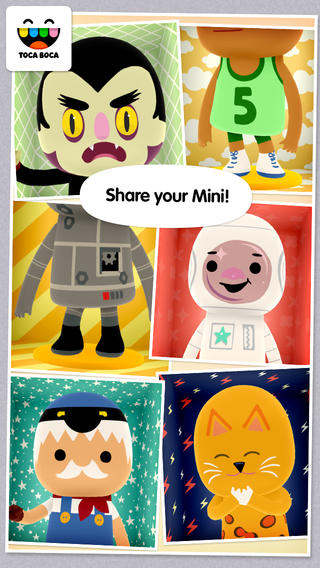
 Toca Mini, another creative app from Toca Boca. With this app kids can create silly monsters, imaginary animals, or playful friends. Toca Minis can become whatever you want them to be. To start, kids add colors to the mini’s body, arms, & legs. Then they add details using a wide variety of stamps – bows, hats, buttons, polka dots, etc. Next, kids add facial features which brings their minis to life – they, ooh, ah, sneeze, smile, blink, and more. Kids can also add hair, eyebrows, beards, mustaches, etc. With 60 different colors and 78 different stamps, there are thousands of possible combinations. When kids finish creating their own unique mini, they can take a snapshot and save it to the camera roll. Then they can print it, share it, pull it into a story writing app, and more. Creating a mini could be a great springboard for creative writing – descriptive paragraphs, a story about their created character/creature. Toca Boca has created another open-ended, creative app!
Download link: https://itunes.apple.com/us/app/toca-mini/id718082838?mt=8&uo=4 Toca Nature is one of the latest apps from Toca Boca. Kids explore nature with this educational app. They can carve out lakes, create mountain ranges, plant trees to grow a forest. Then they can watch as animals move in to populate their new habitats. Kids can also can collect berries, nuts, and mushrooms to feed the animals. As they explore, they will find out what different creatures eat and learn about their natural habitats. Thanks, Toca Boca, for another great app that encourages kids to learn through exploration and use their imagination!
Download link: https://itunes.apple.com/us/app/toca-nature/id893927401?mt=8&uo=6&at=&ct=
Also on sale:
Toca Boo: https://itunes.apple.com/us/app/toca-boo/id919097064?mt=8
Toca Train: https://itunes.apple.com/us/app/toca-train/id521640355?mt=8&uo=4
Toca Lab: https://itunes.apple.com/us/app/toca-lab/id748057890?mt=8&uo=6&at=&ct=
Toca Cars: https://itunes.apple.com/us/app/toca-cars/id689936776?mt=8&uo=4
Enjoy!!















 appydazeblog