0

Chatterbox

chatterboxFREE today – Chatterbox: funny talking videos from photos of pets!, a fun app that turns any photo into a funny animation that you can save or share. It’s simple to use – just pick one of your photos or take a new one. Next line up the eyes, mouth, and chin for the animation. Then record your message. You can adjust the pitch of your voice to be deep like a bear or high like a squirrel. Tap to play your animation. 🙂 Your creation can be saved (and altered later) or shared. There are so many fun things that you could do with this app – birthday greetings, holiday cards, etc. It could also be used for a variety of class projects. FUN!!

Download link: https://itunes.apple.com/us/app/chatterbox-funny-talking-videos/id894760829?mt=8&uo=4

0

Pepi Tree

pepi tree

FREE for a limited time – Pepi Tree, an educational app for preschoolers. Kids travel up and down a tree to learn about the  tree-dwelling animals that make their homes there. The app features six educational games with six musical soundtracks. Kids will enjoy hunting like an owl, making a web like a spider, feeding squirrels, growing food for a hedgehog, helping a mole through tunnels to find his way home, and feeding caterpillars then watching them turn into a butterflies. As kids play, they will learn facts about the animals living in the tree – what they look like, what they eat, how they get their food, and specifically where they live in the tree. Cute fun for little ones!!

Download link: https://itunes.apple.com/us/app/pepi-tree/id587360671?mt=8&uo=4

0

Pepi Bath

Pepi Bath for the iPhone/iPad is FREE again today. This educational app is a role-playing game that teaches kids (ages 2 – 6) about personal hygiene. Kids start by choosing the boy or girl character. Then they choose one of 4 situations: brushing teeth, taking a bath, washing clothes, using the toilet. In each scene kids learn to take care of themselves and they have fun along the way – popping bubbles, playing with rubber duckie in the tub, etc. There are also some good lessons built into the app. For example – when the scissors are chosen, the character shakes his/her head no. Also, the characters are VERY polite – always saying thank you! Check it out for some good clean fun!

Pepi Bath - Pepi Play

0

3 FREE Apps from the National Council of Teachers of Mathematics

equivalent fractionsFrom the National Council of Teachers of Mathematics comes a FREE app called Equivalent Fractions. Kids create equivalent fractions by dividing and shading squares or circles. Circles can be divided into 24ths. Squares can be divided into 144ths. In the play mode, a fraction is shown and kids must create 2 additional fractions that are equivalent. All 3 fractions must have different denominators. The app also places the fractions on a number line – a great visual for comparing! There is also a “build your own” mode which would be fabulous to use for guided exploration & practice. Kids could also use this section as a virtual manipulative when working independently. This app is an excellent resource for the classroom!

Common Core Standards met:

  • 3.NF.3 – Explain equivalence of fractions and compare fractions by reasoning about their size. Understand two fractions as equivalent (equal) if they are the same size, or the same point on a number line. Recognize and generate simple equivalent fractions, e.g., 1/2 = 2/4, 4/6 = 2/3). Explain why the fractions are equivalent, e.g., by using a visual fraction model.

Equivalent Fractions - National Council of Teachers of Mathematics

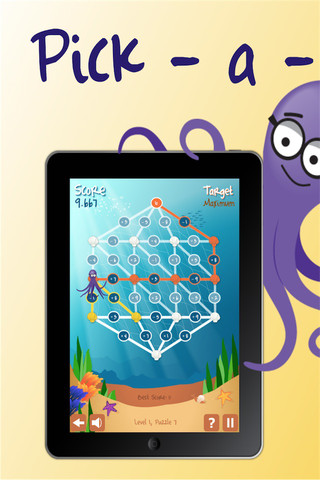
Pick a PathPick-a-Path is another FREE math game from the National Council of Teachers of Mathematics. Kids help Okta the octopus reach a target number by choosing the best path from the top maze to the bottom of a maze. There are 7 different levels with 7 puzzles in each level. The puzzles start with basic operations then move to fractions, negative numbers, decimals, and other more difficult skills. Kids have to plan out a strategy to reach the target which can be a specific value, a minimum value, or a maximum value. This app provides a lot of good skills practice. And… as an extra added bonus, kids have to think of a strategy!

Pick-a-Path - National Council of Teachers of Mathematics

Math concentration

Math Concentration was developed by the National Council of Teachers of Mathematics for students from preschool through fifth grade. It’s a classic matching game that can be played by one or two players. There are six levels of play – numbers 1- 6, numbers 1 – 10, shapes, multiplication, fractions, and percentages & fractions. In all levels, numbers are represented in different ways – written names, digits, pictures, etc. The game also has two modes – a transparent board (for younger students) or a fully covered board. The game is simple to play and kids earn socks for completing all of the matches on the board. 🙂

Download link: https://itunes.apple.com/us/app/math-concentration/id458437534?mt=8&uo=4

0

Petting Zoo

Petting

Over a million downloads and on sale for only $.99 – Petting Zoo, an adorable app for kids and adults who are kids at heart. 🙂 This educational app combines the charm of Christoph Niemann’s humorous animations with state of the art technology as one scene morphs into the next. The app is simple to use – just swipe and tap the 21 animals to see how they react. The results are delightfully surprising! Kids will discover what an elephant would do in the bathroom, if a dog can breakdance, how monkeys play soccer, and more. This app is suitable for kids of all languages because there are no spoken words. It’s perfect for discussion and predicting what will happen next. It would also be great for story writing. A really fun storybook app – creative, silly, and sure to delight!

Download link: https://itunes.apple.com/us/app/petting-zoo-animal-animations/id602773895?mt=8&uo=4

0

iComm and Language Lab: Core Words

Here are two FREE apps that help kids with communication disabilities.
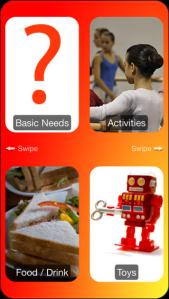
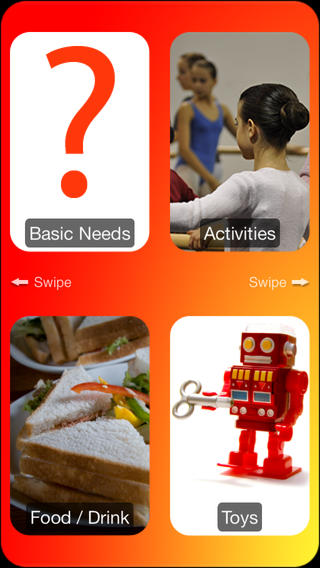
iCommiComm is a picture and voice communication app for children. The FREE version has 9 categories – basic needs, activities, food/drink, toys, movies/book, friends, family, numbers, and blank. There are eleven additional categories in the full version which is available for $6.99. iComm is easy to use and can be personalized with your own photos and voice – fabulous features. It is meant to be used by children with a broad range of disabilities such as cerebral palsy or autism. Children who have communication disabilities can easily swipe from one screen to the next then confirm their choices on a yes/no screen. This app would be great for helping kids with communication disabilities in the classroom. Check out this great FREE resource today.

Find out more about this app @ iComm iPhone App helping children communicate

Download link: https://itunes.apple.com/us/app/icomm/id351726761?mt=8&uo=4
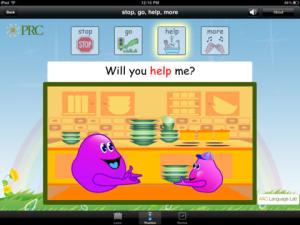
language labLanguage Lab: Core Words is a FREE app developed by the Prentke Romich Company, a provider of language and assistive technology products. This app is the first in a series – based on the developmental stages of language development. It is meant to help early language learners and children with expressive language delays who use augumentative and alternative communication methods. The app teaches 14 specific words – help, more, stop, go, eat, drink, make, play, sleep, work, read, don’t, no, stop. There is also a blank section which permits you to upload photos for teaching people’s names. For each word there are three modes: learn, practice and review. The learn mode has animations that illustrate different uses of the word. In the practice mode, kids find the word in a sentence. The review mode has a sentence with the word missing and kids fill it in. There is a hint available if needed. Check out this FREE app for kids that need assistance with requesting/directing action and identifying familiar people by name. Read more about language development @ www.aaclanguagelab.com and www.prentrom.com.

Download link: https://itunes.apple.com/us/app/language-lab-core-words/id474446989?mt=8&uo=4

0

Draw with Curious George

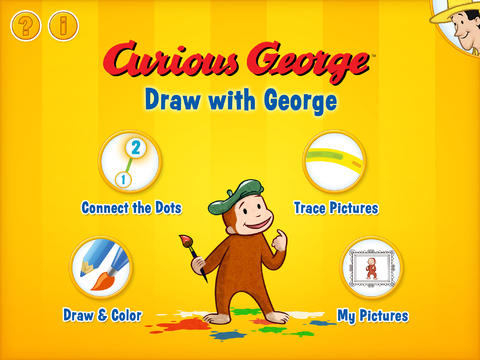
curious George - drawFREE for a limited time – Draw with Curious George, a drawing and coloring app for preschoolers. Curious George has been entertaining kids since 1941 when his first adventure was published. The app is narrated by George’s friend, the Man With the Yellow Hat. Kids can choose to connect-the-dots, trace, draw, and/or color with Curious George in this fun app which has a great a selection of tools, colors, backgrounds, stamps, and stickers. Draw with Curious George has everything your child needs to create a masterpiece. When the art work is complete, he/she can then save it into the art gallery and/or share it with loved ones through a kid-friendly email system. The email system is quite unique. You add a photo, name, & email address for each person that your child can email – up to three. The email is sent from your child through your account. Grandparents will love it getting your child’s artwork and your child will have  hours of fun creating it.

Download link: https://itunes.apple.com/us/app/draw-with-curious-george/id585588104?mt=8&uo=4

0

Imagination Box

FREE for a limited time – Imagination Box, a creative art app for kids. What child doesn’t love creating with play dough? Hours of creative play awaits your child and there is no mess to clean up! It’s perfect for a trip to the doctor, a ride in the car, etc. The app includes 62 pieces of play dough (in 9 colors) including uppercase letters, numbers, and shapes. There are 12 backgrounds available for your child’s creations. Or, you can use your own photos as a background. Make a hat for the family dog or a play dough mustache for grandpa – how fun! There are also 10 markers available in the app adding even more possibilities for creativity. The app could also be used as a take-along “design center” for play dough. Kids could design their creations on the iPad, then actually recreate it with the real stuff. So many possibilities… get it today! 🙂

Download link: https://itunes.apple.com/us/app/imagination-box-colors-shapes/id698092635?mt=8&uo=4

0

Math Blast

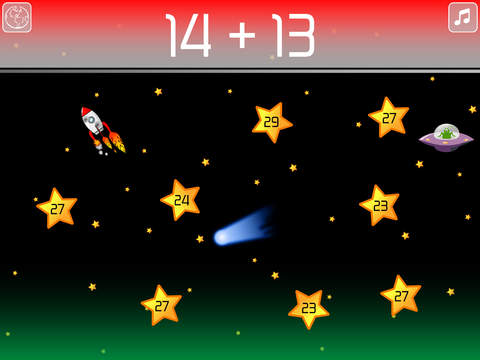
math blastFREE for a limited time – Math Blast, a fun math game for kids. The object of the game is to complete missions by answering math questions as quickly as possible. Players need to guide their rockets to avoid comets. If they catch UFOs, their rockets get an extra speed boost to save time. There are two modes of play: mission control or training center. Mission Control has 3 levels of play – easy, medium & hard. Training Center allows teachers/parents to create customized missions for students – an easy way to differentiate instruction. Multiple games can be saved – perfect for sharing devices. These features make Math Blast a great choice for the classroom. After using the app, kids can graph their scores. By doing so, they can track their improvement and learn to collect data in the process. This educational app is perfect for getting kids to practice their facts in a fun way!.

Common Core Standards met:

1.OA.6 – Add and subtract within 20, demonstrating fluency for addition and subtraction within 10.
2.OA.2 – Fluently add and subtract within 20 using mental strategies. By end of Grade 2, know from memory all sums of two one-digit numbers.
3.OA.7 – Fluently multiply and divide within 100, using strategies such as the relationship between multiplication and division or properties of operations. By the end of Grade 3, know from memory all products of two one-digit numbers.

Download link: https://itunes.apple.com/us/app/math-blast/id911803805?mt=8&uo=4

0

Toca Hair Salon Me

hair salon meFREE for a limited time – Toca Hair Salon Me, the newest addition to the popular Toca Hair Salon apps. Using this app, kids can create a whole new look for themselves and/or their family & friends. They simply import a picture from the camera roll and “the styling” can begin. The salon is equipped with all the right tools to style hair. They can cut it, comb it, make it grow, shave it, color it, etc. They can also wash it, blow it dry, curl it or straighten it. Great sound effects add to the fun! After they finish the styling, they can add fun accessories – glasses, bow, mustaches, etc. They can even use their own photos for the background. Kids or parents can take a photo of the finished creation and save it to their camera roll. What a great springboard for creative writing – give yourself a whole new look and write a story to go with it. What a fun activity for a Wacky Hair Day!!

Download link: https://itunes.apple.com/us/app/toca-hair-salon-me/id730873197?mt=8&uo=4