0

Fiete Match

fiete match2

FREE today – Fiete Match, a pair matching game with a twist. Kids challenge Fiete (a sailor) to play some matching games and he responds like a real player. He claps, gives the thumbs up, shows disappointment, etc. This educational app is suitable for multiple age groups. There are three levels of difficulty (8, 12 or 16 squares) and 6 games included: calculations (adding), counting, flags, marine animals, vehicles (looks for related cards), and world landmarks (matches symbols with images). The app is well-designed and visually appealing. Kids choose the game they would like to play from the lighthouse menu. Parental controls are underwater. Ocean sounds and sailor music complete the nautical setting. Fiete Match has been awarded the German developer prize  – Best Learning Game 2013.

Download link: https://itunes.apple.com/us/app/fiete-match/id695799170?mt=8&uo=4

0

Shadow Puppet

Shadow PuppetUse the power of this app to create a unique travel log with your child. “How I Spent My Summer Vacation” goes digital!

Recently updated and still FREE – Shadow Puppet, a photography app which has been featured by Apple as one of the “Best New Apps” for over 6 months!  Using this app, it’s easy to create “puppets” – recorded explanations of your photos. First you choose your photos and put them in the order. Then you talk about your pictures. Everything is recorded. Finished “puppets” can be shared via email, SMS, Facebook and/or Twitter. There are so many ways for everyone to use Shadow Puppet: to teach something new, to share adventures with friends, to record children talking about their experiences, to tell the story behind old family photos, etc.

The update has many new features. Now you can include video clips, add music, search the web for images, overlay text/stickers, and more! The FREE version of the app permits you to include up to 10 photos/video clips. For $1.99 you can get Puppet Essentials which allows you to add up to 100 items to each video and have access to more drawing & decorating tools. The update made this great app even better!

The classroom uses for this app are only limited by your imagination: Take pictures of a child’s work and have him/her explain it to parents. Send pictures and voice recordings of the class field trip. Have kids give a step-by-step explanation of what happened in a science experiment. Draw & sequence pictures to retell a story. Make a “talking timeline” by sequencing photos of historical events. Have kids use it to present mini reports on any subject. Have virtual “pet day” – kids bring in pictures/recordings of their pets. Because you can use anything saved to your photo library, you can explain photos from the web, artwork created in other apps, and so much more. The possibilities for using this educational app are endless. For more suggestions go to http://get-puppet.com/education. What a fabulous resource!!

Download link: https://itunes.apple.com/us/app/shadow-puppet/id700902833?mt=8&uo=4

0

Earthlapse

earthlapse

FREE for a limited time – Earthlapse, turns your iPad/iPhone into a window aboard the International Space Station. The app comes with 7 views of Earth (aurora borealis, a tropical storm, Canadian arm of the ISS, the cupola of the ISS, Earth & clouds, Canada & northern USA, and aurora australis) captured by NASA astronauts. It also has 8 relaxing space soundtracks. Love the music! When you touch the screen, you can control what you see with your finger. You can also enable a clock and/or worldwide weather – a nice feature if you want to use it as a screen saver. It would be great to Airplay this app on a big screen in your classroom when kids were doing creative writing about space, living on the ISS, etc. 🙂

Download link: https://itunes.apple.com/us/app/earthlapse/id522003167?mt=8&uo=4

0

Popboardz

Popboardz

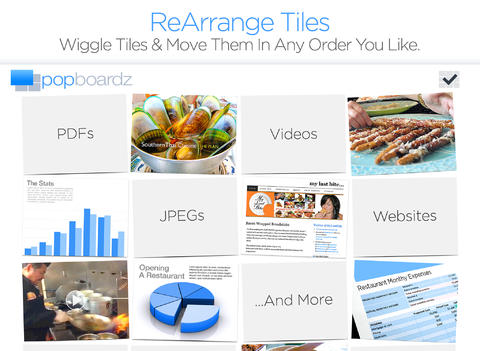
FREE again for a limited time – Popboardz, a productivity tool that normally sells for $4.99.  Popboardz makes it easy to organize, store, and present information. Each board is a grid with 16 spaces for content so that all of your PDFs, images, videos, websites, can be arranged on one screen. Unlike other presentation tools, Popboardz makes it easy to customize your presentation to meet the needs of your group. Just click on the grid space that contains the example, information, or link that you would like present next! It’s easy to skip around. This app would be fabulous to use in the classroom. A teacher could organize all his/her digital resources for a unit on one board. That board can be saved so it is always ready to present! It is also easy to edit and/or rearrange boards so that lessons can be tweaked as new resources become available. Students could also use Popboardz – to organize information, to present projects, to give reports, and more. What a great educational app!

Download link: https://itunes.apple.com/us/app/popboardz/id563989511?mt=8&uo=4

0

Oscar Goes to the Zoo

Oscar Goes to the Zoo

FREE for a limited time – Oscar Goes to the Zoo, a “You Tell Me” story. In this story, a cute little dachshund goes to the zoo and wonders what it might be like to be the different animals that he sees there. In the end he discovers that he likes being himself. Cute story!

“You Tell Me” stories are designed with some special features: 1. They incorporate WordWinks into the story. WordWinks are questions and comments written in red italics. To maximize children’s understanding of the story, teachers often add comments/questions as they read aloud. WordWinks are meant to model that teacher voice. 2. They have a “Retell, Record & Share” section. Kids are asked to order 4 scenes from the story then record their own version of the story to share with grandparents or friends. 3. If you register, you can receive a FREE Oscar Goes to the Zoo activity book by email.

If you have a preschooler or early reader, check out this e-book. I love that it emphasizes “thinking about reading.”

Download link: https://itunes.apple.com/us/app/oscar-goes-to-the-zoo/id587648796?mt=8&uo=4

0

Goodnight Safari

FREE  for the iPhone/iPad, Goodnight Safari is a sweet bedtime story. Kids (ages 2-4) help the animals of the savannah complete their evening activities in 7 interactive scenes –  a giraffe eating dinner, a monkey climbing into bed, a hippo taking a bath, etc. Optional counting & color activities are available as an in-app purchase. Very sweet story for a peaceful end to your child’s day. 🙂

Recommended!

Goodnight Safari - Polk Street Press LLC

0

Summertime Apps

Apps for fun in the sun – some FREE, some were free but are now regular price. Follow my blog and find out when great apps are offered for FREE. 🙂

sand drawing

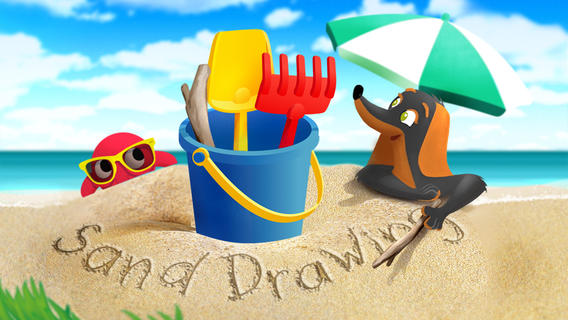
Sand Drawing by Timbuktu is currently $2.99. It was FREE when I downloaded it. Kids can relax on the virtual beach by drawing in the sand. The app comes with 3 drawing tools and 12 decorations that kids can choose to use. Decorations can easily be mixed, rotated, and resized. Waves clear the beach so to make way for new creations. Simple to use and fun!

I wish the app had a save feature built-in – perhaps that will be an option in an updated version. The good news is that you can save your child’s sand drawing by taking a screen shot of your iPad. Here’s how: 1. Have your child’s creation open. 2. Find your Sleep/Wake button (top right of the iPad). 3. Find your home button (centered on the bottom your iPad’s screen). 4. Hold down both buttons together – it only takes a second. 5. Release them and you should hear a camera shutter sound and see a white screen. 6. Check your Camera Roll – the image should be there!

Now the fun begins… use your creations to as illustrations in story apps, as backgrounds for photo albums of your vacation, as postcards to grandma & grandpa, etc. Get creative!!

Sand Drawing - by Timbuktu - Timbuktu Labs, Inc.

Ice Cream Truck Game

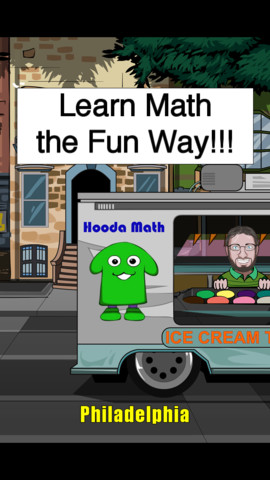
A cute educational app that was FREE but is currently $1.99 – Ice Cream Truck Game. Kids utilize their math skills while operating an ice cream truck in this game. They begin by purchasing the right amount of ingredients (cones, ice cream, and toppings) for each day. All ingredients are sold in metric measurement – liters or grams. Then, kids choose a cone size  and set a price for the treats. Sales are affected by price and by the popularity of the treats. At the end of each day, the child sees a graph of liquid assets and a graph of customer satisfaction. They can assess what is working or not working and make the necessary adjustments for the next day. Kids have 10 days in each city. The goal is to make enough money to move to the next city (level). The levels get progressively more difficult. Lots of math skills are woven into this game – money, measurement, estimating, reading a graph, etc. I could see third, fourth, & fifth graders having fun with this one!

Ice Cream Truck Game - Hooda Math

PH Summer Reading

PH Summer Reading from One More Story is currently FREE. One More Story is an online library high quality children’s picture books that are professionally narrated and with music/sound effects. Benjamin D. Bookworm is the host for the stories – kids can listen and follow the highlighted text or read the book themselves. Right now, the app is FREE. You will need internet access to use it because it streams large multimedia files. This educational app currently has one book  – How I Became a Pirate by Melinda Long and illustrated by David Shannon. I love this book – it is one of my favorites! It is about a young boy named Jeremy Jacob who learns the finer points of pirate life from Captain Braid Beard and his crew. Very cute story – a perfect summer read!

PH Summer Reading - One More Story, Inc

I Like Summer

Another FREEBIE – Preschool Books – I Like Summer from Grasshopper Apps. Written for preschoolers, this book is 1 of 20 books in the “I Like” series. Kids will enjoy listening to the story that highlights the joys of summer. They will also love looking at story’s photos. The best part of this educational app is that it can be customized. You can record the existing story in your child’s voice (or your voice). Or… you can completely change the text and record the new story in your child’s voice/your voice. How fun  – have your child make up a story to go with the pictures!
Preschool Books - I Like Summer - GrasshopperApps.com

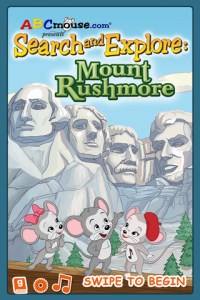
Mount Rushmore 2 FREE interactive books about U.S.Landmarks – ABC Mouse Search & Explore: Mount Rushmore & ABC Mouse Search & Explore: The Grand Canyon. Both books can be read in 3 modes – read to me, read with pause, or read myself. Geared towards young children, these books present fun facts about their respective locations. If you are planning a trip to either place this summer, you may want to take a look at these apps.

Mount Rushmore link: https://itunes.apple.com/us/app/abcmouse.com-mt.-rushmore/id605640045?mt=8&uo=4

Grand Canyon link: https://itunes.apple.com/us/app/abcmouse.com-grand-canyon/id409716293?mt=8&uo=4

Stella adn Sam Storypack

4 out of 5 of these stories are about summer!

Now only $3.99 – Stella and Sam Story Pack, a wonderful educational app that was selling for $6.99. The story pack contains 5 Stella and Sam apps (Into the Snow We Go, Rainy Days and Rainbows, Backyard at Twilight, Go There Square, and Cocoons & Caterpillars). They are also sold individually for $1.99 each. Stella and Sam apps are based on the television show and book series by Marie-Louise Gay. The Stella and Sam books have been translated into 15 languages and have sold over a million copies. All Stella and Sam apps are also supported in French.

I love how all of the stories focus on getting kids outside to enjoy the beauty of nature. They are beautifully animated, creatively presented, and such fun for preschoolers!

Into the Snow We Go: In this adventure, kids join Stella and Sam to make pictures in the snow, decorate a snowman, and discover what’s hidden under the snow.

Rainy Days and Rainbows: Once again, kids join Stella, Sam and their dog Fred. They paint with Fred, dig through leaves looking for treasures, and have a pine cone race across Puddle Lake.

Backyard at Twilight: In this adventure, kids play along with Stella, Sam, and their dog Fred as they spend the night camping out in the backyard. They look for bugs, learn about shapes from fireflies, and discover the constellations.

Go There Square: Stella and Sam find magical places with the help of their go-there-square. Kids go along to pop musical bubbles, collect dandelions and build a bridge out of flowers.

Cocoons & Caterpillars: In this adventure, kids play along with Stella, Sam, and their dog Fred to discover the joys of nature – butterflies, birds, and clouds.

Download link: https://itunes.apple.com/us/app/stella-and-sam-story-pack/id441939700?mt=8&uo=4
torii

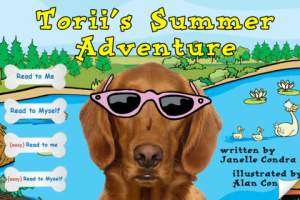
Now $1.99 – Torii’s Summer Adventure, a cute interactive book written by an elementary school teacher. Torii is a lovable & curious golden retriever who loves exploring – especially when her family takes her to the lake! Kids will enjoy reading about her adventures. They will have fun discovering the interactivity & sound effects on every page. The book has “read to me” or “read by myself” options. It also has a choice of reading levels – a very cool feature. Kids can search for Torii’s bone throughout the story and the app keeps track along the way. The app also includes additional activity/coloring pages at the end of the story. Who wouldn’t love a dog in pink sunglasses? 🙂

Download link: https://itunes.apple.com/us/app/toriis-summer-adventure-interactive/id579935507?mt=8&uo=4

0

Bug Games HD

bug games

Singing crickets! Bug Games HD is FREE for a limited time. This super cute educational app for preschoolers has 4 sections: Cricket Concert, Bee Word Builder, Ant Tunnel Builder, and Spider Dot-to-Dot. In the Cricket Concert section, kids can select a song to hear the crickets sing together or they can tap on each cricket to play the song on their own. In Bee Word Builder, kids hear the phonic pronunciation of individual letters as they use them to put words together. Ant Tunnel Builder requires kids to rotate puzzle pieces so that the ants can march through a completed tunnel. Spider Dot-to-Dot has kids connecting dots in numerical order. Kids collect sticker rewards along the way. This app has a nice combination of learning games for preschoolers – cute, fun, & engaging! Who knew playing with bugs could be so much fun! 🙂

Bug Games HD - by Busy Bee Studios - Busy Bee Studios

0

Halftone 2 Comic Book Creator

halftone 2

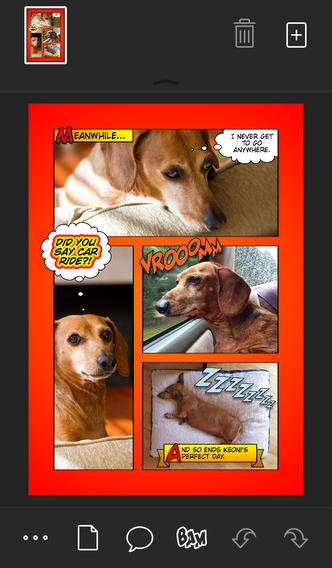
Halftone 2 – Comic Book Creator is FREE this weekend. This app was named by Apple as a Best of 2013 winner and an Editors’ Choice. Halftone 2 – Comic Book Creator is a categorized as a photography app but it has many educational uses. This app makes it easy to turn your photos into comic book pages that your friends and family will love! The app includes a large assortment of paper styles, captions, speech bubbles, graphic stamps, and fonts for your projects. And… it’s so simple to use. First choose a page layout, then apply photo filters. Next add text by using captions and/or speech & thought bubbles. Then finish your project with some fun graphics like WHAM, BAM, or POW. You can even add a few sound effects. Your creation can be shared as an image, a multi-page document, or high-definition video. Because it is so easy to use, this app would be great for creating visuals to go with classroom projects such as stories, book reports, newsletters, etc. And… it would be really fun to use this app to create comics of your family vacation. Get started today – there are SO many creative & educational uses for this app!

Download link: https://itunes.apple.com/us/app/halftone-2-comic-book-creator/id603139024?mt=8&uo=4

0

Homework+

Homework+

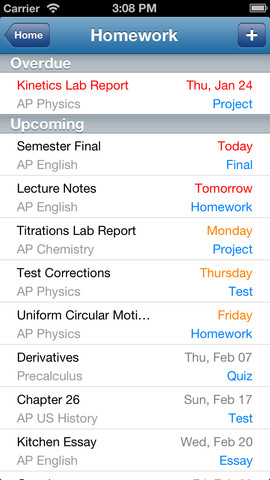
FREE again, for a limited time – Homework+, a simple to use homework/test planner. This educational app is geared towards older students who are taking multiple classes. It could also be used with younger kids as an electronic assignment book. It’s never too early to teach kids how to be organized. 🙂

To set up the app, first edit the subject list & category lists to reflect what you are studying. After that, it is very easy to add assignments to the calendar – just give the assignment a title, choose the subject & category, put in the due date, choose a level of priority, and save. As you finish an assignment, mark it as complete and the app moves it to the finished list. App badges show you how many assignments you have and how many you have finished. Notifications can be set (1 or 2 days before) to remind you of an upcoming assignment. The app also keeps track of overdue assignments. Very slick and intuitive – great for teaching kids to be organized!!

Homework+ - Chijang Huang