0

PEEP and the Big Wide World apps

FREE for a limited time – 6 PEEP and the Big Wide World apps from WGBH, the producers of the animated series of the same name. Major funding for these educational apps is provided by the National Science Foundation. These apps are designed to teach science to preschoolers (3 – 5 years) in a cute, fun way! The games begin simply but become more challenging as kids are successful. Each app also includes a “Try This Anywhere Activity” for you and your children to do together based on the lesson in the app. Your child will LOVE learning with Peep and friends. And you will too!

PEEP  - House Hunt

PEEP and the Big Wide World House Hunt: Kids turn over leaves to pair animals with their homes in a match game that demonstrates that some habitats are home to many different animals.

Download link: https://itunes.apple.com/us/app/peep-big-wide-world-house/id536554271?mt=8&uo=4

PEEP  - Hide & peep

PEEP and the Big Wide World Hide and Peep: Peep and friends are hiding in the tool shed. This app helps kids practice their observation and memory skills.

Download link:https://itunes.apple.com/us/app/peep-big-wide-world-hide-peep/id536312346?mt=8&uo=4
Peep - Paint Splat

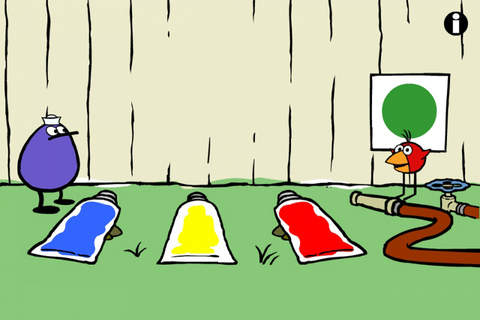
PEEP and the Big Wide World Paint Splat: Kids join two quirky characters named Quack & Chirp to experiment with mixing colors in a fun, silly way!

Download link: https://itunes.apple.com/us/app/peep-big-wide-world-paint/id536621786?mt=8&uo=4

Peep - Sounds

PEEP and the Big Wide World Sounds Like Fun!: Kids explore music and sounds as they mix and match sounds with this app. The characters represent different musical rhythms.

Download link: https://itunes.apple.com/us/app/peep-big-wide-world-sounds/id536623915?mt=8&uo=4
Peep - trash

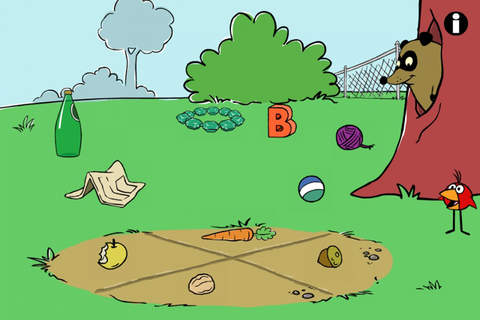
PEEP and the Big Wide World Trash Stash: Kids practice their categorization skills by sorting objects using increasingly sophisticated criteria.

Download link: https://itunes.apple.com/us/app/peep-big-wide-world-trash/id536624731?mt=8&uo=4

Peep - Quack's Apples

PEEP and the Big Wide World Quack’s Apples: Kids roll Quack’s apples into a pond – testing and tweaking the design of their route as often as needed. As they play, they are practicing the engineering design process!

Download link: https://itunes.apple.com/us/app/peep-big-wide-world-quacks/id536623428?mt=8&uo=4

0

Learn with Homer

Learn with Homer

Listed as “New & Noteworthy” in August 2013, Learn with Homer is an educational reading app for kids 3 – 6. Its FREE download includes 30 stories and lessons with additional content available through in-app purchases. The app was updated on February 6, 2013. The update includes a FREE Presidential Pack featuring lessons on Presidents Washington, Jefferson and Lincoln. 

Homer, a gray pigeon, resides in an interactive world designed to help kids learn to read. The fun starts in the Hat Shop where kids have photos taken in the “thinking caps” of their choice. Kids then proceed to a carousel which features every part of the app: Story Time, Learn to Read, Discover the World, Draw a Picture, Songs & Rhymes, Record Your Voice, and U.S. Presidents. There kids choose where to begin their reading adventure. The Learn to Read lessons teach phonemes (sounds) in sequence, then words, then sentences in a sequential, step-by-step reading program. The Story Time section is divided into categories – Homer stories, poetry, folktales, first readers. It includes some free stories with many more offered as in-app purchases. Discover the World is a series of adventures in science, history, art, etc. designed to increase kids’ basic knowledge and vocabularies. The drawing & recording tools help kids develop their expressive skills. There is also a parent website to track children’s progress and/or download printables & book recommendations. This educational app seems to have it all – a well-designed, comprehensive approach to learning to read with real kid appeal!

For more information go to Homer: Parent Resources.

Download link: https://itunes.apple.com/us/app/learn-with-homer/id601437586?mt=8&uo=4

0

BrainPOP and BrainPOP Jr.

BrainPOP has been around for more than a decade as an educational website. The site features short animated movies – 750+ lessons covering science, social studies, math, art & music, etc. The content is geared for grades 4 and above but I found that many movies were also suitable for third graders. When I was in the classroom, it was one of my favorite online resources.

Now you can download the BrainPOP Featured Movie, the educational app for FREE! Your child can learn something new every day. After watching the daily movie there is a short interactive quiz. And… if your child can’t get enough of this app, there are two subscription options: $1.99 per month/ 4 movies & quizzes a day OR $6.99 per month/full access.

Teachers could add the BrainPOP movie of the day to their daily routine. Watch it at a transition time – right before lunch, after lunch, while waiting for buses to called, etc. Interesting and educational!!

Highly Recommended!

BrainPOP Featured Movie - BrainPOP®

Also available for FREE is BrainPOP Jr. Movie of the Week, another educational app. Every week Annie and Moby (two lovable characters) help 5 to 9 year olds learn about a different subject. There is also a quiz and activities to accompany each animated movie. BrainPOP Jr. has been on the web since 2006 delivering content for younger students in science, social studies, reading, writing, math, and more.

Again, teachers could add the BrainPOP Jr. Movie of the Week to their routine. Start your Monday off with the “Movie of the Week” or use it on Friday. BrainPOP gives teachers another way spark kids interest in learning!

Highly recommended!

BrainPOP Jr. Movie of the Week - BrainPOP®

0

The Tree I See

FREE for a limited time – The Tree I See, a storybook app for iPhone/iPad. Geared towards toddlers, this educational app tells a story about a little boy who spends time with a tree that willingly gives and shares with wilderness friends. The Tree I See is a beautifully animated story about sharing and what it means to be a friend.  🙂

The Tree I See - Interactive Storybook - Aridan Books

2

Kid in Story Book Maker

Kid in Story

FREE today (normally $6.99) – Kid in Story Book Maker, a great app for creating personalized stories that support your child’s learning and social monitoring. It’s easy to make your child the star of the story with this app. One-of-a-kind technology (Locolens™ image detection ) makes it easy to superimpose your child onto the story backgrounds – similar to “green screening.” The app includes 8 story templates for you to customize with your own images, text, and narration. You can also create your own original stories by using the “Blank Story” template. Story templates included are – Faces I Make, Let’s Get a Haircut, Are Monsters Hiding in My Room?, A Day at the Movies, At the Playground, What Will I See in San Francisco?, and When Is It Time to Wash My Hands? The app also makes it super easy to share your creations via email and/or Dropbox. Parents, teachers, and/or language therapists – this app would be fabulous to support early literacy, establish routines, model social behaviors & emotions, and more! Most kids love being the star of their own story!

Download link: https://itunes.apple.com/us/app/kid-in-story-book-maker/id594403164?mt=8&uo=4

0

Educreations

Educreations is great FREE app that turns your iPad into a recordable whiteboard. You can create tutorial videos for a variety of purposes: teach a lesson, create example math problems, explain a diagram, add commentary to your photos, etc. This educational app records & replays your voice, handwriting and/or drawings. Educreations is simple to use and permits you to build lessons with multiple pages. The editing tools allow you to: add text to any page, add photos, resize and move images, easily erase drawing mistakes, create “animated playback” by dragging objects as you record, and more.

But the best thing about this app is the ability to share your work. Free accounts are available at http://www.educreations.com where you can share your work as well as look at lessons created by others. Students can be given online access to the lessons that you have created there. Or, you can embed your lessons on your class blog/website. Students can watch a lesson before class or review a lesson after class. Absent students can watch from home. You can post information to help students with their homework. You can tutor someone online. Parents can log in to find out what is going on in class so they can help their children. What a powerful tool!! This app is being used at all levels of education including the college level. The features of Educreations make it a standout among the recordable whiteboard apps!

Highly recommended!

Educreations Interactive Whiteboard - Educreations, Inc

0

ABC ZooBorns

zooborns

ABC ZooBorns for the iPhone/iPad is FREE for a limited time. The educational app is geared towards 3 – 5 year olds to teach them about 50+ baby animals. The app opens to a grid arranged in ABC order. Kids can tap on a letter to bring up baby animals that begin with that letter or they can tap on a specific baby animal. As a baby animal’s photo appears, a child’s voice says the initial letter then reads the name of the baby animal which appears in writing at the bottom of the screen. A little cartoon person drops down on the left hand side of the screen with a link to a video clip about that baby animal or an interactive scene for your child to explore. They can also scroll to the left for additional pictures & videos about each animal. If your child taps the exclamation point on each page, he/she will learn an interesting fact about the baby animal pictured.

This app needs an internet connection to work because the 100+ videos are actually links to You Tube videos. They are chosen by Peapod Labs and checked to be interesting and safe for kids. Kids cannot link from this app into other You Tube content. This app is nicely done and the facts make it interesting for adults too!

Highly recommended!

Download link: https://itunes.apple.com/us/app/abc-zooborns/id543646069?mt=8&uo=4

0

ICDL (International Children’s Digital Library) – Free Books for Children

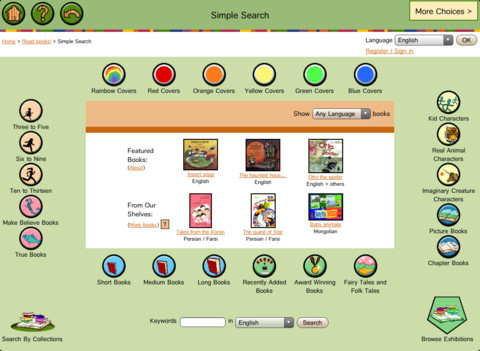
FREE – ICDL (International Children’s Digital Library) – Free Books for Children. This app brings thousands of free children’s books from 60 different countries to the iPad – it’s truly a worldwide collection of books at your fingertips. Books can be searched in a variety of ways – by age appropriateness, length (short, medium, long), genre, ratings, awards, picture vs chapter, and more. You may register if you wish, but it is not necessary. Some advantages to registering include – saving favorite books on a personal bookshelf, returning to the last page that you were reading, and selecting the language you prefer to use.

The feature that I really like is the “Browse Exhibitions” section. The exhibitions are theme based collections of books from around the world. Examples of some current themes are: Celebrating Differences, Everyone Needs Water & Water Needs Everyone, and Forever Friendship. Within each exhibition is an overview of the theme, links to the books included, descriptions of why the books are included, and related activities (in pdf format). As the world becomes more mobile, school systems are facing language barriers. For example, Chicago Public Schools has over 70 languages spoken by their students. What an awesome resource to promote worldwide citizenship and understanding!

The mission of the International Children’s Digital Library Foundation (ICDL Foundation) is to support the world’s children in becoming effective members of the global community – who exhibit tolerance and respect for diverse cultures, languages and ideas — by making the best in children’s literature available online free of charge. The Foundation pursues its vision by building a digital library of outstanding children’s books from around the world and supporting communities of children and adults in exploring and using this literature through innovative technology designed in close partnership with children for children. 

Read more @ http://en.childrenslibrary.org/

ICDL - Free Books for Children - International Children's Digital Library - ICDL Foundation

0

The Winston Show

winston

FREE – The Winston Show, an adorable app for kids 6+. Winston (a self-proclaimed, yellow fellow) and his sidekick Ellington have created the first talk show starring you! Special guests include Blackbeard the Pirate, Marie Antoinette, and the Blue Whale. Kids visit 6 different studios within the app. In Studio 1, they become a contestant on a quiz show called Win with Winston. Studio 2 features Fireside Chats on a variety of kid-friendly subjects such as magic and chores. In Studios, 3 kids can choose to become the star in two movies: Squabble Among the Stars or Winston Sly, Private Eye. They battle colorful characters (such as Lewis & Clark) in Studio 4’s You vs., another game show. Studio 5 is the Costume Department where kids can play dress-up in an assortment of costumes. And finally, Studio 6 features the Writing Room where kids choose the path of a story. This app is fabulous helping kids with conversational language because the characters listen and talk back! This app is quite ingenious and it’s really fun – for kids and adults. Adults will love seeing kids interact with Winston and friends. And, they will understand all of the jokes. 🙂 Delightful!!

HIghly recommended!

Download link: https://itunes.apple.com/us/app/winston-show/id669541931?mt=8&uo=4

0

Pocket Toons – YouTube for Kids

pocket toons

FREE for a limited time – Pocket Tunes, an app which puts a selection of classic cartoons literally in your pocket via your iPhone/iPad. Over 100 cartoons are available each time you open the app. The list changes periodically so that there is always new content. Check it out – you may enjoy it more than your kids do. 🙂

Teachers – the app also permits you to add your own YouTube educational playlists. There are step-by-step, visual directions available. Just press the i button next to Add Playlist to begin. I was able to go into Safari and add the whole School House Rock playlist (53 educational videos) into the Pocket Toons app. Your students can have access to these videos and you don’t have to worry about the other things they might find.

Download link: https://itunes.apple.com/us/app/pocket-toons-youtube-for-kids/id406165193?mt=8&uo=4