0

I Hear Ewe – Animal Sounds for Toddlers

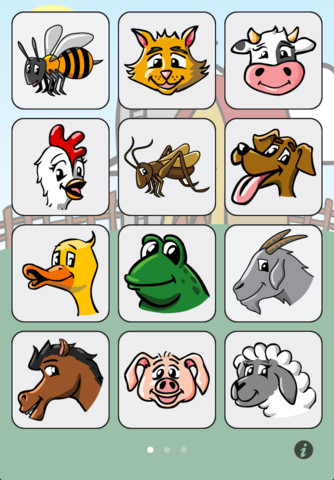
I Hear Ewe – Animal Sounds for Toddlers is a FREE educational app for toddlers. When your child taps on an animal’s picture, a voice says “This is the sound a ____ makes” and the sound follows. This app is very easy to use with big buttons for little fingers. 24 animal sounds and 12 vehicle sounds are included. There are 5 language options: English, Spanish, Chinese, German, and Japanese. This app is perfect for little ones who love naming animals and imitating their sounds. 🙂

I Hear Ewe - Animal Sounds for Toddlers - Claireware Software

0

Artkive

Now that it is summer, you may want to create a digital book of your child’s latest year in school. You can use Artkive, a productivity app, to do so. You may have heard of  this app because it has been featured on THE TODAY SHOW and in Real Simple magazine.

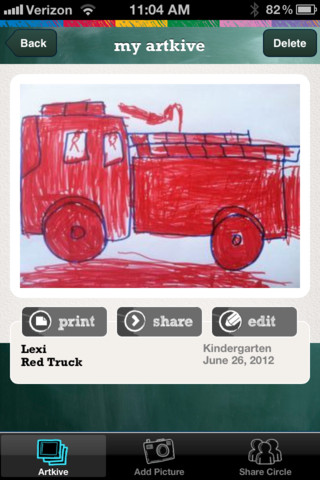
Artkive makes it easy to digitally store, share, and print your children’s artwork/schoolwork. Originally released on August 11, 2012  – this app for the iPhone/iPad is FREE again. It is very easy to use…. First you create an account. Then enter the first names of your children. Take photos of their artwork/schoolwork or upload existing photos from your camera roll. Tag the photo with a child’s name, age or grade, the date, and a title. So simple! You can then share their art with family & friends. You will also be able to have Artkive create digital books & other products using your child’s artwork/schoolwork. You can even order a few holiday presents while you’re at it. 🙂 Artkive makes it easy to collect, store, and share your children’s artwork.

What a great idea! As a parent, you can use it to create books for your children, of any age. I plan to make gift books for my adult children of the art/work that I have saved for years – yay, no more clutter!! As a teacher, you could use it to create digital portfolios of children’s work. Lots of possibilities with this one…. try it yourself while it is free!

To learn more @ http://www.artkiveapp.com/

Recommended!

Artkive - The Kive Company

0

Artkive

Now that it is almost summer, you may want to create a digital book of your child’s latest year in school. You can use Artkive, a productivity app, to do so. You may have heard of  this app because it has been featured on THE TODAY SHOW and in Real Simple magazine.

Artkive makes it easy to digitally store, share, and print your children’s artwork/schoolwork. Originally released on August 11, 2012  – this app for the iPhone/iPad is FREE again. It is very easy to use…. First you create an account. Then enter the first names of your children. Take photos of their artwork/schoolwork or upload existing photos from your camera roll. Tag the photo with a child’s name, age or grade, the date, and a title. So simple! You can then share their art with family & friends. You will also be able to have Artkive create digital books & other products using your child’s artwork/schoolwork. You can even order a few holiday presents while you’re at it. 🙂 Artkive makes it easy to collect, store, and share your children’s artwork.

What a great idea! As a parent, you can use it to create books for your children, of any age. I plan to make gift books for my adult children of the art/work that I have saved for years – yay, no more clutter!! As a teacher, you could use it to create digital portfolios of children’s work. Lots of possibilities with this one…. try it yourself while it is free!

To learn more @ http://www.artkiveapp.com/

Recommended!

Artkive - The Kive Company

0

WWF Together

wwf

Just named by Apple as 1 of 10 Apps That WOW – WWF Together. This beautifully designed, FREE app for the iPad was originally released in January by the World Wildlife Federation. The app features 8 endangered species – giant pandas, marine turtles, polar bears, elephants, tigers, bison, whales, and snow leopards. The unique and engaging features of this app includes: stories about these endangered animals with playful interactive elements, fabulous high-definition videos and image galleries – featuring photos by renowned environmental photographer Morten Koldby, cool facts about each animal, and a 3D interactive globe that tells how far you are from 60 different animals around the world. Everything about this app is wonderful – including the music. You will fall in love with the magnificent creatures presented in this app.  Additional stories about other species will be added regularly – AWESOME app !!

Highly recommended!

WWF Together - World Wildlife Fund

0

Teacher Clicker – Socrative / Student Clicker – Socrative

Still FREE and now even better!! Socrative has just added two additional quiz features: # 1 – Teachers can now add images to their questions. #2 – The system can now grade short answer questions. Teachers just input the acceptable answers and the system does the rest.  🙂

This website and app are unbelievably cool – they turn any device with a web browser (iPhone, iPad, laptops) into a student response clicker. If a teacher has access to any kind of wireless lab, he/she can engage the entire class in a game or quiz and watch the results in real-time. Teachers begin by using their teacher app or logging into t.socrative.com with their email and password. Once logged in, teachers are assigned a room number to share with their students. Students log in using their student app or at m.socrative.com and enter the “virtual room number” provided by the teacher. Teachers initiate an activity and students respond on their devices. Multiple choice and short answer quizzes are easy to create – types of questions can be mixed. Teachers can also choose to run the quiz as a Space Race game. The students’ responses are visible to the teacher in real-time. Teachers can see what each child answered individually as well as what the group answered collectively. And the best part is… the app grades, graphs the results, and generates a report as an Excel spreadsheet or an email.

What a powerful tool for teachers – a short quiz at the end of a lesson can pinpoint what students understand and what needs to be retaught. Hours of grading and analyzing test results are done immediately. Every student is involved – wow!

Highly recommended!

Teacher app Teacher Clicker - Socrative - Socrative           Student app Student Clicker - Socrative - Socrative

0

Sail Through Math

sail through math

Ahoy there!! FREE again (normally $1.99), Sail through Math from McGraw Hill – a fun way for students to practice their math facts/skills. There are 3 levels of play for addition, subtraction, multiplication, and division facts. Other areas covered are addition equations. subtraction equations, multiplication equations, two-step equations, names for numbers, patterns/factors/multiples, and compare numbers. This app provides of great practice built around a pirate theme – complete with music and firing cannonballs! At the end of each game, the child can see what problems he/she missed as well as a percentage score. What a fun way to learn basic facts – in the classroom, at home, in the car on a way to an evening activity. I used to tell my students to practice during commercials – 10 to 15 minutes a day works wonders. This app provides a fun way to accomplish that goal 🙂

Common Core Standards met:

  • 1.OA.6 – Add and subtract within 20, demonstrating fluency for addition and subtraction within 10.
  • 2.OA.2 – Fluently add and subtract within 20 using mental strategies. By end of Grade 2, know from memory all sums of two one-digit numbers.
  • 3.OA.7 – Fluently multiply and divide within 100, using strategies such as the relationship between multiplication and division or properties of operations. By the end of Grade 3, know from memory all products of two one-digit numbers.

Sail Through Math - McGraw-Hill School Education Group

0

Preschool University – phonics/spelling apps

spelling-magic

Moveable Alphabet option from ABC Spelling Magic

Wow!! Preschool University has 12 phonics/spelling apps available for FREE again. There are links to all below. I have them grouped by the skills that they teach and from easiest to most difficult. The first group teaches letter sounds.

  • ABC Magic Phonics – initial letter sounds, 1 picture for each letter       ABC MAGIC PHONICS - PRESCHOOL UNIVERSITY
  • ABC Magic 2 –  initial letter sounds, 4 pictures for each letter       ABC MAGIC 2 - PRESCHOOL UNIVERSITY
  • ABC Magic 3 Line Match – Kids apply what they know about sounds by matching. There are 2 modes: matching 2 pictures with the same beginning sounds or matching letters to a picture that starts with that sound.       ABC MAGIC 3 Line Match - PRESCHOOL UNIVERSITY
  • ABC Magic 4  – Kids are given a letter and they must find pictures of 3,6,or 9 items that begin with that sound.       ABC MAGIC 4 - PRESCHOOL UNIVERSITY
  • ABC Magic 5 Letter Sound Matching – Kids match sounds in 2 modes: picture to letter or letter to picture. As kids become more advanced, you can increase their number of choices (4, 6, or 9) and increase the number of matches per round (5,10,15,20,or 25). ABC MAGIC 5 Letter Sound Matching - PRESCHOOL UNIVERSITY
  • ABC Magic 6 – is the same as Sound Beginnings (follows #8).
  • ABC Magic 7 Memory Match – A matching game with 2 options: match letter to letter or match picture to picture. Letter sounds and picture names are pronounced with the option of turning the sounds off. Grids of 12, 16, or 20 are available.       ABC MAGIC 7 Memory Match - PRESCHOOL UNIVERSITY
  • ABC Magic 8 Sound Matching – This app is an extension of ABC Magic 7. It’s another matching game with 2 options: letter to picture having that beginning sound or picture to another picture with the same beginning sound. Letter sounds and picture names are pronounced with the option of turning the sounds off. Grids of 12, 16, or 20 are available.       ABC MAGIC 8 Sound Matching - PRESCHOOL UNIVERSITY
  • Sound Beginnings – This app is the most advanced of the letter sound teaching apps. It is called sound beginnings but actually teaches beginning, middle, and ending sounds. There are two options: a picture to letter and letter to picture. As kids become more advanced, you can increase their number of choices (3,4, or 5) and increase the number of matches per round (5,10,15,20,or 25). Awesome practice for beginning readers!!       SOUND BEGINNINGS - PRESCHOOL UNIVERSITY

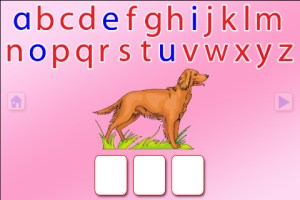
The second group of apps uses letter sounds to spell words that phonetically regular. There are 2 ways to use each of these apps. Word Jumble provides the  child with the letters of the word and the child puts them in order. Moveable Alphabet (the more difficult option) has the entire alphabet across the top of the page and the child must find the correct letters to spell the word. If a child touches a picture, the app reads the word. If a child touches a letter, the app gives the sound for that letter. Each vowel is taught in isolation but there is also a shuffle option which provides mixed practice. Vowels are printed in blue and consonants are in red so you can reinforce the CVC (consonant, vowel, consonant) pattern.

  • ABC Spelling Magic Short Vowels – teaches short vowels       ABC SPELLING MAGIC Short Vowel Words - PRESCHOOL UNIVERSITY
  • ABC Spelling Magic 2 Consonant Blends – teaches consonant blends and consonant clusters       ABC SPELLING MAGIC 2 Consonant Blends - PRESCHOOL UNIVERSITY
  • ABC Spelling Magic 3 Blends & Syllables – GREAT practice spelling multi-syllable words       ABC SPELLING MAGIC 3 Blends and Syllables - PRESCHOOL UNIVERSITY
  • Sentence Reading Magic – Kids built 2 or 3 words sentences using phonetically regular words.       SENTENCE READING MAGIC - PRESCHOOL UNIVERSITY

These apps provide a lot of good practice for preschoolers and early readers!!

Common Core Standards met:

  • K. RF.3 – Know and apply grade-level phonics and word analysis skills in decoding words. Demonstrate basic knowledge of one-to-one letter-sound correspondences by producing the primary sound or many of the most frequent sounds for each consonant. Associate the short sounds with common spellings (graphemes) for the five major vowels.
0

Nighty Night

FREE again!! This interactive bedtime app for kids 1 – 4 years old is by the same developer that produced Little Fox Music Box (see review June 28). Like the Little Fox app, the artwork is beautifully done by Heidi Wittlinger, an Oscar nominated artist. Kids click off the lights around the farm to put 7 animals to bed – setting the mood for their own bedtime 🙂 6 additional animals can be added with in-app purchases. The story easily changes to 12 different languages – without going into the general settings of your iPad. This app is really lovely and it has been successful internationally – winning the App of the Year 2011 in the “books category” in Germany & the U.S. It also reached #1 in iPad books in the US, Brazil, Spain, Denmark, Portugal, Germany, Sweden, South Africa, Australia Switzerland and Austria!


Nighty Night! HD – Bedtime stories – Story book for children - Shape Minds and Moving Images GmbH

0

Miss Spider’s Bedtime Story for the iPad

spider-bedtime

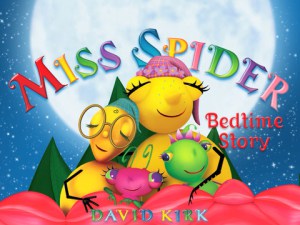
This app is the digital version of David Kirk’s beautiful picture book by the same name. It initially sold for $4.99 but is now FREE. There are several nice features: children can watch the story in 3-D animation, they can read along with the narration, or they can read the story on their own. As they read they can touch the illustrations to reveal special surprise effects. Also included are games, puzzles and pictures to paint.

Worth downloading – highly recommended!

Miss Spider's Bedtime Story for the iPad - Callaway Digital Arts Inc.

0

Sail Through Math

sail through math

Ahoy there!! FREE again (normally $1.99), Sail through Math from McGraw Hill – a fun way for students to practice their math facts/skills. There are 3 levels of play for addition, subtraction, multiplication, and division facts. Other areas covered are addition equations. subtraction equations, multiplication equations, two-step equations, names for numbers, patterns/factors/multiples, and compare numbers. This app provides of great practice built around a pirate theme – complete with music and firing cannonballs! At the end of each game, the child can see what problems he/she missed as well as a percentage score. What a fun way to learn basic facts – in the classroom, at home, in the car on a way to an evening activity. I used to tell my students to practice during commercials – 10 to 15 minutes a day works wonders. This app provides a fun way to accomplish that goal 🙂

Common Core Standards met:

  • 1.OA.6 – Add and subtract within 20, demonstrating fluency for addition and subtraction within 10.
  • 2.OA.2 – Fluently add and subtract within 20 using mental strategies. By end of Grade 2, know from memory all sums of two one-digit numbers.
  • 3.OA.7 – Fluently multiply and divide within 100, using strategies such as the relationship between multiplication and division or properties of operations. By the end of Grade 3, know from memory all products of two one-digit numbers.

Sail Through Math - McGraw-Hill School Education Group