0

TED – TED conferences and TEDiSUB – Enjoy TED videos with Subtitles!

Parents/Teachers – here is an app for you and the kids!

TED started in 1984 as a conference bringing together people from three worlds: Technology, Entertainment, and Design. It is now a nonprofit devoted to ideas worth spreading. Here is information on 2 apps that will bring the world of TED to the device of your choice!

TED - originalRiveting talks by remarkable people and FREE to the world. Connect with the official TED app for iPhone/iPad. Access more than 1,400 TEDTalk videos with more added every week! When you open the app, you will see a wide variety of featured talks – Where is Google going next? by Larry Page, A new way to grow bone by Molly Steven, Teach teachers how to create magic by Christopher Emdin, and so on. There are about 60 talks to choose from. Click on a title that interests you to get additional information about that talk: the length of the talk, a short synopsis, related talks, and related tags. Then you can watch the talk, save it, bookmark it, or share it. The app permits you to browse the entire library at any time – even when you are offline. You can browse by tag or by language. TEDTalks are subtitled in over 100 languages! You can create your own playlist or the app can create one for you based on your mood and how much time you have to listen. A fabulous resource for lifelong learners!!

TED - TED Conferences

Ted

FREE for a limited time – TEDiSUB – Enjoy TED videos with Subtitles!  This app enhances the TED experience with added control features. It also allows you to see two subtitles at once – great for a language classes. 
TEDiSUB - Enjoy TED videos with Subtitles! - semix2

0

ProCollage – Photo Collage Maker & Photo Stitch Creator

procollage

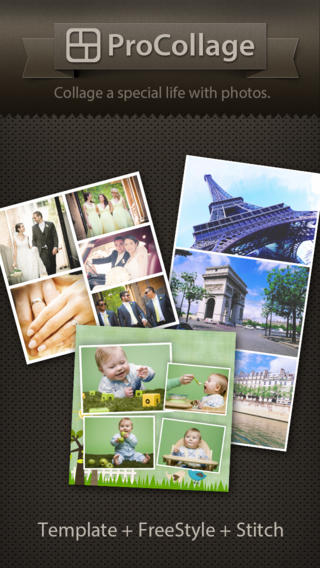
FREE today only – ProCollage – Photo Collage Maker & Photo Stitch Creator, a wonderful app for creating collages! With ProCollage you can easily make creative collages with your photos and/or pictures from the internet – basically, any images that you have saved in your camera roll/photo stream. This app is incredibly intuitive and easy to use. There are three collage modes to choose from – template collage, freestyle collage, and stitching photo. All modes support up to 9 photos. In all modes it’s easy to: flip and rotate photos, add/replace photos, add text (60 colors & patterns), customize borders, corners & backgrounds, and more.
There are SO many fun uses of this app for education. Teachers, use ProCollage to make a collage of a student’s work or a collage of the school year’s highlights. Add collages of what’s happening in your classroom to your class newsletter, website, or blog. Have students use ProCollage to introduce themselves at the start of the year. Send students on a scavenger hunt of geometric shapes then have them make a ProCollage of what they found. Add a ProCollage to a report or make a ProCollage representing the main character of a book, etc. The list is only limited by your imagination! I LOVE educational apps like this – open-ended with great potential for creativity! WOW!!

Download link: https://itunes.apple.com/us/app/procollage-photo-collage-maker/id593389475?mt=8&uo=4

0

Still Shot

still shot

Ever wish that you could capture a still shot from a video? Well now you can. 🙂

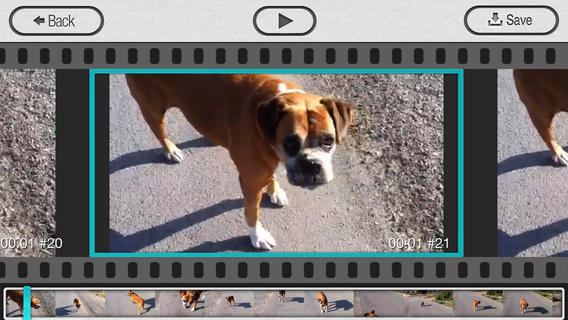
FREE today – Still Shot from the makers of Group Shot. This photography app can be used to catch the moment when your subject is on the move – perfect for kids and pets! It’s extremely easy to use – just load a video, choose your favorite frame, and save it to your camera roll. Your “still shot” will have the same resolution as the video. Once the picture has been saved, it can be printed, shared, pulled into another app, etc. There are so many ways to use this app in an educational setting. Freeze and save – scenes from play, moments from a field trip, segments of a demonstration, etc. Teachers/coaches can capture kids in action then analyze their movements frame by frame. Fabulous and FREE today!!

Download link: https://itunes.apple.com/us/app/stillshot/id520436425?mt=8&uo=4

0

Shadow Puppet

Shadow Puppet

Recently updated and still FREE – Shadow Puppet, a photography app which has been featured by Apple as one of the “Best New Apps” for over 6 moths!  Using this app, it’s easy to create “puppets” – recorded explanations of your photos. First you choose your photos and put them in the order. Then you talk about your pictures. Everything is recorded. Finished “puppets” can be shared via email, SMS, Facebook and/or Twitter. There are so many ways for everyone to use Shadow Puppet: to teach something new, to share adventures with friends, to record children talking about their experiences, to tell the story behind old family photos, etc.

The update has many new features. Now you can include video clips, add music, search the web for images, overlay text/stickers, and more! The FREE version of the app permits you to include up to 10 photos/video clips. For $1.99 you can get Puppet Essentials which allows you to add up to 100 items to each video and have access to more drawing & decorating tools. The update made this great app even better!

The classroom uses for this app are only limited by your imagination: Take pictures of a child’s work and have him/her explain it to parents. Send pictures and voice recordings of the class field trip. Have kids give a step-by-step explanation of what happened in a science experiment. Draw & sequence pictures to retell a story. Make a “talking timeline” by sequencing photos of historical events. Have kids use it to present mini reports on any subject. Have virtual “pet day” – kids bring in pictures/recordings of their pets. Because you can use anything saved to your photo library, you can explain photos from the web, artwork created in other apps, and so much more. The possibilities for using this educational app are endless. For more suggestions go to http://get-puppet.com/education. What a fabulous resource!!

Download link: https://itunes.apple.com/us/app/shadow-puppet/id700902833?mt=8&uo=4

0

Pocketbooth – the photobooth that fits in your pocket

pocketbooth

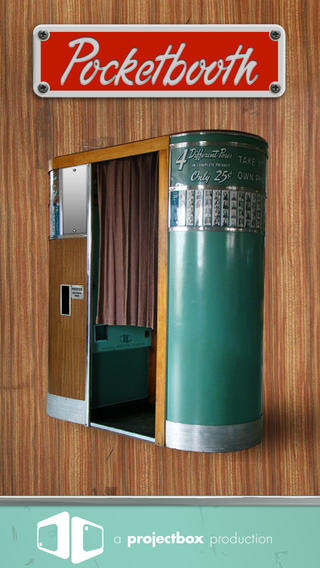
FREE today – Pocketbooth – the photobooth that fits in your pocket, an app that turns your iPhone/iPad into a 1950s-era vintage photobooth. Pocketbooth takes a series of photos (a few seconds apart) to create photo strips of your special events. The app includes five photo effects (1975, antique, B&W, color, sepia), two paper types, and two border styles. There are additional filters/borders available as in-app purchases. Pocketbooth can use either the front or the rear facing camera of your device. Photo strips can be shared via Facebook, Twitter, email, or they can be saved to your camera roll. They can  be printed on a wireless printer or you can have them professionally printed/mailed to your friends for an additional charge. Pocketbooth was chosen Starbuck’s App of the Week, featured as New and Noteworthy” by Apple, and listed as one of 2010’s Hottest Apps – iTunes Rewind. What a fabulous app to have for your next birthday party, family reunion, etc.

And teachers… how cool would it be to have a photobooth in your classroom? It would be perfect for taking pictures of special events – Dr. Seuss Day, St. Patrick’s Day, Halloween, Wacky Hair Day, Silly Hat Day, etc. The kids could help make the props. 🙂 It would also be great for special projects – animal reports (kids dress as their animal), biographies (kids dress as their person), the 100th day (kids dress as if they are 100 years old), etc. How fun!!

Download link: https://itunes.apple.com/us/app/pocketbooth-photobooth-that/id385145330?mt=8&uo=4

0

TED – TED conferences

Parents/Teachers – here is an app for you (and the kids)!

TED started in 1984 as a conference bringing together people from three worlds: Technology, Entertainment, and Design. It is now a nonprofit devoted to ideas worth spreading. Here is information on 2 apps that will bring the world of TED to the device of your choice!

TED - original

tedRiveting talks by remarkable people and FREE to the world. Connect with the official TED app for iPhone/iPad. Access more than 1,400 TEDTalk videos with more added every week! When you open the app, you will see a wide variety of featured talks – Where is Google going  next? by Larry Page, A new way to grow bone by Molly Steven, Teach teachers how to create magic by Christopher Emdin, and so on. There are about 60 talks to choose from. Click on a title that interests you to get additional information about that talk: the length of the talk, a short synopsis, related talks, and related tags. Then you can watch the talk, save it, bookmark it, or share it. The app permits you to browse the entire library at any time – even when you are offline. You can browse by tag or by language. TEDTalks are subtitled in over 100 languages!  You can create your own playlist or the app can create one for you based on your mood and how much time you have to listen. A fabulous resource for lifelong learners!!

TED - TED Conferences

And now, Ted has a new initiative for teachers and students called TED-Ed. Teachers can create lessons around any TED-Ed original, TED Talk, or YouTube video and/or start a TED-Ed Club in their school.

From their site: “TED-Ed aims to amplify the voices and ideas of teachers and students around the world. TED-Ed’s commitment to creating lessons worth sharing is an extension of TED’s mission of spreading great ideas. With this philosophy in mind, and with the intention of supporting teachers and sparking the curiosity of learners around the world, TED-Ed is the newest of TED’s initiatives.”

Connect to TED-Ed here: Lessons Worth Sharing | TED-Ed

0

ClassDojo

Class Dojo just added FREE messaging! A teacher can now send “direct” messages to individuals and/or “broadcast” messages. This great FREE app just got better!!

ClassDojo is a FREE & fabulous tool that helps improve classroom behaviors. Rewarding good behavior in real-time is easy – all it takes is a click. To use ClassDojo, you only need one device (computer, smart phone, a laptop, or a tablet) and an internet connection. It is very easy to set up. Each student on your class list is assigned a cute, monster-like avatar. Kids earn points for positive behaviors and lose points for negative behaviors. ClassDojo is also fully customizable so you can delete behaviors from the original list and/or add your own behaviors. As you use it, it automatically logs any data that you input. This data can be used to generate behavior reports to share with parents and administrators. How awesome is that? You can go into a meeting/conference with reports in hand! And now, parents can check online to see what kind of day their child is having.

If I were still in the classroom, I would enter my class list twice – once for data on work/study habits and the other for data on behaviors. I would make my habits/behaviors match exactly what was on my report cards. Then as I used the app, I would also be gathering data for my report cards. At the end of the grading period, I would just print out the date and enter it on the report cards – how easy!  I would also have the data (in a printed report) to be able to back up any grade on the card.  “As you can see Mrs. Doe, Jane only turned in her homework 56% of the time.”  Instant data would also be available for the RTI process, IEPs or any other team meeting on a child. What a powerful tool for teachers! An educational app that has the ability to positively impact the learning environment – LOVE it!!

Check out the website for more information: www.classdojo.com

Highly recommended !!

ClassDojo - Class Twist Inc

0

Brainfeed – Educational Videos for Kids

brain

FREE (with in-app purchases) – Brainfeed – Educational Videos for Kids, a collection of 1000+ educational videos for kids (7+), tweens, teens, and life-long learners. The videos in this collection were picked by a team of educators from around the globe. To be included in the app, the video had to be: under 10 minutes, documentary style, curriculum-based, entertaining & engaging, visually stimulating, age-appropriate, and child-friendly. The videos are categorized by topic: This is Your World, Tech & Design, English, Arts & Music, The Human Body, Social Studies, Math, and Make Your Future. I watched several videos (Yellowstone Super Volcano, The Evolution of Life on Earth, Fun with Fractals, and How the Brain Works) and enjoyed all of them. The free version includes more than 100 titles – a great  introduction to what the subscription ($14.99) has to offer. Teachers, this app could be a great source of video clips  to supplement your curriculum. You can contact team@brainfeed.org to request a discounted teachers’ version to use in the classroom. Parents, your kids (and you) can learn interesting things about the world in your home, on the road, or any place that has a 3G or wireless connection. And, new videos added each week to spark children’s curiosity about their world. What a great resource!

Download link: https://itunes.apple.com/us/app/brainfeed-educational-videos/id727189716?mt=8&uo=4

0

MyScript Calculator

myscript

Named by Apple as 1 of  10 Apps That WOW and FREE  – MyScript Calculator is an amazing app. It performs mathematical operations literally by hand! You write the problem … it solves the problem! The app is very simple to use. Just write the mathematical equation on the screen. MyScript technology converts the symbols and numbers to digital text and delivers the answers. It supports the following operations: basic operations (+, -, x, ÷, +/‒, 1/x), additional operations ( %, √, x!, |x|), powers/exponentials (ℯx, xy , x2), trigonometry, and more. Winner of the Mobile App Showdown at CES 2013, MyScript Calculator has been redesigned to work with iOS7. The update also allows automatic calculation to be disabled and replaced by a “calculate” button. Love this app – numbers have to be written somewhat legibly for it to work. 🙂

MyScript Calculator - Vision Objects

0

Shadow Puppet

Shadow Puppet

FREE for a limited time – Shadow Puppet, a photography app that was featured by Apple as one of the “Best New Apps” for 4 weeks in a row! Using this app, it’s easy to create “puppets” – recorded explanations of your photos. First you choose your photos and put them in the order. Then you talk about your pictures. Everything is recorded. Finished “puppets” can be shared via email, SMS, Facebook and/or Twitter. There are so many ways for everyone to use Shadow Puppet: to teach something new, to share adventures with friends, to record children talking about their experiences, to tell the story behind old family photos, etc.

And… the classroom uses for this app are only limited by your imagination: Take pictures of a child’s work and have him/her explain it to parents. Send pictures and voice recordings of the class field trip. Have kids give a step-by-step explanation of what happened in a science experiment. Draw & sequence pictures to retell a story. Make a “talking timeline” by sequencing photos of historical events. Have kids use it to present mini reports on any subject. Have virtual “pet day” – kids bring in pictures/recordings of their pets. Because you can use anything saved to your photo library, you can explain photos from the web, artwork created in other apps, and so much more. The possibilities for using this educational app are endless. What a fabulous resource!!

Download link: https://itunes.apple.com/us/app/shadow-puppet/id700902833?mt=8&uo=4