0

ABCmouse.com – Ham with Jam, Dan & Jan, Hen in the Pen, Big Pig & Little Pig, To Run is Fun, Big Bug & Little Bug

FREE for a limited time – 6 beginning reading apps!! These educational apps for the iPhone/iPad are from the ABC Mouse word family beginning reader series. I chose to downloaded The Hen in the Pen in order to review the series. Each story emphasizes words from a particular word family. There are also easy sight words in the stories. There are several ways that the books can be read: Read to Me, Read with Pause, I Can Read It, and Hear the Words. I really like the Hear the Words option. It allows the child to read alone but tap any word that he/she gets stuck on. There are parent tips on the title page that explain word families and sight words for beginning readers. There are also parent tips throughout the books. The illustrations are colorful and support the text so that kids can use picture clues as they read. The story lines are very simple. But, that is not a negative thing because these educational apps are more about the process of reading than the actual story. When my son was an early reader, he loved books like these because he could read them on his own. That alone makes them worth downloading – not to mention that they are FREE.

Common Core Standards met:

K.RF.3 – Know and apply grade-level phonics and word analysis skills in decoding words. c. Read common high-frequency words by sight (e.g., the, of, to, you, she, my, is, are, do, does). d. Distinguish between similarly spelled words by identifying the sounds of the letters that differ.

Recommended!

ABCmouse.com Ham and Jam - Age of Learning, Inc. Ham with Jam    ABCmouse.com Dan and Jan - Age of Learning, Inc. Dan and Jan

ABCmouse.com The Hen in the Pen - Age of Learning, Inc. Hen in the Pen     ABCmouse.com Big Pig and Little Pig - Age of Learning, Inc. Big Pig & Little Pig

ABCmouse.com To Run is Fun - Age of Learning, Inc. To Run is Fun   ABCmouse.com Big Bug and Little Bug - Age of Learning, Inc. Big Bug and Little Bug

0

ABCmouse.com – A-Z Music Videos

a to z

FREE – A to Z Music Videos. This educational app has 26 animated videos  – one for each letter of the alphabet. As kids watch the videos, they earn tickets to unlock other videos. There is also an option to purchase tickets to unlock videos more quickly. The videos are top-notch! They help children learn letter names and sounds AND develop vocabulary. Every video is produced in a different musical style, so kids are also introduced to a wide variety of musical genres. This app is a must-have for preschool, kindergarten, and first grade teachers – a perfect introduction to the letters of the alphabet!

Common Core Standards met:

  • K. RF.3 – Know and apply grade-level phonics and word analysis skills in decoding words. Demonstrate basic knowledge of one-to-one letter-sound correspondences by producing the primary sound or many of the most frequent sounds for each consonant. Associate the short sounds with common spellings (graphemes) for the five major vowels.

ABCmouse.com 26 A-Z Music Videos - Age of Learning, Inc.

0

MakeChange – Money counting math game for iPad

Make Change

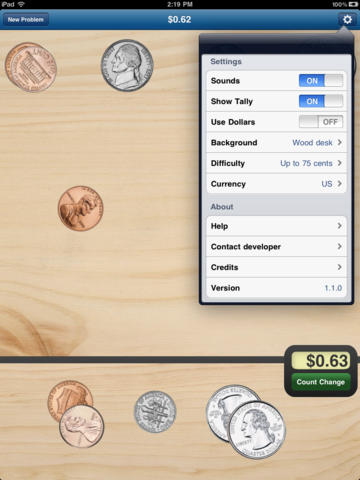
MakeChange – Money counting math game for iPad was FREE yesterday but is now back up to $1.99. This educational app provides great practice for kids learning to count money – U.S. dollars, Canadian dollars, or Euros. KIds are given an amount and they must count out money to reach that amount. They can use bills & coins or coins only. Coins can be flipped with a tap so that both sides can be learned. There is an option to have the amount tallied to guide kids who are just learning. The level of difficulty can also be set – from ‘Up to 10 cents” to “Up to 5 dollars.” There are 9 background choices. The piggy bank one is my favorite – really cute. 🙂 This educational app teaches counting money not making change (as the name implies). Regardless, it gives kids lots of much-needed practice!

Common Core Standard:

  • 2.MD.8 – Solve word problems involving dollar bills, quarters, dimes, nickels, and pennies, using $ and ¢ symbols appropriately.

Download link: https://itunes.apple.com/us/app/makechange-money-counting/id368509937?mt=8&uo=4

0

The Opposites

FREE again – The Opposites for the iPhone/iPad. Designed for kids 7+, this educational app requires the matching of increasingly difficult pairs of opposite words. There are two sections of the app: dictionary and play. In the dictionary section, words are listed next to their opposites. To learn the meaning, students just tap on the word and a definition appears. There are 10 levels with 100+ words per level. In the play section, words are pronounced by a boy or a girl as they appear in bubbles and float towards the top of the screen  Kids are to tap pairs of opposites as they appear – which makes the words turn a color then pop. The goal is to match 12 sets of opposites  – which completes the level. A bonus round then appears in which the student has 20 seconds to match up an entire  board full of opposites. This app starts off simply but becomes quite challenging in the later levels. It could be used for differentiating a lesson and/or for helping students grow their understanding of antonyms.

Common Core Standards met:

  • 4.L.5 – Demonstrate understanding of figurative language, word relationships, and nuances in word meanings. c.Demonstrate understanding of words by relating them to their opposites (antonyms) and to words with similar but not identical meanings (synonyms).
  • 5.L.5 – Demonstrate understanding of figurative language, word relationships, and nuances in word meanings. c. Use the relationship between particular words (e.g., synonyms, antonyms, homographs) to better understand each of the words.

Recommended!

The Opposites - Mindshapes Limited

0

Math Splat

Math Splat

FREE for a limited time – Math Splat, a really fun mental math game. Kids are challenged to answer 21 math questions as fast as they can. A colorful paint splat covers each correct answer. Each game is timed and limited to 3 incorrect answers. Each incorrect answer adds a 3 second penalty to the final time. Kids will  love trying to beat their best time! The student can choose between easy, medium, and hard questions which makes this game great for differentiating instruction. Have kids graph their scores so that they can see themselves improve and in the process they will also learn to collect data. This educational app is perfect for getting kids to practice their facts in a fun way!

Common Core Standards met:

  • 1.OA.6 – Add and subtract within 20, demonstrating fluency for addition and subtraction within 10.
  • 2.OA.2 – Fluently add and subtract within 20 using mental strategies. By end of Grade 2, know from memory all sums of two one-digit numbers.
  • 3.OA.7 – Fluently multiply and divide within 100, using strategies such as the relationship between multiplication and division or properties of operations. By the end of Grade 3, know from memory all products of two one-digit numbers.

Download link: https://itunes.apple.com/us/app/math-splat/id495477324?mt=8&uo=4

0

Virtual Math Manipulatives

Geoboard by The Math Learning Center (a nonprofit organization dedicated to K – 12 education) is a FREE educational app that turns your iPhone/iPad into a virtual geoboard. Geoboards can be used as tools to teach mathematical concepts such as polygons, perimeter, area, line segments, angles, congruent shapes, symmetry, fractions, etc. Shapes are created by stretching bands on the geoboard’s pegs. There are 5 colors of bands in the iPhone version and 8 in the iPad version. There is also a tool to fill in shapes. On the iPad version, you can switch from the standard 25 peg board to a 150 peg board to create more complex shapes. This is a great app with the potential to be used in so many ways.

Highly recommended for your virtual math tool kit!

Geoboard, by The Math Learning Center - Clarity Innovations

FREE for the iPad, Virtual Manipulatives, an educational app that features math manipulatives for teaching fractions, decimals, and percents. Included are tiles/circles divided into halves, thirds, fourth, fifths, sixths, eighths, tenths, and 12ths AND their corresponding decimals and percentages! The manipulatives are color coded across the settings so that 1/2 is blue as is .50 and 50%. Kids drag tile pieces onto the work area to compare fractions/decimals/percentages. In the settings you can change from tiles to circles, make the pieces transparent, and hide the numbers on the pieces. Completed work can be easily saved to photos. Finding equivalent fractions has never been so slick – WOW!!

Common Core Standards

  • 3.NF.3 – Explain equivalence of fractions in special cases, and compare fractions by reasoning about their size. Understand two fractions as equivalent (equal) if they are the same size, or the same point on a number line.
  • 4.NF.1 – Explain why a fraction a/b is equivalent to a fraction (n × a)/(n × b) by using visual fraction models, with attention to how the number and size of the parts differ even though the two fractions themselves are the same size. Use this principle to recognize and generate equivalent fractions.

Highly Recommended!

Virtual Manipulatives! - ABCya.com

equivalent fractions

From the National Council of Teachers of Mathematics comes a FREE educational app called Equivalent Fractions. Kids create equivalent fractions by dividing and shading squares or circles. Circles can be divided into 24ths. Squares can be divided into 144ths. In the play mode, a fraction is shown and kids must create 2 additional fractions that are equivalent. All 3 fractions must have different denominators. The app also places the fractions on a number line – a great visual for comparing! There is also a “build your own” mode which would be fabulous to use for guided exploration & practice. Kids could also use this section as a virtual manipulative when working independently. This app is an excellent resource for the classroom !!

Common Core Standards met:

  • 3.NF.3 – Explain equivalence of fractions and compare fractions by reasoning about their size. Understand two fractions as equivalent (equal) if they are the same size, or the same point on a number line. Recognize and generate simple equivalent fractions, e.g., 1/2 = 2/4, 4/6 = 2/3). Explain why the fractions are equivalent, e.g., by using a visual fraction model.

Highly Recommended!

Equivalent Fractions - National Council of Teachers of Mathematics

0

BuzzMath Middle School

Buzz Math

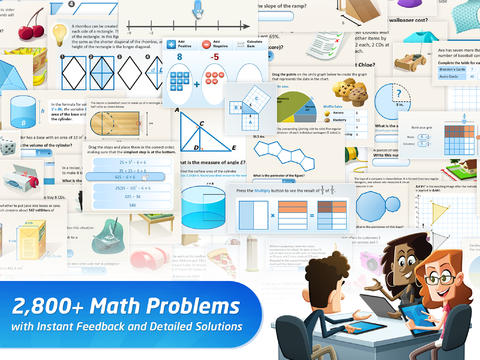
FREE with an option to upgrade to premium features – BuzzMath Middle School, a math practice app for 6 – 8th graders based on the Common Core State Standards. All you need to use this educational app is an iPad 2 or higher and an internet connection. The app has 2800+ problems arranged by topic – number sense & operations, fractions & decimals, geometry, measurement, data & probability, patterns, algebraic equations, and more. Parents/Homeschoolers can register their kids individually or teachers can register their classes. Teachers who register are given a class code to distribute to their students. Once students register with the teacher’s code, the teacher can make a class assignments. The teacher also has the ability to make assignments specific to individual needs. And, as the students work, their data is being tracked and reported! Wow, individualized practice across all of the math strands, all of the work graded and reported – what’s not to love? 🙂

0

Tellagami

Telegami

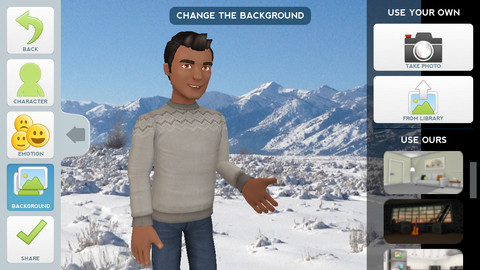
Currently FREE, Tellagami (rhymes with origami) is a unique storytelling app. Short stories called gamis are easy to create. First you select and customize a character by choosing his/her skin tone, eye color, hair color, and clothing. Then you choose an emotion – happy, sad, surprised, angry, scared, silly. Next you choose a background from the app, from your photo library, or create one by using your camera. You are now ready to create your gami. You can record your gami in you own voice or choose the text button to type in what your character will say  – the limit is 450 characters. Gamis can be shared via email, messaging, Facebook, or Twitter.

This educational app is fabulous!! Its uses are only limited by your imagination!! Kids can use gamis to introduce themselves at the beginning of the year. They can customize gamis to look like themselves and be reporters, scientists, teachers, etc. They can create the character (and setting) from a book they are reading. They can message or email a parent to explain what they are learning in class. Teachers could use gamis as interactive exit slips. The list is endless. Kids will LOVE creating gamis!

Tellagami ™ - Tellagami Inc.

0

The Opposites

FREE again – The Opposites for the iPhone/iPad. Designed for kids 7+, this educational app requires the matching of increasingly difficult pairs of opposite words. There are two sections of the app: dictionary and play. In the dictionary section, words are listed next to their opposites. To learn the meaning, students just tap on the word and a definition appears. There are 10 levels with 100+ words per level. In the play section, words are pronounced by a boy or a girl as they appear in bubbles and float towards the top of the screen  Kids are to tap pairs of opposites as they appear – which makes the words turn a color then pop. The goal is to match 12 sets of opposites  – which completes the level. A bonus round then appears in which the student has 20 seconds to match up an entire  board full of opposites. This app starts off simply but becomes quite challenging in the later levels. It could be used for differentiating a lesson and/or for helping students grow their understanding of antonyms.

Common Core Standards met:

  • 4.L.5 – Demonstrate understanding of figurative language, word relationships, and nuances in word meanings. c.Demonstrate understanding of words by relating them to their opposites (antonyms) and to words with similar but not identical meanings (synonyms).
  • 5.L.5 – Demonstrate understanding of figurative language, word relationships, and nuances in word meanings. c. Use the relationship between particular words (e.g., synonyms, antonyms, homographs) to better understand each of the words.

Recommended!

The Opposites - Mindshapes Limited

0

Wubbzy The Superhero

Wubby The Superhero

FREE today – Wubbzy The Superhero, a storybook app featuring Wonder Wubbzy and Flower Power Daizy. This app was developed by Cupcake Digital in partnership with the producers of the Emmy® Award-winning Nick Jr. TV series Wow! Wow! Wubbzy!®.

 Kids join Wubby and Daizy as they help Ms. Bookbinder the librarian, rescue a poodle from a tree, and find a lost key to the city. Along the way kids will discover animations & interactivity on every page! The app also has 4 educational games and sing-along music videos. The Grown Up’s Corner has 2 sets of questions about the story. The questions address literal understanding of the story (thin questions) as well as extended meaning (fat questions).  Also included in the Grown-Up Corner is information about the Common Core Standards addressed by this app which are predominately kindergarten standards. Print-outs and activities to supplement the story are available online at cupcakedigital.com. What is not to love about this educational app? – Cute story packed with interactivity, great message about helping others, educational games, sing-along videos, standards-based, and a guide for adults!

Download link: https://itunes.apple.com/us/app/wubbzy-the-superhero/id616726246?mt=8&uo=4