0

4 FREE Poetry Apps from the International Reading Association

Planning a unit for poetry month? The International Reading Association has some great FREE apps. acrosticAcrostic Poem helps kids learn about and write acrostic poetry. An acrostic poem uses a word as its subject. The word is written vertically so that each letter begins a line of the poem. All lines of the poem describe or relate to the subject word. The poem does not have to rhyme. Acrostic poems are easy to write and great for having kids introduce themselves, Mother’s Day, Father’s Day, etc.

The app is perfect for a classroom where devices are shared because each student creates his/her own profile. The app explains an acrostic poem and gives an example. Then the student enters his/her topic word. The app advances to a brainstorming page where the student can enter ideas to help write the poem. Then the app advances to a “write your poem” page. The brainstormed words are displayed to help. Work can be saved in progress – reinforcing the elements of the writing process. Finished poems can be saved to the device’s camera roll or emailed. This app mirrors ReadWriteThink’s popular acrostic poem web-based interactive: http://www.readwritethink.org/classroom-resources/student-interactives/acrostic-poems-30045.html. Students can send their editable poems to an email address and then open them in the online tool!

Download link: https://itunes.apple.com/us/app/acrostic-poem/id724841119?mt=8&uo=4 diamanteDiamante Poem helps kids learn about and write diamante poetry. Diamante poems can be written about one central topic or two opposing topics such as day/night. A diamante poem has seven lines and is written in the shape of a diamond. The first and last lines are just one word – nouns. The second and sixth line are two words – adjectives. The third and fifth lines are three words – “ing” words. And the middle line has four+ words – nouns or prepositional phrases. Diamante poems are great for teaching parts of speech and synonyms/antonyms.

The app is perfect for a classroom where devices are shared because each student creates his/her own profile. The app explains a diamante poem and gives two examples – a synonym poem and an antonym poem. Then the student enters his/her beginning and ending topic words. The app advances to a “write your poem” page where the student enters his/her words. The app reminds students which kids of words should be used on each line. Work can be saved in progress – reinforcing the elements of the writing process. Finished poems can be saved to the device’s camera roll or emailed. This app mirrors ReadWriteThink’s popular diamante poem web-based interactive: http://www.readwritethink.org/classroom-resources/student-interactives/diamante-poems-30053.html. Students can send their editable poems to an email address and then open them in the online tool!

Download link: https://itunes.apple.com/us/app/diamante-poem/id724953313?mt=8&uo=4 theme poemTheme Poem helps kids learn about and write theme poetry. A theme poem is sometimes called a shape poem. It is written in the shape of what the poem is about. For example, the apple poem is written in the shape of an apple.
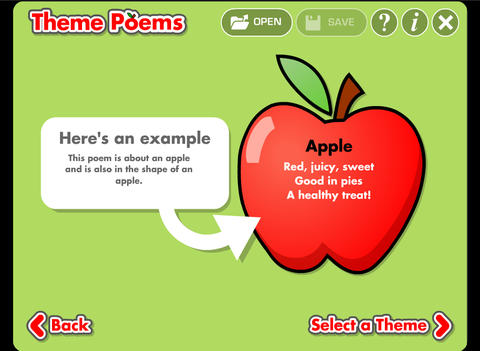
Again, this app is perfect for a classroom where devices are shared because each student creates his/her own profile. The app gives an example of a theme poem. Then the student selects one of 5 themed files – nature, school, sports, celebrations, shapes. Each themed file has 5 – 8 shapes for students to choose. Once a shape is chosen, the app advances to a “think of words” page for the student to brainstorm his/her ideas. Then the app advances to a “write your poem” page. The brainstormed words are displayed to help. Work can be saved in progress – reinforcing the elements of the writing process. Finished poems can be saved to the device’s camera roll or emailed. This app mirrors ReadWriteThink’s popular theme poem web-based interactive: http://www.readwritethink.org/files/resources/interactives/theme_poems/. Students can send their editable poems to an email address and then open them in the online tool!

Download link: https://itunes.apple.com/us/app/theme-poem/id724978211?mt=8&uo=4 haiku Haiku Poem helps kids learn about and write Haiku poetry. Haiku is a Japanese poem of three lines with a very specific syllable structure  – 5 syllables, 7 syllables, 5 syllables. Haikus are traditionally about nature but they can be about any subject as long as they follow the syllable structure.
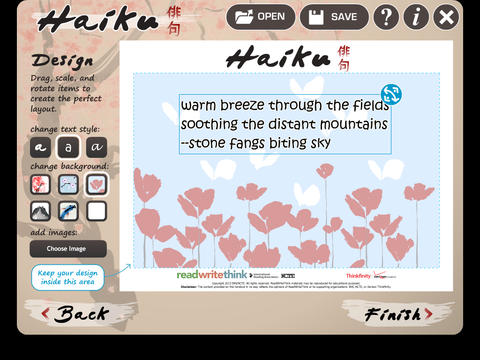
Again, this app is perfect for a classroom where devices are shared because each student creates his/her own profile. The app encourages students to go on a haiku walk for inspiration. Then, they brainstorm words for their poem. As they choose words to compose their poems, students are reminded to pay attention to the poem’s structure. The app also gives helpful tips about creating a shift in the poem’s imagery. Once a poems is complete, a student can customize its design by choosing a style of text and background. The finished poem can be saved to the device’s camera roll or emailed. This app mirrors ReadWriteThink’s popular theme poem web-based interactive:http://www.readwritethink.org/classroom-resources/student-interactives/haiku-poem-interactive-31074.html. Students can send their editable poems to an email address and then open them in the online tool!

Download link: https://itunes.apple.com/us/app/haiku-poem/id810338702?mt=8&uo=4

0

Swapsies Sports

sportsFREE for a limited time – Swapsies Sports. This educational app features 10 mini games based on sports: football, basketball, baseball, soccer, hockey, golf, tennis, boxing, cycling and skateboarding. There are two different modes: a dress-up game and an interactive quiz. In the dress-up game mode, kids mix-and-match hats, tops, & bottoms to find the correct combination. Kids will have lots of fun matching and mismatching the clothes on 6 different characters. Once the clothes are properly matched, a fun activity is unlocked for each sport. The quiz mode is age-appropriate. Kids are asked to make connections, reason, and classify. Nicely done for little ones!

Download link: https://itunes.apple.com/us/app/swapsies-sports/id716848871?mt=8&uo=4

0

Petting Zoo

Petting

On sale for $.99 – Petting Zoo, an adorable app for kids and adults who are kids at heart. 🙂 This educational app combines the charm of Christoph Niemann’s humorous animations with state of the art technology as one scene morphs into the next. The app is simple to use – just swipe and tap the 21 animals to see how they react. The results are delightfully surprising! Kids will discover what an elephant would do in the bathroom, if a dog can breakdance, how monkeys play soccer, and more. This app is suitable for kids of all languages because there are no spoken words. It’s perfect for discussion and predicting what will happen next. It would also be great for story writing. A really fun storybook app – creative, silly, and sure to delight!

Download link: https://itunes.apple.com/us/app/petting-zoo-animal-animations/id602773895?mt=8&uo=4

0

Nighty Night Apps on Sale for $.99

nighty night On sale for $.99 – sweet bedtime apps for little your little ones.

Over 3 million downloads and counting… Nighty Night is the perfect go-to-sleep app for kids 1 – 4. The app has it all – cute animals, sleepy lullaby music, great narration, and fabulous artwork. The artwork is beautifully done by Heidi Wittlinger, an Oscar nominated artist. The story is perfect for your child’s bedtime ritual. Kids help to put 7 sleepy animals to bed by clicking off the lights around the farm thus setting the mood for their own bedtime. 🙂 Six additional animals can be added to the story with in-app purchases. The story can be switched from the winter version to the summer version and it can be changed to 12 different languages – English, Dutch, French, German, Italian, Japanese, Portuguese, Russian, Chinese, Spanish, Swedish, and Turkish. This educational app is really lovely and it has been successful internationally.  It won App of the Year 2011 in the “books category” in Germany & the U.S. It also reached #1 in iPad books in the US, Brazil, Spain, Denmark, Portugal, Germany, Sweden, South Africa, Australia Switzerland and Austria! Love this app!!

Nighty Night! HD – Bedtime stories – Story book for children - Shape Minds and Moving Images GmbH nighty night circus Nighty Night Circus is also on sale for $.99. In this app kids help put eight circus animals to bed by switching off the lights or blowing out candles. Each circus animal wants to show his tricks off before going to sleep – super cute! The app has all of the same great features as the original – cute animals, sleepy lullaby music, great narration, and fabulous artwork done by Heidi Wittlinger. It’s no wonder that Nighty Night Circus is on Apple’s Best of 2014 list!

Download link: https://itunes.apple.com/us/app/nighty-night-circus-bedtime/id931936670?mt=8&uo=4

0

YouTube Kids

youtube kids

Just released on February 23 and FREE – YouTube Kids, a child-geared version of YouTube. The app is designed for little ones to navigate – big buttons, easy scrolling, and instant full-screen. Kids can enjoy their favorites such as Sesame Street, Peppa Pig, and Reading Rainbow. They can find videos about things that interest them – science, music, crafts, etc. The app has four sections: shows, music, learning, and explore. I especially love the learning section which includes great programming from TedEd, Khan Academy, WhizKid Science, PBS Kids, and more. There is also a search option which is great for teachers looking for a video clip to enhance a lesson. Google is focused on kids’ safety so they’ve worked to build YouTube Kids to be a family friendly place. Parents can quickly notify YouTube if they see anything questionable. Even though this app greatly limits a child’s access to inappropriate content, supervision of your child’s online activity is always a good idea. 🙂

Download link: https://itunes.apple.com/us/app/youtube-kids/id936971630?mt=8&uo=4

0

Fiete – A Day on a Farm

Fiete farm FREE for a limited time – Fiete – A Day on a Farm, a cute educational app for preschoolers. Kids help Fiete and friends collect eggs, harvest carrots, clean pigs, pick apples, shear sheep, milk cows, and more. The app is completely intuitive making it suitable for young kids of any language. The farm scenes are sequenced from morning through evening. Each scene features cute animals, great animations and fun background sounds. Nicely done!

Download link: https://itunes.apple.com/us/app/fiete-a-day-on-a-farm/id916273469?mt=8&uo=4

0

Coding for Kids – 3 FREE & Fabulous Apps

Why teach kids to code? Coding is what makes computer software work. Understanding the basics of programming will help your child be prepared for the jobs of the future. And, in the process your child will be using logic, solving problems, and having fun! Check out these apps and try coding yourself. Then try it with your students. We are living in creative, exciting times – be part of it!! 🙂

Here are fabulous FREE resources to use:

scratch jrFREE app – ScratchJr is designed to teach kids how to code their own stories and/or games. Specifically developed for younger children, ScratchJr is based on Scratch programming language (http://scratch.mit.edu) which is used by millions around the world. The app includes an introduction video and examples of sample projects. Once the add button is pressed, the app opens to a page with a friendly looking cat in a blank square surrounded by programming tools. Then the fun begins. Kids snap together programming blocks to make the cat move – forward, backward, right, left, hop, etc. They can choose to add a setting to their story/game by selecting one of the twenty-eight different backgrounds. They can add additional characters and/or objects to their scenes. They can make their character talk either by using word bubbles or by recording their own voices. They can control timing, speed, and the sequencing of events. The app can be simple but it becomes more complex as kids start to figure things out. For example, they can learn to program multiple characters to move in sequence, move together, etc. Kids can also add themselves to the story. They simply choose one of the fifteen “faceless” characters then add in their own face using the iPad’s built-in camera. How cool is that? As kids learn to program, they are also learning to problem solve, design projects, and be creative on the computer. LOVE this app!

Download link: https://itunes.apple.com/us/app/scratchjr/id895485086?mt=8&uo=4

kodableFREE for iPad – Kodable, an introduction to programming for kids 5+. The fuzzFamily has crashed their spaceship on Smeeborg. Kids help the fuzzes through Smeeborg’s mazes by creating drag & drop instructions for them to follow. As they code, kids need to remember that fuzzes follow instructions exactly as they are written. After coding the instructions, kids hit play to watch the fuzzes roll through the maze. They are rewarded with stars, coins, and extra members of the fuzzFamily if they are successful. This educational app comes with 45 free levels which become progressively more difficult. Additional content is available as an in-app purchase.

Download link: https://itunes.apple.com/us/app/kodable/id577673067?mt=8&uo=4

Hopscotch HD

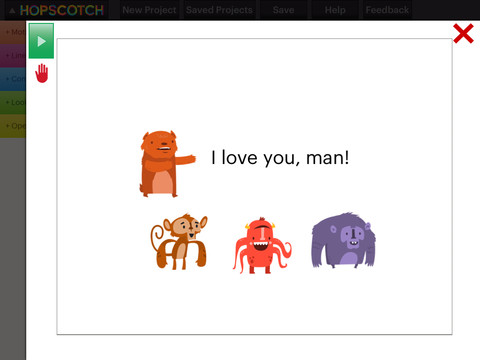
Hopscotch HD is an educational app that teaches kids how to program their own games and animations! Introduce kids to computer science with this app. 🙂 Kids drag and drop “method blocks” into scripts. When they are done, they can press play to see their code in action! Why teach kids coding? According to the developer – there will be about 1.4 million computer jobs by 2020 and only 400,000 computer science students. Many coders first fell in love with coding when they were  8-12 year old children. Hopscotch is based on a visual programming language named Scratch which was developed by MIT. It promotes STEM education (science, technology, engineering and math) in a fun way – by making coding kid-friendly!  LOVE it!!

Hopscotch HD - Hopscotch Technologies

0

Wee Kids Math

wee kids math

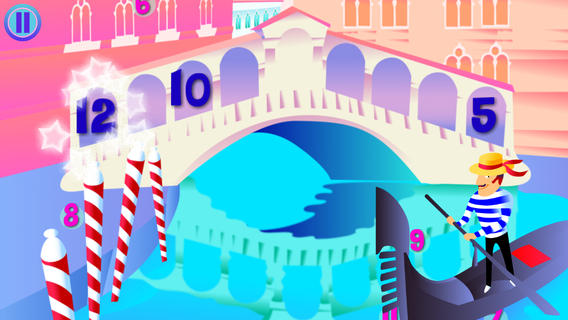
FREE for a limited time – Wee Kids Math, an educational app that features a variety of activities for beginning math students. There are 20 activities in all – each activity presented in a new brightly colored scene. Kids can order numbers on a caterpillar, match number words/numerals/pictures on ocean liners, practice addition on a farm, practice subtraction in the ocean, etc. A definite strength of this app is its variety. Number skills (0 – 20) included are matching, counting, ordering, identifying equalities & inequalities, identifying > & <, adding, and subtracting. The app jumps right into each activity without any sort of instructions. Most of the activities are fairly intuitive. But if kids can’t figure what they are supposed to do, they can go back & press the help button. Then they will find visual instructions for each activity. This app would be a good one to use WITH your child. There is no progress tracking so you will want to see what your child understands. 🙂

Download link: https://itunes.apple.com/us/app/wee-kids-math/id638457112?mt=8&uo=4

0

Mr. Sandman

mr sandmanFREE for a limited time – Mr. Sandman is a beautiful, interactive bedtime story for the iPad/iPhone. The story does a nice job of addressing a common fear of childhood. It is about a young boy who is afraid of the dark. The sandman appears and the boy drifts off to sleep. In his dream, he meets an owl who shows him wonderful & magical things about the dark. The app features incredibly beautiful artwork and dreamy music – perfect to set the mood for the story. But the most wonderful thing about this app is the way that it transitions from page to page. Kids move the story forward in a variety of unique ways. They help the sandman sprinkle the sand, say “Shhh” to calm the frogs, scratch the owl’s belly, touch the moon, and more. Each page transitions to the next page in a uniquely delightful way. And, the app can be switched different languages – nine in all. Mr. Sandman is wonderful – don’t miss it! 🙂

Download link: https://itunes.apple.com/us/app/mr.-sandman/id511273529?mt=8&uo=4

0

My Story – Book Maker for Kids

story maker

One of my favorite writing apps – FREE today.

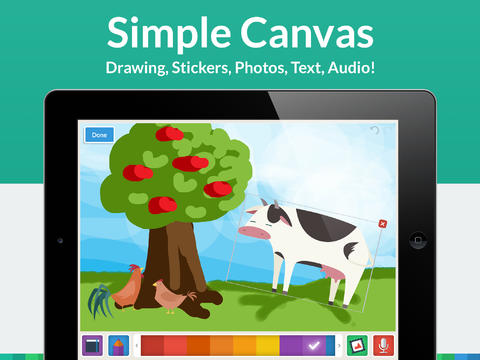
My Story – Book Maker for Kids is a great writing app for the iPad. The cost is normally $3.99 but it Is currently FREE. Kids can easily create then read an unlimited number of their own e-books using this app. Upgraded in March, the design has been simplified to make it easier for writers of all ages. Kids create their books one page at a time by typing in their text and adding their artwork. They can use a variety of mediums for their art –  stickers, drawings (with pencils, paints or markers), camera photos, or pictures saved in the photo library. They can also record themselves reading their books. Finalized stories can read directly from the app, be published to iBooks, and/or shared via email with anyone who owns an iPhone or iPad.

Watch the video and learn more about this app here: My Story – Book Maker for Kids.

What a great medium for your child to share his/her life experiences with grandparents and other loved ones – take photos of your day (at the zoo, in the park, etc.) and let your child narrate the experience! The voice recordings remain intact when the book is shared. The words can be typed in after your child has provided the narration so that kids learn that the words in books are really just “talk written down.”

My Story is perfect for the classroom because teachers can add multiple authors and sync it across multiple iPads! Kids can share their stories with friends through iBooks, write and present digital reports, keep ongoing vocabulary books and/or journals etc. What a fantastic tool to encourage writing! Don’t miss this one!!

My Story - Book Maker for Kids - HiDef Web Solutions