0

5 Math Manipulatives for your Digital Toolkit

Five FREE apps for your virtual math toolkit. 

Geoboard by The Math Learning Center (a nonprofit organization dedicated to K – 12 education) is a FREE app that turns your iPhone/iPad into a virtual geoboard. Geoboards can be used as tools to teach mathematical concepts such as polygons, perimeter, area, line segments, angles, congruent shapes, symmetry, fractions, etc. Shapes are created by stretching bands on the geoboard’s pegs. There are 5 colors of bands in the iPhone version and 8 in the iPad version. There is also a tool to fill in shapes. On the iPad version, you can switch from the standard 25 peg board to a 150 peg board to create more complex shapes. This is a great app with the potential to be used in so many ways.

Geoboard, by The Math Learning Center - Clarity Innovations

FREE for the iPad, Virtual Manipulatives contains math manipulatives for teaching fractions, decimals, and percents. Included are tiles/circles divided into halves, thirds, fourth, fifths, sixths, eighths, tenths, and 12ths AND their corresponding decimals and percentages! The manipulatives are color coded across the settings so that 1/2 is blue as is .50 and 50%. Kids drag tile pieces onto the work area to compare fractions/decimals/percentages. In the settings you can change from tiles to circles, make the pieces transparent, and hide the numbers on the pieces. Completed work can be easily saved to photos. Finding equivalent fractions has never been so slick – WOW!!

Common Core Standards

  • 3.NF.3 – Explain equivalence of fractions in special cases, and compare fractions by reasoning about their size. Understand two fractions as equivalent (equal) if they are the same size, or the same point on a number line.
  • 4.NF.1 – Explain why a fraction a/b is equivalent to a fraction (n × a)/(n × b) by using visual fraction models, with attention to how the number and size of the parts differ even though the two fractions themselves are the same size. Use this principle to recognize and generate equivalent fractions.

Virtual Manipulatives! - ABCya.com

equivalent fractions

From the National Council of Teachers of Mathematics comes a FREE app called Equivalent Fractions. Kids create equivalent fractions by dividing and shading squares or circles. Circles can be divided into 24ths. Squares can be divided into 144ths. In the play mode, a fraction is shown and kids must create 2 additional fractions that are equivalent. All 3 fractions must have different denominators. The app also places the fractions on a number line – a great visual for comparing! There is also a “build your own” mode which would be fabulous to use for guided exploration & practice. Kids could also use this section as a virtual manipulative when working independently. This app is an excellent resource for the classroom !!

Common Core Standards met:

  • 3.NF.3 – Explain equivalence of fractions and compare fractions by reasoning about their size. Understand two fractions as equivalent (equal) if they are the same size, or the same point on a number line. Recognize and generate simple equivalent fractions, e.g., 1/2 = 2/4, 4/6 = 2/3). Explain why the fractions are equivalent, e.g., by using a visual fraction model.
Equivalent Fractions - National Council of Teachers of Mathematics

counting board

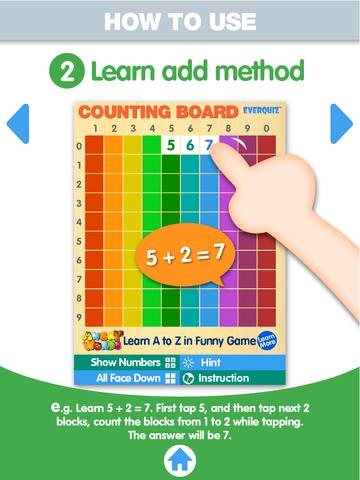
Another FREE app is Counting Board HD, a colorful number grid that can be used to help kids learn basic number concepts. The app is advertised as being suitable for 2 to 4 year olds but it can also used with older students. I frequently used number grids with third graders. Number grids help kids see patterns and visualize math concepts. With younger children, the app can be used for counting to 100 – by ones, fives, tens. Younger kids can also learn basic addition and subtraction by using the app to count up or count back. With older kids, number grids can be used to teach: greater than and less than, how to find missing addends, place value concepts, skip counting, and more! The app can be used with the numbers showing or hidden and the pronunciation can be on or off. The app simple to use, visually appealing, and useful for so many math lessons. I love this app! It’s so much easier than dragging out the laminated number grids and counters. 🙂

Common Core Standards met:

  • K.CC.1. Count to 100 by ones and by tens.
  • K.CC.2. Count forward beginning from a given number within the known sequence (instead of having to begin at 1).
  • 1.NBT.5. Given a two-digit number, mentally find 10 more or 10 less than the number, without having to count; explain the reasoning used.
  • 1.NBT.6. Subtract multiples of 10 in the range 10-90 from multiples of 10 in the range 10-90 (positive or zero differences), using concrete models or drawings and strategies based on place value, properties of operations, and/or the relationship between addition and subtraction; relate the strategy to a written method and explain the reasoning used.
  • 3.OA. 9. Identify arithmetic patterns (including patterns in the addition table or multiplication table), and explain them using properties of operations.

Download link: https://itunes.apple.com/us/app/counting-board/id450751745?mt=8&uo=4

number lineNumber Line, by the Math Learning Center is a fantastic FREE app that will help kids visualize number patterns and understand number operations. The app is well-designed with several useful features. The number line can be set by ones, twos, fives, tens, twenty-fives, and hundreds. It can also be customized to show multiples of any whole number from 1 to 100. This feature is perfect for skip counting and/or for visualizing multiplication. The app permits kids to add and manipulate forward & backward jumps – a great feature for teaching addition & subtraction. This feature also helps kids visualize multiplication as repeated addition of the same number and division as repeated subtraction of the same number. Teachers are able to hide or reveal numbers on the number line. This feature can be used to challenge kids to apply what they know in order to figure out the missing number/numbers. Teachers can also use this feature to teach kids how to solve more difficult patterns that are missing several numbers; such as 4, __, __, 16.  Kids can use the drawing tools to show what they know. They can write equations and expressions with the text tool. They can screen shot their work and use it as an exit slip after a lesson. Add this one to your virtual toolkit today – “seeing math” helps kids understand it. 🙂

Download Link: https://itunes.apple.com/us/app/number-line-by-math-learning/id751816884?mt=8&uo=4

0

Toca Boca Apps – $.99 sale

I LOVE Toca Boca apps!! They make learning what it should be – fun, creative, and joyful! 11 of their apps are on sale for $.99 each. These apps are usually $2.99. toca 2 Toca Hair Salon, one of my favorite educational apps for toddlers! Kids go into the salon to groom 6 different characters. They can use the tools in the salon to style their hair – cut it, comb it, make it grow, shave it, color it, etc. Great sound effects are also included in this fun app. Kids or parents can take a photo of the finished creation and save it to their camera roll. If parents wish, creations may be posted on the Toca Boca Facebook page. The developers have also built-in options to turn off sounds, pictures, and news. What a great springboard for creative writing – give a character a whole new look and write a story to go with it. What a fun writing activity for a Wacky Hair Day!! Download link: https://itunes.apple.com/us/app/toca-hair-salon/id426382105?mt=8&uo=4 toca band

Rock on… with Toca Band. This educational app for the iPhone/iPad encourages kids to explore music as they mix beats & sounds together to produce a hit song. The 16 characters in this app each have their own sound and rhythm. Kids drag different combinations of performers on stage to create their own musical band. How a character plays depends on where he/she is placed on the stage. Characters can also be chosen to give a solo performance. Even the names of the characters are fun: Bang Bang Chef on the drums, Dancy Nancy on the piano, Shaky McBones on the maracas,etc. Another great educational app from a developer that makes learning what it should be – fun, creative, and joyful!

Download link: https://itunes.apple.com/us/app/toca-band/id521640648?mt=8&uo=4

toca mini

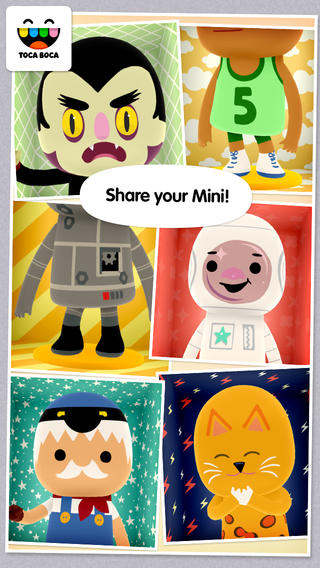
Toca Mini, another creative app from Toca Boca. With this app kids can create silly monsters, imaginary animals, or playful friends. Toca Minis can become whatever you want them to be. To start, kids add colors to the mini’s body, arms, & legs. Then they add details using a wide variety of stamps – bows, hats, buttons, polka dots, etc. Next, kids add facial features which brings their minis to life – they, ooh, ah, sneeze, smile, blink, and more. Kids can also add hair, eyebrows, beards, mustaches, etc. With 60 different colors and 78 different stamps, there are thousands of possible combinations. When kids finish creating their own unique mini, they can take a snapshot and save it to the camera roll. Then they can print it, share it, pull it into a story writing app, and more. Creating a mini could be a great springboard for creative writing – descriptive paragraphs, a story about their created character/creature. Toca Boca has created another open-ended, creative app!

Download link: https://itunes.apple.com/us/app/toca-mini/id718082838?mt=8&uo=4 Toca House Toca House, another fantastic app for toddlers from Toca Boca. Kids help 5 friends do household chores – iron, sweep, sort mail, plant the garden, etc. There are 19 mini games in all. Kids will love the fun sounds that accompany the tasks! If your child likes the other Toca Boca apps, you’ll want to add this one to your collection today because these apps do not go on sale or free that often. This is another great app from a developer that makes learning fun. Download link: https://itunes.apple.com/us/app/toca-house/id495680460?mt=8&uo=4 toca kitchen On sale  – Toca Kitchen, another fun educational app from Toca Boca. Kids take to the kitchen to cook for four lovable characters. In the frig they will find 12 different foods that they can prepare 180 different ways. They can slice, blend, boil, fry, microwave, and/or mix the foods together. They can also add seasoning to the food; but they need to be careful not to add too much. Once the food is prepared they plate it up, serve it to the character, and wait for a reaction. Kids will learn which foods each character prefers in a fun creative way. I love the questions and conversations that Toca Boca apps inspire. It’s no wonder that this app was a Gold Winner of the Parent’s Choice Awards in 2012. Teachers – use this app to inspire creative writing. Write stories or poems about being a cook and the preferences of your consumers. Or, you could have kids compare and contrast the food preferences of the different characters on a graphic organizer. This app also inspires conversation about healthy eating. There are lots of possibilities for learning while having fun!

Download link: https://itunes.apple.com/us/app/toca-kitchen/id476553281?mt=8&uo=4 toca store Toca Store turns your iPhone or iPad into play store for your preschooler and a friend with this app. This app permits your child to choose which items to sell (34 choices), set prices for the items, invite a friend to shop, count money, bag the items, etc. It’s a very cute simulation that teaches: taking turns, cooperation, and basic counting. Toca Boca apps are very popular and usually sell for $1.99 – 2.99. Toca Store is on sale today. 🙂

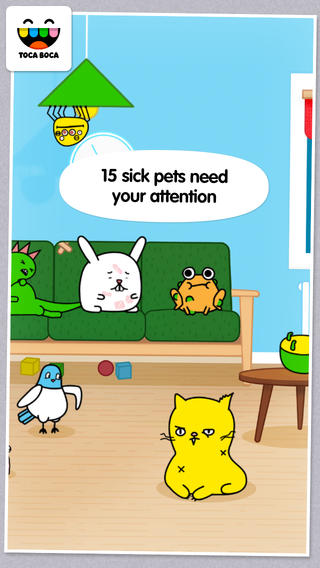
Download link: https://itunes.apple.com/us/app/toca-store/id442705759?mt=8&uo=4 toca petToca Pet Doctor is another creative app for preschoolers from Toca Boca. The app guides kids (ages 2 – 6) through activities that teach them to care and feel for animals. Fifteen animals need some tender loving care. Kids come to their rescue in a variety of ways. They help to clean & medicate Rascal’s ear, flip over Tarzan the upside down turtle, untie the knotted worm, and more. After the animals are cured, kids feed them and they go back to sleep. If your child likes the other Toca Boca apps, you’ll want to add this one to your collection today. These apps do not go on sale or free that often. Another great app from a developer that makes learning fun. 🙂 Download link: https://itunes.apple.com/us/app/toca-pet-doctor/id808108897?mt=8&uo=4 Toca BuildersAlso $.99  – Toca Builders, another wonderfully creative app from Toca Boca. Kids (ages 5+) create things with the help of 6 builder friends: Blox, Cooper, Vex, Stretch, Connie, and Jum-Jum. Each builder has unique skills which kids can control with simple gestures. The builders help move, stack, drop, spray, smash, paint, & lift blocks as kids create/construct new objects.The educational app also has a snapshot feature and an autosave feature to share & save the world that your child has created. If your child can imagine it, he/she can build it with the help of the Toca Builders – creative fun for your budding engineer/builder!

Download link: https://itunes.apple.com/us/app/toca-builders/id652077009?mt=8&uo=4

Also on sale: Toca Train: https://itunes.apple.com/us/app/toca-train/id521640355?mt=8&uo=4

Toca Cars: https://itunes.apple.com/us/app/toca-cars/id689936776?mt=8&uo=4

Toca Tailor: https://itunes.apple.com/us/app/toca-tailor/id556430416?mt=8&uo=4 Enjoy!!

0

Grandmas Loves Bugs

grandma

FREE for a limited time – Grandmas Loves Bugs, another adorable educational app for preschoolers by Fairlady Media. Kids join dancing grandma in her garden to learn all about bugs. The app features 10 educational games – all thematically linked. Kids will love helping grandma in her garden and they will be learning math & reading as they do. The app also features short videos of real bugs in action. Some of the educational content in the games include: colors, observation (spot the difference), numbers (recognition & counting), letters (upper & lower case), memory, problem solving, and vocabulary. This app is nicely done for little ones – educational content covered in a fun way with a dancing Grandma to celebrate a job well-done!

Download link: https://itunes.apple.com/us/app/grandma-loves-bugs/id666526099?mt=8&uo=4

0

Musical Paint

Musical Paint

FREE for a limited time – Musical Paint a creative, multi-sensory app for the iPhone/iPad. Kids are welcomed into an art museum by a friendly blue walrus with a French accent. There is also an ensemble of lively musicians (underwater animals) at the museum. Kids are invited to paint a picture on a canvas. Each color is a musical tone so when the kids paint, they are painting music! If the child chooses to save his/her painting, it is hung in the museum – a very cute feature. They even get to sign their work. Kids can also share their paintings via email. What fun it would be for kids to send Grandma a picture of their masterpiece that is in a museum!! The app also has a lesson plan section for teachers & parents. Nicely done app for younger kids!!

Musical Paint - Building Blocks Media LLC

0

Toca Pet Doctor

toca petFREE for a limited time – Toca Pet Doctor, another creative app from Toca Boca. The app guides kids (ages 2 – 6) through activities that teach them to care and feel for animals. Fifteen animals need some tender loving care. Kids come to their rescue in a variety of ways. They help to clean & medicate Rascal’s ear, flip over Tarzan the upside down turtle, untie the knotted worm, and more. After the animals  are cured, kids feed them and they go back to sleep. If your child likes the other Toca Boca apps, you’ll want to add this one to your collection today. These apps do not go on sale or free that often. Another great app from a developer that makes learning fun. 🙂

Download link: https://itunes.apple.com/us/app/toca-pet-doctor/id808108897?mt=8&uo=4

0

Coding for Kids – 3 FREE & Fabulous Apps

Why teach kids to code? Coding is what makes computer software work. Understanding the basics of programming will help your child be prepared for the jobs of the future. And, in the process your child will be using logic, solving problems, and having fun! Check out these apps and try coding yourself. Then try it with your students. We are living in creative, exciting times – be part of it!! 🙂

Here are fabulous FREE resources to use:

scratch jrFREE app – ScratchJr is designed to teach kids how to code their own stories and/or games. Specifically developed for younger children, ScratchJr is based on Scratch programming language (http://scratch.mit.edu) which is used by millions around the world. The app includes an introduction video and examples of sample projects. Once the add button is pressed, the app opens to a page with a friendly looking cat in a blank square surrounded by programming tools. Then the fun begins. Kids snap together programming blocks to make the cat move – forward, backward, right, left, hop, etc. They can choose to add a setting to their story/game by selecting one of the twenty-eight different backgrounds. They can add additional characters and/or objects to their scenes. They can make their character talk either by using word bubbles or by recording their own voices. They can control timing, speed, and the sequencing of events. The app can be simple but it becomes more complex as kids start to figure things out. For example, they can learn to program multiple characters to move in sequence, move together, etc. Kids can also add themselves to the story. They simply choose one of the fifteen “faceless” characters then add in their own face using the iPad’s built-in camera. How cool is that? As kids learn to program, they are also learning to problem solve, design projects, and be creative on the computer. LOVE this app!

Download link: https://itunes.apple.com/us/app/scratchjr/id895485086?mt=8&uo=4

kodableFREE for iPad – Kodable, an introduction to programming for kids 5+. The fuzzFamily has crashed their spaceship on Smeeborg. Kids help the fuzzes through Smeeborg’s mazes by creating drag & drop instructions for them to follow. As they code, kids need to remember that fuzzes follow instructions exactly as they are written. After coding the instructions, kids hit play to watch the fuzzes roll through the maze. They are rewarded with stars, coins, and extra members of the fuzzFamily if they are successful. This educational app comes with 45 free levels which become progressively more difficult. Additional content is available as an in-app purchase.

Download link: https://itunes.apple.com/us/app/kodable/id577673067?mt=8&uo=4

Hopscotch HD

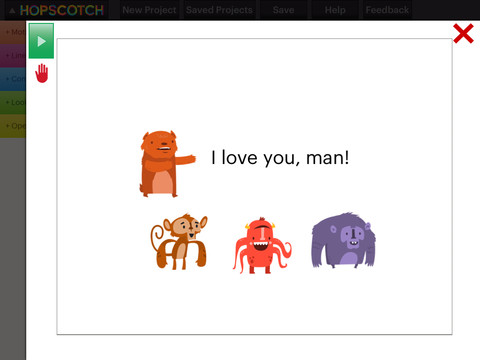
Hopscotch HD is an educational app that teaches kids how to program their own games and animations! Introduce kids to computer science with this app. 🙂 Kids drag and drop “method blocks” into scripts. When they are done, they can press play to see their code in action! Why teach kids coding? According to the developer – there will be about 1.4 million computer jobs by 2020 and only 400,000 computer science students. Many coders first fell in love with coding when they were  8-12 year old children. Hopscotch is based on a visual programming language named Scratch which was developed by MIT. It promotes STEM education (science, technology, engineering and math) in a fun way – by making coding kid-friendly!  LOVE it!!

Hopscotch HD - Hopscotch Technologies

0

Earthlapse

earthlapse

FREE for a limited time – Earthlapse, an app that turns your iPad/iPhone into a window aboard the International Space Station. The app comes with 7 views of Earth (aurora borealis, a tropical storm, Canadian arm of the ISS, the cupola of the ISS, Earth & clouds, Canada & northern USA, and aurora australis) captured by NASA astronauts. It also has 8 relaxing space soundtracks. Love the music! When you touch the screen, you can control what you see with your finger. You can also enable a clock and/or worldwide weather – a nice feature if you want to use it as a screen saver. It would be great to Airplay this app on a big screen in your classroom when kids were doing creative writing about space, living on the ISS, etc. 🙂

Download link: https://itunes.apple.com/us/app/earthlapse/id522003167?mt=8&uo=4

0

My Monster Mayhem

FREE for a limited time – My Monster Mayhem, an interactive e-book for the iPhone/iPad which normally sells for $4.99. It is the story of a little girl and all of the monsters in her house (imagination) that prevent her from doing what her mother asks her to do – turn off lights, not waste dental floss, etc. What her mother doesn’t seem to understand is that she is really a hero!

The storyline is cute and there are animations/interactivity found on almost every page – kids pop bubbles from the bathtub, play tug of war with the Broncus Dentus, etc. Kids also collect hidden monsters on almost every page to unlock puzzles at the end of the story. The “existence” of the monsters is left open for discussion/interpretation – perfect for kids that are a bit older. Thanks for another great story, Digital Leaf!

My Monster Mayhem - Digital Leaf

0

ScratchJr

scratch jrFREE app – ScratchJr is designed to teach kids how to code their own stories and/or games. Specifically developed for younger children, ScratchJr is based on Scratch programming language (http://scratch.mit.edu) which is used by millions around the world. The app includes an introduction video and examples of sample projects. Once the add button is pressed, the app opens to a page with a friendly looking cat in a blank square surrounded by programming tools. Then the fun begins. Kids snap together programming blocks to make the cat move – forward, backward, right, left, hop, etc. They can choose to add a setting to their story/game by selecting one of the twenty-eight different backgrounds. They can add additional characters and/or objects to their scenes. They can make their character talk either by using word bubbles or by recording their own voices. They can control timing, speed, and the sequencing of events. The app can be simple but it becomes more complex as kids start to figure things out. For example, they can learn to program multiple characters to move in sequence, move together, etc. Kids can also add themselves to the story. They simply choose one of the fifteen “faceless” characters then add in their own face using the iPad’s built-in camera. How cool is that? As kids learn to program, they are also learning to problem solve, design projects, and be creative on the computer. LOVE this app!

Download link: https://itunes.apple.com/us/app/scratchjr/id895485086?mt=8&uo=4

0

Spelling Test by FunExam.com

spelling test

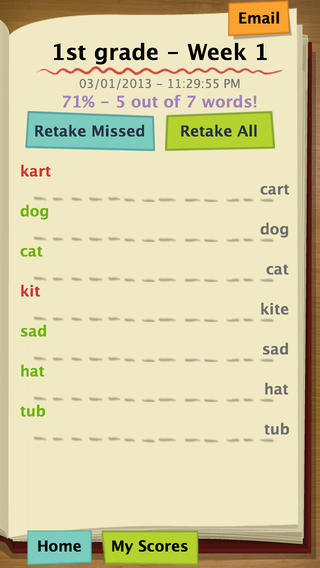
FREE for a limited time  – Spelling Test by FunExam.com, a cool tool for improving spelling test scores. To use this app you must create a free account by submitting your email and a password. Then you can begin creating your tests. First you name your test – short a words, days of the week, first grade/week 1, sight words/list 1, etc. I would make the name match the lesson so that your data is more meaningful. Then you type in the words – the app is case-sensitive. If you enter a proper noun, the app is going to mark it wrong without a capital letter. 🙂 Then you record the words. The app gives you enough time to also include the words’ meanings or sentences using the words – perfect for homonyms. That’s it – easy!!

Once your test has been created, kids can practice. They simply click on the test they would like to take. The words are pronounced and the kids spell them by typing them in. The app grades the test as you go  – correct words are shown in green, incorrect words in red. The correct spelling of each word is also shown. When the test is complete, the final score is shown in two ways – 5/7 and 71%. Kids are given the option of retaking the missed words or retaking all of the words. The results can be emailed. This app is fantastic – easy to use and it tracks progress. Kids would love creating their own test at the beginning of the week. Teachers could use it for phonics lessons, to teach homonyms, and more. Older students could us this app for science vocabulary, to learn foreign language words, etc. There are lots of applications (beyond spelling) for this app. Just use a bit of imagination – LOVE it!!

Download link: https://itunes.apple.com/us/app/spelling-test-free-by-funexam.com/id426041393?mt=8&uo=4