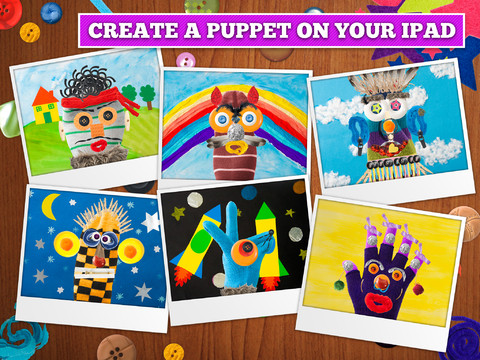
FREE again for a limited time (normally $2.99) –  Puppet Workshop. Kids use their creativity to turn a sock or a glove into a virtual puppet using this educational app. They first choose their sock or glove. Then they create the puppet’s eyes, nose, mouth, & hair from an assortment of buttons, ribbons, strings, etc. The puppet can be placed on a background from the app or a background from your camera roll. Or… your child can also create his/her own background! You can also save a picture of your child’s puppet to your camera roll or it ca be stored in the application. The app includes 20 different socks & gloves, 150+ enhancements, and 18 different backgrounds – enough “stuff” for a whole lot of creating!! Very fun. 🙂
Tag Archives: educational apps for kids
TallyTots Counting School Edition – Learn the 123s with Numbers, Count-alongs and Fun Games for Kids – Spinlight Studio
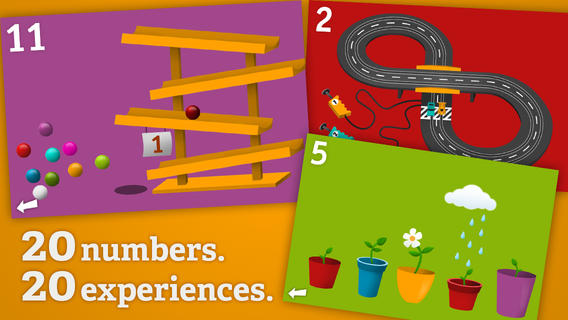
FREE for a limited time –Tally Tots, an educational app that teaches kids to count to 20. The app features 20 interactive mini-games that make learning numbers and counting fun. Kids race 2 cars, make bubbles in 6 colors, place 10 shapes into a puzzle, feed a chipmunk 19 acorns, etc. The app features something unique for each number with lots of positive verbal encouragement along the way. Tally Tots is the perfect choice for young kids learning to count!
Download link:Â https://itunes.apple.com/us/app/tallytots/id424070269?mt=8&uo=4
Math Splat
FREE again for a limited time – Math Splat, a really fun mental math game. Kids are challenged to answer 21 math questions as fast as they can. A colorful paint splat covers each correct answer. Each game is timed and limited to 3 incorrect answers. Each incorrect answer adds a 3 second penalty to the final time. Kids will  love trying to beat their best time! The student can choose between easy, medium, and hard questions which makes this game great for differentiating instruction. Have kids graph their scores so that they can see themselves improve and in the process they will also learn to collect data. This educational app is perfect for getting kids to practice their facts in a fun way!
Common Core Standards met:
- 1.OA.6 – Add and subtract within 20, demonstrating fluency for addition and subtraction within 10.
- 2.OA.2 – Fluently add and subtract within 20 using mental strategies. By end of Grade 2, know from memory all sums of two one-digit numbers.
- 3.OA.7 – Fluently multiply and divide within 100, using strategies such as the relationship between multiplication and division or properties of operations. By the end of Grade 3, know from memory all products of two one-digit numbers.
Download link:Â https://itunes.apple.com/us/app/math-splat/id495477324?mt=8&uo=4
What Time is is Mr. Wolf?
What Time is it Mr. Wolf? (by Teacher’s Pet) is FREE for a limited time. Make sure you get the correct one – there is another app by the same name by Joy Preschool. This educational app features a Wilfred the Wolf who spins the clock on the face of the moon 10 times. Kids have to choose the correct answer and drag it under the moon. The wolf giggles and says “well done” if the answer is correct. The app’s setting allows you to choose what interval of time you would like your child to work on – hours, half hours (half past), quarter hours, 10 minutes, or 5 minutes. Answers can be displayed in words, digitally, or mixed. You can also set the number of answers per question.
The Common Core Standards expect first graders to tell time to the 1/2 hour, second graders to tell time in 5 minute intervals (AM and PM), and third graders to tell time to the minute. So, this app would work well for first and second graders but not third graders. I like that this app includes practice with the words  – half past, quarter after, quarter to. It is a difficult concept for some kids to understand. Nicely done!!
Common Core Standards met:
- 1.MD.3 –Â Tell and write time in hours and half-hours using analog and digital clocks.
- 2.MD.7 –Â Tell and write time from analog and digital clocks to the nearest five minutes,
using a.m. and p.m.
Phoster
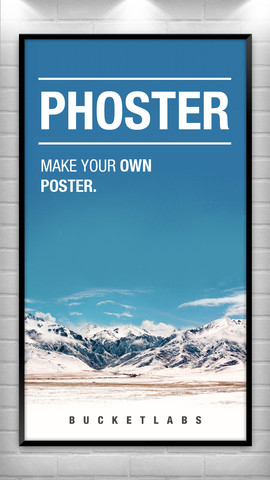
FREE again for a limited time – Phoster, a wonderful app for creating your own posters and invitations. This app has been selected by Apple as App of the Week in Canada, Japan, and the United States. Phoster makes creating your own posters easy! There are 197 free templates to use and they come in a wide variety of designs. You can add photos from your photo libraries or take new photos with your device’s camera. Background colors, fonts, font colors, brightness, saturation, size, position, etc. are all changeable. Your final creation will really be one of a kind. There are also many options for sharing your creation – Facebook, Twitter, Tumblr, and email.
Teachers can use this app in the classroom. Kids could use Phoster to advertising a book that they just read. They could make a travel poster for a place they just studied. Kids could create math posters – geometric shapes found in nature, posters of things that are symmetrical, etc.  Posters could be created as a visual props for reports. There are so many creative uses for this app – download it and get started!
Petting Zoo
FREE again – Petting Zoo, an adorable app for kids and adults who are kids at heart. 🙂 This educational app combines the charm of Christoph Niemann’s humorous animations with state of the art technology as one scene morphs into the next. The app is simple to use – just swipe and tap the 21 animals to see how they react. The results are delightfully surprising! Kids will discover what an elephant would do in the bathroom, if a dog can breakdance, how monkeys play soccer, and more. This app is suitable for kids of all languages because there are no spoken words. It’s perfect for discussion and predicting what will happen next. It would also be great for story writing. A really fun storybook app – creative, silly, and sure to delight!
Download link:Â https://itunes.apple.com/us/app/petting-zoo-animal-animations/id602773895?mt=8&uo=4
Small Science Experiments HD AND Small Chemistry Experiments HD
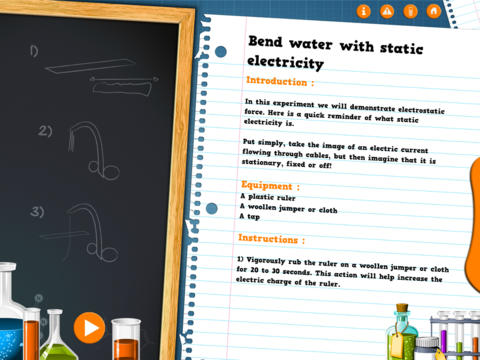
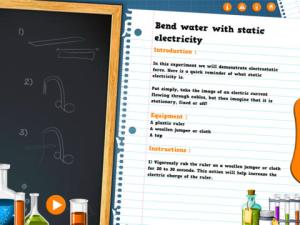
FREE again for a limited time – Small Science Experiments HD. This educational app features fun, easy science experiments for kids to do at home. Each experiment is written up with 4 parts: introduction, equipment, instructions, and explanation. The experiments are also demonstrated in step-by-step videos. There are a total of 25 experiments. Some examples are: make an engine with a candle, turn a tea bag into a rocket, extract DNA from a pear, make a mini jet boat from a chemical reaction. As you can tell from the titles, these experiments need to be done under the supervision of an adult. A warning to that effect is included in the app. The app also includes a quiz with a limited number of multiple choice questions such as: Who invented the first electric battery? and What was the first name of Einstein? Personally, I would skip the quiz. I think kids would benefit more from journaling about their experiments – what they observed, what they learned, etc. Check it out for your budding scientist!
Download link:Â https://itunes.apple.com/us/app/small-experiments-hd/id586218241?mt=8&uo=4
Also FREE – Small Chemistry Experiments HD. This educational app features more fun & easy experiments for kids to do at home. Just like Small Science Experiments HD, each experiment in this app is written up with 4 parts: introduction, equipment, instructions, and explanation. The experiments are also demonstrated in step-by-step videos. There are a total of 10 experiments. Some examples are: making magic ink, dissolving an eggshell, making a soap powered boat. These experiments are also meant to be done under the supervision of an adult. This app also includes a short quiz. Again, I would recommend that kids journal about their experiments rather than take the quiz. I love that these apps encourage adults and kids to do the experiments together – how fun!  🙂
Download link: https://itunes.apple.com/us/app/small-chemistry-experiments/id689598627?mt=8&uo=4
Toca Band
Rock on… with Toca Band – FREE again!  This educational app for the iPhone/iPad encourages kids to explore music as they mix beats & sounds together to produce a hit song. The 16 characters in this app each have their own sound and rhythm. Kids drag different combinations of performers on stage to create their own musical band. How a character plays depends on where he/she is placed on the stage. Characters can also be chosen to give a solo performance. Even the names of the characters are fun: Bang Bang Chef on the drums, Dancy Nancy on the piano, Shaky McBones on the maracas,etc. Another great educational app from a developer that makes learning what it should be – fun, creative, and joyful!
Highly recommended!
ClassDojo
Class Dojo just added FREE messaging! A teacher can now send “direct” messages to individuals and/or “broadcast” messages. This great FREE app just got better!!
ClassDojo is a FREE & fabulous tool that helps improve classroom behaviors. Rewarding good behavior in real-time is easy – all it takes is a click. To use ClassDojo, you only need one device (computer, smart phone, a laptop, or a tablet) and an internet connection. It is very easy to set up. Each student on your class list is assigned a cute, monster-like avatar. Kids earn points for positive behaviors and lose points for negative behaviors. ClassDojo is also fully customizable so you can delete behaviors from the original list and/or add your own behaviors. As you use it, it automatically logs any data that you input. This data can be used to generate behavior reports to share with parents and administrators. How awesome is that? You can go into a meeting/conference with reports in hand! And now, parents can check online to see what kind of day their child is having.
If I were still in the classroom, I would enter my class list twice – once for data on work/study habits and the other for data on behaviors. I would make my habits/behaviors match exactly what was on my report cards. Then as I used the app, I would also be gathering data for my report cards. At the end of the grading period, I would just print out the date and enter it on the report cards – how easy! Â I would also have the data (in a printed report) to be able to back up any grade on the card. Â “As you can see Mrs. Doe, Jane only turned in her homework 56% of the time.” Â Instant data would also be available for the RTI process, IEPs or any other team meeting on a child. What a powerful tool for teachers! An educational app that has the ability to positively impact the learning environment – LOVE it!!
Check out the website for more information:Â www.classdojo.com
Highly recommended !!
Lulu in Polynesia
FREE today – Lulu in the Polynesia, an interactive storybook in English, French, and Portuguese. Lulu and her cat Zazou are taking a trip around the world in this series of books about travel/other cultures. Kids join them on their second adventure as they crisscross Polynesia in a double canoe. They will learn all about the Polynesian culture as they participate in a variety of activities: making tropical flower necklaces, preparing a Tahitian salad, catching coconut crabs, racing canoes, and more! Kids can also click on the characters to hear them speak, look for the little pink bird on every page, and play games as they journey around the islands. The app includes a map that shows where they have traveled. It also permits kids to go back to a favorite page or a favorite game.
 At the end of their adventure, kids can make postcards personalized with their own photos. I love the idea of this series – exposing kids to different cultures around the world. What a fun educational app for kids 3 – 10!
Download link:Â https://itunes.apple.com/us/app/lulu-in-polynesia/id510098538?mt=8&uo=4