
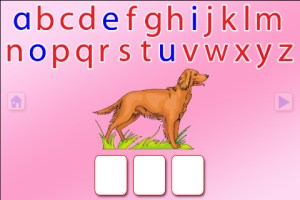
Moveable Alphabet option from ABC Spelling Magic
Wow!! Preschool University has 12 phonics/spelling apps available for FREE again. There are links to all below. I have them grouped by the skills that they teach and from easiest to most difficult. The first group teaches letter sounds.
- ABC Magic Phonics – initial letter sounds, 1 picture for each letter

- ABC Magic 2 – initial letter sounds, 4 pictures for each letter
- ABC Magic 3 Line Match – Kids apply what they know about sounds by matching. There are 2 modes: matching 2 pictures with the same beginning sounds or matching letters to a picture that starts with that sound.
- ABC Magic 4 – Kids are given a letter and they must find pictures of 3,6,or 9 items that begin with that sound.
- ABC Magic 5 Letter Sound Matching – Kids match sounds in 2 modes: picture to letter or letter to picture. As kids become more advanced, you can increase their number of choices (4, 6, or 9) and increase the number of matches per round (5,10,15,20,or 25).
- ABC Magic 6 – is the same as Sound Beginnings (follows #8).
- ABC Magic 7 Memory Match – A matching game with 2 options: match letter to letter or match picture to picture. Letter sounds and picture names are pronounced with the option of turning the sounds off. Grids of 12, 16, or 20 are available.
- ABC Magic 8 Sound Matching – This app is an extension of ABC Magic 7. It’s another matching game with 2 options: letter to picture having that beginning sound or picture to another picture with the same beginning sound. Letter sounds and picture names are pronounced with the option of turning the sounds off. Grids of 12, 16, or 20 are available.
- Sound Beginnings – This app is the most advanced of the letter sound teaching apps. It is called sound beginnings but actually teaches beginning, middle, and ending sounds. There are two options: a picture to letter and letter to picture. As kids become more advanced, you can increase their number of choices (3,4, or 5) and increase the number of matches per round (5,10,15,20,or 25). Awesome practice for beginning readers!!
The second group of apps uses letter sounds to spell words that phonetically regular. There are 2 ways to use each of these apps. Word Jumble provides the child with the letters of the word and the child puts them in order. Moveable Alphabet (the more difficult option) has the entire alphabet across the top of the page and the child must find the correct letters to spell the word. If a child touches a picture, the app reads the word. If a child touches a letter, the app gives the sound for that letter. Each vowel is taught in isolation but there is also a shuffle option which provides mixed practice. Vowels are printed in blue and consonants are in red so you can reinforce the CVC (consonant, vowel, consonant) pattern.
- ABC Spelling Magic Short Vowels – teaches short vowels
- ABC Spelling Magic 2 Consonant Blends – teaches consonant blends and consonant clusters
- ABC Spelling Magic 3 Blends & Syllables – GREAT practice spelling multi-syllable words
- Sentence Reading Magic – Kids built 2 or 3 words sentences using phonetically regular words.
Common Core Standards met:
- K. RF.3 – Know and apply grade-level phonics and word analysis skills in decoding words. Demonstrate basic knowledge of one-to-one letter-sound correspondences by producing the primary sound or many of the most frequent sounds for each consonant. Associate the short sounds with common spellings (graphemes) for the five major vowels.
These educational apps from Preschool University provide good practice for preschoolers and early readers!!
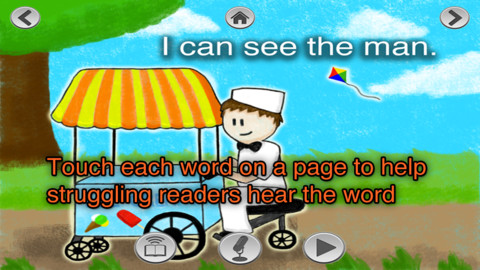
Currently $2.99 – Super Readers, an animated storybook app for early readers! This educational app uses the Dolch sight words in 10 vocabulary controlled stories at 5 different reading levels: kindergarten, beginning first, middle first, end of first, and beginning second. Kids can choose to have the stories read to them with automatic text highlighting or they can touch individual words to have them read. Another great feature – kids can record themselves reading the book and then play it back. What a wonderful confidence builder for little ones trying to build their fluency!!
Common Core Standards met:
- K.RF.3 – Know and apply grade-level phonics and word analysis skills in decoding words. c. Read common high-frequency words by sight (e.g., the, of, to, you, she, my, is, are, do, does).
Download link: https://itunes.apple.com/us/app/super-readers-dolch-sight/id560348568?mt=8&uo=4
 Listed as “New & Noteworthy” in August 2013, Learn with Homer is an educational reading app for kids 3 – 6. Its FREE trial download includes multiple stories and lessons with additional content available through in-app purchases. The app was updated on February 5, 2015. Learn with Homer now includes 50+ reading skills that help get kids ready for kindergarten and first grade.
Homer, a gray pigeon, resides in an interactive world designed to help kids learn to read. The fun starts in the Hat Shop where kids have photos taken in the “thinking caps” of their choice. Kids then proceed to a carousel which features every part of the app: Story Time, Learn to Read, Discover the World, Draw a Picture, Songs & Rhymes, Record Your Voice, and U.S. Presidents. Kids choose where to begin their reading adventure. The Learn to Read lessons teach phonemes (sounds) in sequence, then words, and then sentences. These lessons provide a sequential, step-by-step reading program. The Story Time section is divided into categories – Homer stories, poetry, folktales, first readers. It includes some free stories with many more offered as in-app purchases. Discover the World is a series of adventures in science, history, art, etc. designed to increase kids’ basic knowledge and vocabularies. The drawing & recording tools help kids develop their expressive skills. There is also a parent website to track children’s progress and/or download printables & book recommendations. This educational app seems to have it all – a well-designed, comprehensive approach to learning to read with real kid appeal!
Download link: https://itunes.apple.com/us/app/learn-homer-reading-educational/id601437586?mt=8&uo=4

Currently $2.99 – Gappy’s First Words. This educational app has beginning readers constructing 200+ three-letter words – 174 of the words following the CVC pattern. There are also 37 three-letter sight words included. Kids start with basic letter and sound identification then progress to making words. As they work through the app, kids earn parts to redesign Gappy’s house – with over 700 possible combinations. Parents can disable the music, change letters from upper case to lower case, and control the number of word lists used in the settings. I like that the app varies which letters (beginning, middle, end) of the words are missing in the easy levels. In the medium level, two letters are missing and in the hard level, all letters are missing. Kids are gradually learning to spell – nicely done for little readers. 🙂
Download link: https://itunes.apple.com/us/app/gappys-first-words/id614840334?mt=8&uo=4
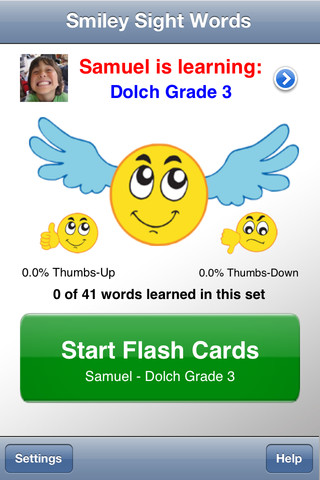 Currently $1.99 – Smiley Sight Words. This educational app teaches kids 1,600 common sight words compiled from high frequency lists such as Dolch, Fry, Pinnell-Fountas, UK, and others. Why learn sight words? Over half of the words we read each day are sight words! For early readers, this percentage is much greater. Many of these words do not follow the rules of phonics and/or cannot be represented by pictures. In order to read fluently, students should learn to read these words “by sight.”
The app is very simple to use. First enter the students’ names and pictures. In the settings you can enter up to 40 students – perfect for a classroom teacher or an intervention specialist! Next you choose a list of words for each child to work on. There are 40 sets of Smiley Words (the 1000 most frequently used words), 18 sets of Dolch words, 10 sets of Fry words, 10 sets of UK words, 12 sets of AU color-coded words, plus 11 additional sets (upper case letters, lower case letters, number words, color words, etc.). There is also the option of making customized lists by mixing and matching words from other lists within the app. The app is ready to use! It displays one flashcard at a time. Tap the word to hear an American-English pronunciation. Then rate the ability to read the word with a thumbs up or a thumbs down. To be proficient, 3 thumbs up need to be collected for each word! The app generates a progress report at the end of the session which can be saved to photos. Once saved, it can be printed or emailed. The progress report is stated positively – Thumbs up % Pretty slick! This app makes it easy for teachers to provide individualized practice and keep track of their students’ progress. 🙂
Download link: https://itunes.apple.com/us/app/smiley-sight-words/id361006388?mt=8&uo=4

Currently $2.99… Word Wizard – Talking Movable Alphabet. This educational app features advanced text to speech capabilities to help kids with reading and spelling. Emergent readers can utilize the phonics movable alphabet to explore and play with words and sentences. As they do so, the app pronounces and spell-checks their work. Consonant letters are blue and vowels are red – helping kids to become aware of the differences. The short pronunciation of the vowels is featured as the letters are moved onto the board. Once a word is spelled, the app changes the vowel’s pronunciation for that word if necessary. If a word is not recognized by the app, it is still pronounced (according to the rules of phonics) but it is highlighted in red. How cool is that?!
Word Wizard can also be used for spelling practice. The app features lists of words – more than 1,400 words in all. I love that it includes the 1000 most frequently used words. Learning to recognize these words is important to a child’s overall reading fluency. The app also lets you add your own word lists. Teachers can add in their weekly spelling list and track the progress of their students. Reports can be emailed from teacher to parent or from parent to teacher. There are lots of possibilities for using this app – teach letter sounds, explore word patterns, small group word building, spelling practice, the list goes on… It’s no wonder that this app was featured in the New York Times, featured by Apple as “New and Noteworthy” and named a winner of a Parents’ Choice Award.
Download link: https://itunes.apple.com/us/app/word-wizard-talking-movable/id447312716?mt=8&uo=4
 Currently FREE – Fry Words, an educational app that teaches sight words from the Fry Word List. The Fry Instant Word List contains 1000 words arranged by their order of frequency in printed materials. In order to build reading fluency, it is important for early readers to recognize these words by sight. It is suggested that first graders learn the first 100 words, second graders learn the second 100 words, and third graders learn the third 100 words. The remaining words on the list should be mastered by the end of fifth grade.
The app presents the word in a manageable fashion – lists of 10 words. There is a learning mode and a quiz mode. In the learning mode, words are presented one at a time. In the quiz mode, kids have to choose the correct word from a list of 2 – 6 words. The app permits you or your child to pronounce/record the words in your own voice – a great option for kids working on articulation. This is a nice app for helping kids learn important sight words. If it only kept track of what was mastered – now THAT would be fabulous!
Download link: https://itunes.apple.com/us/app/fry-words/id470926345?mt=8&uo=4






 appydazeblog