0

3rd Grade Vocabulary Prep

vocab

FREE for a limited time – 3rd Grade Vocabulary Prep, an educational app designed to improve children’s vocabulary. Here’s how it works… Before entering students’ names, teachers are asked to enter an administrative password. The administrative feature permits teachers to review their students’ scores and track individual student improvement. The app also generates a “most difficult words for this student” list so teachers can see where individuals are having difficulty. Once the student names have been entered, kids can begin to study. There are 10 words to study at each level. Kids click on each word to hear its pronunciation, meaning, and a sample sentence. I love that the words are used in context! They can go through the lesson as often as needed to learn the words. There are 2 quizzes to take to make sure that students are making progress. If a student misses a word on one of the practice quizzes, the word goes back in the deck for further review. A test must be passed (90%) in order to move to the next level. Teachers can send emails to parents that provide specific test results or that recap the child’s progress to date. Check it out while it is free. 🙂

Download link: https://itunes.apple.com/us/app/3rd-grade-vocabulary-prep/id416481779?mt=8&uo=4
0

Material

material

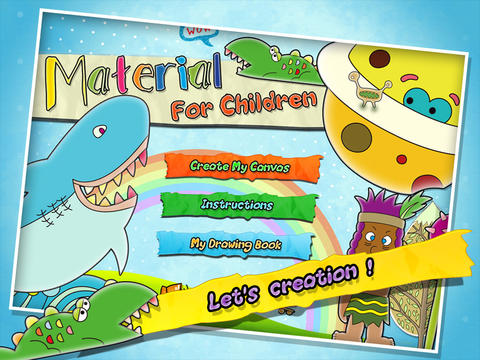
FREE for a limited time – Material, an educational app for creating 3D pictures with your kids! Start by choosing one of 40 backgrounds or use one of your photos as a background. Add stickers from the 4 sets (basic shapes, buildings, forests, ocean) included with the app. There are 6 additional sets of stickers available as in-app purchases. Add some color. When you are happy with your creation, save your work into the library or print it out to create a 3D scene. Watch the video on YouTube to see how it works: http://youtu.be/y-uB2b3DYTY. It might be fun to create a 3D scene of your vacation at the beach, create a 3D card for grandma & grandpa, or just create a silly scene on a rainy day. 🙂

Download link: https://itunes.apple.com/us/app/material/id767017751?mt=8&uo=4

0

News-O-Matic

news

Check out a FREE trial of News-o-Matic, an educational newspaper app for kids 7 – 11 years old. A new edition is published every Monday through Friday. Each edition features 5 articles from the news – sports, science, world news, wacky events, etc. The articles are kid-friendly and age-appropriate. Kids can read on their own or have the articles read to them. Important vocabulary words are underlined and linked to their definitions. The articles also include fun facts, a map for locating where the news is happening, videos, and games. Once registered, kids can connect to the News Room to draw pictures, express opinions, or ask questions about the news. This app helps kids become informed citizens of the world!

The FREE trial lasts for 2 weeks. After that, you must subscribe: yearly – $19.99. monthly – $1.99, or weekly – $0.99. If you subscribe before the end of your free trial, you get a special rate. Teachers, there is also a News-o-Matic School Edition. It comes with a teacher’s guide which includes discussion prompts, comprehension questions, Lexile reading levels, and more. And, it’s a great resource for non-fiction reading!

Download link: https://itunes.apple.com/us/app/news-o-matic-daily-reading/id578023255?mt=8&uo=4


0

Monki Animal Builder

animal builder

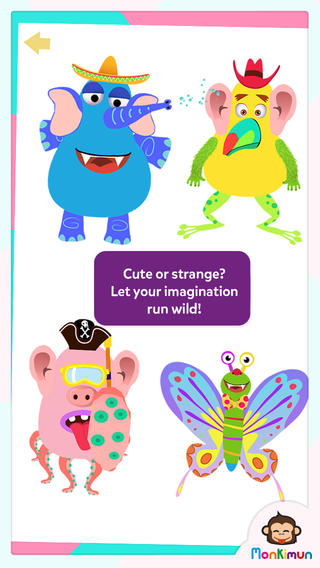
FREE again – Monki Animal Builder, a creative & fun app for kids. Kids use their imaginations to build unique animals. They start cracking open one of 6 eggs. Inside each egg is a different character – each having its own personality. There’s Hairy Ball who is grumpy, Pear who loves to be ticked, Slug who is dreamy, and 3 other interesting animals. Then kids add body parts (over 30 to choose from) and accessories (15 in all) such as a pirate hat, sunglasses, a sombrero. Animations bring everything to life. Kids can save their animals to play with later or share them with kids around the world. They can also save a picture to their device. Saved pictures can be printed and use for creative writing – descriptions, stories, compare/contrast, etc. Whether kids use this app to create, play, save, share, and/or write, it’s sure to bring smiles!

Download link: https://itunes.apple.com/us/app/monki-animal-builder/id836529548?mt=8&uo=4

0

Sandbox and RabbleBrowser

FREE again for a limited time – 2 great web browsing/sharing tools from Float Mobile Learning. Check them out while they are FREE. 🙂

sandbox

Sandbox Web Browser allows teachers/administrators to customize the appearance of the user interface on students’ devices. By using Sandbox, teachers can restrict students to a predetermined list of websites (called a whitelist) – perfect for classroom research. Bookmarks for approved sites can also be added. A passcode is set to prevent students from changing the settings. Sandbox also returns to a preset home page when the device goes idle. This app can be used to configure an individual device or it can be used to configure multiple devices by using a property list file. The app includes extensive instructions for configuring Sandbox to meet the specific your needs. It also includes instructions for restricting access to Safari, the App Store, You Tube, and other built-in apps through your device.

Download link: https://itunes.apple.com/us/app/sandbox-web-browser/id562054411?mt=8&uo=4

rabble

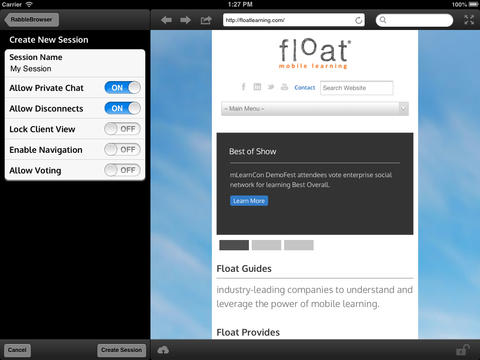
RabbleBrowser is a collaborative web browsing and file sharing tool. A teacher or student leader can facilitate a shared web-browsing/file-sharing experience with an unlimited number of locally connected others in their group. Other features of this app include: integrating chats, saving bookmarks, sharing of personal files, social sharing via email/Facebook/Twitter, and printing. This app looks fantastic for teacher collaboration – meetings, professional development days, college classes, etc.

Download link: https://itunes.apple.com/us/app/rabblebrowser/id432616026?mt=8&uo=4

0

Cutie Mini Monsters

Cutie Mini Monsters

FREE again for a limited time – Cutie Mini Monsters, an iPhone/iPad app for preschoolers. This educational app introduces kids to number recognition and counting. Kids meet Blushy, Toothy, Golly, Taily, Blobby, Growly, and Snouty. They count the monsters’ body parts – tails, eyes, feet, spikes, etc. The app also includes 9 simple jigsaw puzzles featuring the same characters. Cute for little fans of monsters!

Cutie Mini Monsters - Paul Smith

Also FREE – Cutie Monsters – Jigsaw Puzzles, another interactive counting app for your little ones. This app was featured by Apple as a best app for 5 and under.

Download link: https://itunes.apple.com/us/app/cutie-monsters-jigsaw-puzzles/id585378286?mt=8&uo=4

0

Sandbox

FREE again for a limited time – a great web browsing/sharing tools from Float Mobile Learning. Check it out while it is FREE. 🙂

sandbox

Sandbox Web Browser allows teachers/administrators to customize the appearance of the user interface on students’ devices. By using Sandbox, teachers can restrict students to a predetermined list of websites (called a whitelist) – perfect for classroom research. Bookmarks for approved sites can also be added. A passcode is set to prevent students from changing the settings. Sandbox also returns to a preset home page when the device goes idle. This app can be used to configure an individual device or it can be used to configure multiple devices by using a property list file. The app includes extensive instructions for configuring Sandbox to meet the specific your needs. It also includes instructions for restricting access to Safari, the App Store, You Tube, and other built-in apps through your device.

Download link: https://itunes.apple.com/us/app/sandbox-web-browser/id562054411?mt=8&uo=4

0

Todo Math – Complete Curriculum for Kindergarten and Beyond

todo math

FREE through June 26 if you are a registered user – Todo Math – Complete Curriculum for Kindergarten and BeyondTodo Math’s in-app purchases have been unlocked temporarily through June 26. Try the app’s 18 games and 31 missions for free before buying. On June 27, Todo Math will change to 3 in-app purchasing options. So… make sure you check it out while it’s free!

Todo Math is currently featured as one of the “best new apps” by Apple. It has 2 modes of play – missions or free choice. The app currently has 31 missions and 18 free-choice games – number tracing, counting, tallies, cookies, falling blocks, equation maker, word windows, patterns, quick addition, quick subtraction, quick multiplying, quick facts, little farm, same or different, matrix, days & weeks, train time, and ferris wheel. The app includes three player profiles with progress reports. The developer has also included special setting for lefties, a special font for kids with dyslexia, and an on/off help button. I wish they would have also included the option to turn off the music which could be distracting to some children. Early math concepts are leveled and presented in multiple ways. The app features activities for preschoolers through first graders.

And… teachers, the developers are offering a pilot program: “Classroom Pilot Program. Calling all Kindergarten and 1st grade teachers! Sign up for our classroom pilot program and receive Todo Math for free through December 2014. Go to the parent page inside the Todo Math app and fill out the pilot program application.”

Download link: https://itunes.apple.com/us/app/todo-math-complete-curriculum/id666465255?mt=8&uo=4

0

Socrative

Socrative has been acquired by MasteryConnect. Read the press release here: https://www.masteryconnect.com/learn-more/press_releases/MasteryConnect-Acquires-Socrative.pdf

Still FREE and getting better with every upgrade – Socrative, an app that turns any device with a web browser into a student response clicker. I have been a fan of Socrative since I first discovered it two years ago. It’s one of those apps that I wish had been around when I was still in the classroom. Last July, Socrative added two additional quiz features. # 1 – Teachers can now add images to their questions. #2 – The system can now grade short answer questions. Teachers just input the acceptable answers and the system does the rest. 🙂

The Socrative website and app are unbelievably cool – they turn any device with a web browser (iPhone, iPad, laptops) into a student response clicker. If a teacher has access to any kind of wireless lab, he/she can engage the entire class in a game or quiz and watch the results in real-time. Teachers begin by using their teacher app or logging into t.socrative.com with their email and password. Once logged in, teachers are assigned a room number to share with their students. Students log in using their student app or at m.socrative.com and enter the “virtual room number” provided by the teacher. Teachers initiate an activity and students respond on their devices. Multiple choice and short answer quizzes are easy to create – types of questions can be mixed. Teachers can also choose to run the quiz as a Space Race game. The students’ responses are visible to the teacher in real-time. Teachers can see what each child answered individually as well as what the group answered collectively. And the best part is… the app grades, graphs the results, and generates a report as an Excel spreadsheet or an email.

What a powerful tool for teachers – a short quiz at the end of a lesson can pinpoint what students understand and what needs to be reviewed. Hours of grading and analyzing test results are done immediately. Every student is involved – wow!

Link to new user guide: http://www.socrative.com/materials/SocrativeUserGuide.pdf

Highly recommended!

Teacher app Teacher Clicker - Socrative - Socrative           Student app Student Clicker - Socrative - Socrative

0

Tally Tots Counting & AlphaTots Alphabet

Tally Tots

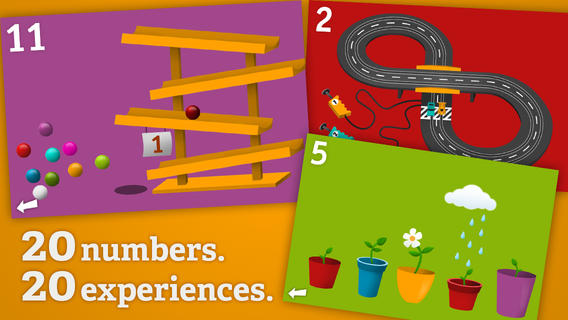
On sale for $.99 – Tally Tots Counting, an educational app that teaches kids to count to 20. The app features 20 interactive mini-games that make learning numbers and counting fun. Kids race 2 cars, make bubbles in 6 colors, place 10 shapes into a puzzle, feed a chipmunk 19 acorns, etc. The app features something unique for each number with lots of positive verbal encouragement along the way. Tally Tots is the perfect choice for young kids learning to count!

Download link: https://itunes.apple.com/us/app/tallytots/id424070269?mt=8&uo=4

AlphaTots

Also on sale for only $.99 – AlphaTots Alphabet, a GREAT ABC app for kids! What makes this educational app unique is that it uses 26 action words to teach the alphabet. Kids are asked to complete 26 interactive tasks, for example: b – build a robot, p – play instruments, z – zap alien spaceships, etc. This app has been featured on The Today Show and has received a lot of positive press. It is a VERY fun app for toddlers/preschoolers who are learning their alphabet!!

Download link: https://itunes.apple.com/us/app/alphatots-alphabet-learning/id436142340?mt=8&uo=4