0

Barefoot World Atlas

Barefoot World AtlasOn sale for $1.99, its lowest price since July 2013 – Barefoot World Atlas. This educational app has been downloaded over 4 million times and was selected by Apple as one of the “10 best apps ever” for the 5th anniversary of the App Store.

Barefoot World Atlas features a 3D interactive globe that invites children to explore and learn about the countries and regions of our world.  The app is beautifully designed with wonderful animated illustrations by artist David Dean. The narration is done by geographer Nick Crane from BBC television. In addition to learning about the continents and oceans, kids will learn about Earth’s people, wildlife, landmarks, natural features, famous buildings, and other interesting things. This app is very engaging – there is so much to discover & learn! Kids of all ages will get lost for hours as they spin, zoom, and fly around the globe to learn about our planet. VERY cool!!

Barefoot World Atlas - Touch Press

0

Labo Drawing Lessons

labo

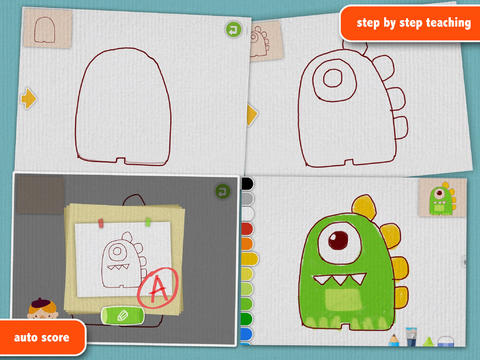
FREE for a limited time – Labo Drawing Lessons. This educational app has 3 different modes: drawing lessons, free drawing, and PK. In the lesson mode, your child will learn to draw 40 different things from 5 categories: animals, plants, vehicles, monsters, people. The app utilizes a step-by-step teaching method then scores (from A+ to D-) the drawing after it has been completed. In the free drawing mode, kids work on a blank canvas and draw their own creations. They are not scored in this mode. They can choose from 3 tools (pencil, crayon, brush) and 18 different colors. They can also pull in photos from the camera roll to use as a background. In both modes, kids can take pictures of their drawings, redo them, or trash them. If they take a picture, the creation is stored in the photo gallery and saved to the device’s camera roll. Once a drawing is on the camera roll, it can be shared, printed, or pulled into other apps. Finally, there is a PK mode which permits a child to compete with their parents or friends to see who can draw faster. Check out this YouTube video to see how this app works: http://www.youtube.com/watch?

Download link: https://itunes.apple.com/us/app/labo-drawing-lessons-3y+/id879834557?mt=8&uo=4

0

Still Shot

still shot

Ever wish that you could capture a still shot from a video? Well now you can. 🙂

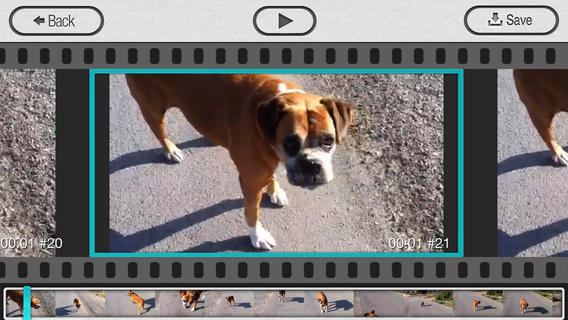
FREE today – Still Shot from the makers of Group Shot. This photography app can be used to catch the moment when your subject is on the move – perfect for kids and pets! It’s extremely easy to use – just load a video, choose your favorite frame, and save it to your camera roll. Your “still shot” will have the same resolution as the video. Once the picture has been saved, it can be printed, shared, pulled into another app, etc. There are so many ways to use this app in an educational setting. Freeze and save – scenes from play, moments from a field trip, segments of a demonstration, etc. Teachers/coaches can capture kids in action then analyze their movements frame by frame. Fabulous and FREE today!!

Download link: https://itunes.apple.com/us/app/stillshot/id520436425?mt=8&uo=4

0

Toca Mini

toca mini

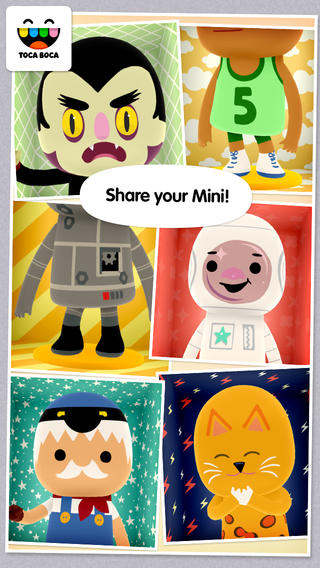
FREE for a limited time – Toca Mini, another creative app from Toca Boca. With this app kids can create silly monsters, imaginary animals, or playful friends. Toca Minis can become whatever you want them to be. To start, kids add colors to the mini’s body, arms, & legs. Then they add details using a wide variety of stamps – bows, hats, buttons, polka dots, etc. Next, kids add facial features which brings their minis to life – they, ooh, ah, sneeze, smile, blink, and more.  Kids can also add hair, eyebrows, beards, mustaches, etc. With 60 different colors and 78 different stamps, there are thousands of possible combinations. When kids finish creating their own unique mini, they can take a snapshot and save it to the camera roll. Then they can print it, share it, pull it into a story writing app, and more. Creating a mini could be a great springboard for creative writing – descriptive paragraphs, a story about their created character/creature. Toca Boca has created another open-ended, creative app!

Download link: https://itunes.apple.com/us/app/toca-mini/id718082838?mt=8&uo=4

Toca Mini is available for Android on Google Play for $2.99.

0

iTooch 6th Grade Language Arts

itooch 6

FREE for a limited time iTooch 6th Grade Language Arts. This app normally sell for $4.99. It offer exercises for practicing/learning  grammar, vocabulary, writing, and reading comprehension. The app has over 1500 questions which are organized by chapter. First, kids choose an area to practice. The app is set on practice mode when the testing option is turned off. Once an answer is submitted, a solution button appears for most questions. When pressed, it explains why an answer is correct. There is also a lesson summary available for each chapter. If the testing mode is tuned on, kids are graded & timed on their answers. They earn points based on the number correct and their time. If they do not meet the criteria for that chapter (4 out of 6), they can choose to “go back to practice” or try the test again. Other useful features of this app include: speech synthesis for kids who may have difficulty reading the problems and the option to adjust the font size. These apps can be used by multiple students and track their individual achievement – great for tutors and classroom teachers. Check it out while it is free. 🙂

Download link: https://itunes.apple.com/us/app/itooch-6th-grade-language/id521723371?mt=8&uo=4

0

Fizzy’s Lunch Lab Fresh Pick

Fizzy's Lunch Lab Fresh Pick

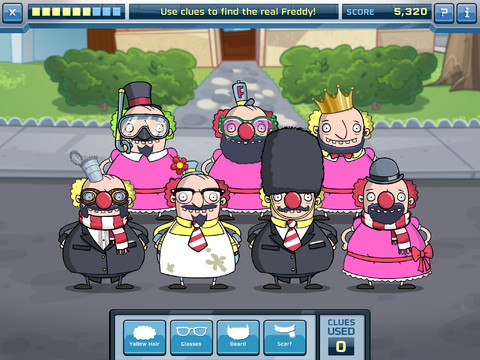
Fizzy’s Lunch Lab Fresh Pick (an educational app based on the PBS KIDS web series) is FREE ! It was developed by PBS with funding from a Ready to Learn Grant from the U.S. Department of Education. Professor Fizzy is holding a competition for 6 – 8 year olds to see who qualifies to be the next Lunch Labber. The app includes 8 challenges that use math and problem solving skills – deductive reasoning, mapping, sorting and classifying. Kids must navigate their way through a grocery store, buy groceries, count out the correct change in a check-out line, successfully serve the correct food to hungry customers, use reasoning to find Freddy, and more. This educational app supports multiple users with self-leveling games that make the challenge specific to each child. FUN!!

Fizzy's Lunch Lab Fresh Pick - PBS KIDS

0

iTooch 5th Grade Math and iTooch 6th Grade Math

itoochFREE for a limited time iTooch 5th Grade Math and iTooch 6th Grade Math. Both apps normally sell for $4.99. Both offer math exercises for practicing/learning different math strands of their respective grade levels. The 5th grade app covers: numbers & operations, fractions, measurement & estimating, graphing & stats, and geometry. The 6th grade app covers: numbers & operations, algebraic structures, data analysis, graphs, and geometry. Both apps have over 1500 questions which are organized by chapter. First, kids choose an area to practice. The app is set on practice mode when the testing option is turned off. Once an answer is submitted, a solution button appears for most questions. When pressed, it explains why an answer is correct. There is also a lesson summary available for each chapter. If the testing mode is tuned on, kids are graded & timed on their answers. They earn points based on the number correct and their time. If they do not meet the criteria for that chapter (4 out of 6), they can choose to “go back to practice” or try the test again. Other useful features of this app include: speech synthesis for kids who may have difficulty reading the problems, the option to adjust the font size, and an embedded calculator. These apps can be used by multiple students and track their individual achievement – great for tutors and classroom teachers. Check them out while they are free. 🙂

Download links:

5th Grade Math https://itunes.apple.com/us/app/itooch-5th-grade-math-maths/id423778530?mt=8&uo=4

6th Grade Math https://itunes.apple.com/us/app/itooch-6th-grade-math-math/id521720767?mt=8&uo=4

0

ABC Mouse.com Apps: Mount Rushmore & Grand Canyon

Mount Rushmore

Grand Canyon

Get ready for summer…

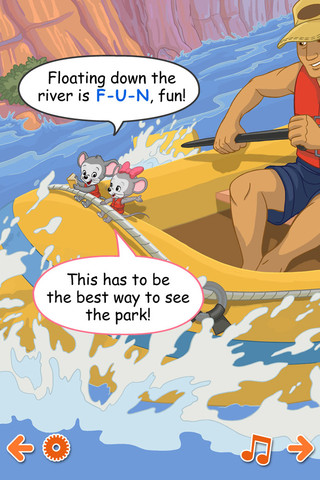
2 FREE interactive books about U.S.Landmarks – ABC Mouse Search & Explore: Mount Rushmore & ABC Mouse Search & Explore: The Grand Canyon. Both books can be read in 3 modes – read to me, read with pause, or read myself. Geared towards young children, these books present fun facts about their respective locations. If you are planning a trip to either place this summer, you may want to take a look at these apps.

Mount Rushmore   ABCmouse.com Mt. Rushmore - Age of Learning, Inc.          Grand Canyon   ABCMouse.com Grand Canyon - Age of Learning, Inc.

0

Remind 101

Used by over 700,000 teachers…

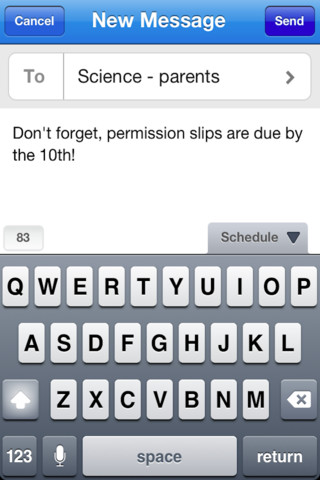
Remind 101 a FREE iPhone/iPad app that provides a safe way for teacher to text or email parents/students. To start, a teacher goes to the Remind 101 website to add his/her class list. A unique code is generated and the teacher shares that code with parents/students. The parent or student then sends a text message with the code to subscribe to the teacher’s class. From that point on, the parent/student will receive any message that the teacher sends from Remind 101. Teachers can text or email their entire class in minutes – homework assignments, field trip reminders, etc. All phone numbers remain private –  students never see the teacher’s phone # and the teachers never see the students’ numbers. This app has been written about by NBC, NPR, Huffington Post, Edutopia, and Edweek. Wow – what a great tool for improving communications but maintaining your privacy!

Remind101 - remind101

0

ICDL (International Children’s Digital Library) – Free Books for Children

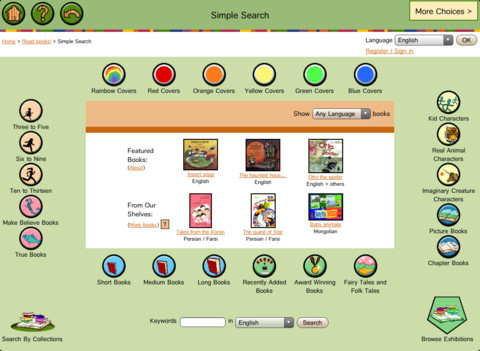
FREE – ICDL (International Children’s Digital Library) – Free Books for Children. This app brings thousands of free children’s books from 60 different countries to the iPad – it’s truly a worldwide collection of books at your fingertips. Books can be searched in a variety of ways – by age appropriateness, length (short, medium, long), genre, ratings, awards, picture vs chapter, and more. You may register if you wish, but it is not necessary. Some advantages to registering include – saving favorite books on a personal bookshelf, returning to the last page that you were reading, and selecting the language you prefer to use.

The feature that I really like is the “Browse Exhibitions” section. The exhibitions are theme based collections of books from around the world. Examples of some current themes are: Celebrating Differences, Everyone Needs Water & Water Needs Everyone, and Forever Friendship. Within each exhibition is an overview of the theme, links to the books included, descriptions of why the books are included, and related activities (in pdf format). As the world becomes more mobile, school systems are facing language barriers. For example, Chicago Public Schools has over 70 languages spoken by their students. What an awesome resource to promote worldwide citizenship and understanding!

The mission of the International Children’s Digital Library Foundation (ICDL Foundation) is to support the world’s children in becoming effective members of the global community – who exhibit tolerance and respect for diverse cultures, languages and ideas — by making the best in children’s literature available online free of charge. The Foundation pursues its vision by building a digital library of outstanding children’s books from around the world and supporting communities of children and adults in exploring and using this literature through innovative technology designed in close partnership with children for children. 

Read more @ http://en.childrenslibrary.org/

ICDL - Free Books for Children - International Children's Digital Library - ICDL Foundation