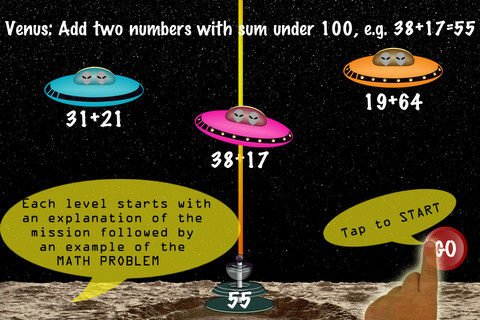
FREE for a limited time – Arithmetic Invaders: Grade 3 Math Facts. Kids defend the planets from invaders in this math game. The table of contents shows the titles of the missions, a short description of the math required, and the high score for that mission. There are 8 “missions” to complete – 2 addition, 2 subtraction, 2 multiplication, and 2 division. With completion of the last mission, your child earns the highest rank – DEFENDER OF THE SOLAR SYSTEM. In each mission, the child matches the value on the laser gun to an equation having the same value – written below 1 of 3 invader ships. The mission’s length can be 2, 3, or 5 minutes. Even though the title implies that the app only practices facts, the addition & subtraction missions include 2 digit numbers. All in all, this educational app provides another fun way for kids to practice math!

Category Archives: educational apps for kids
Factor Samurai
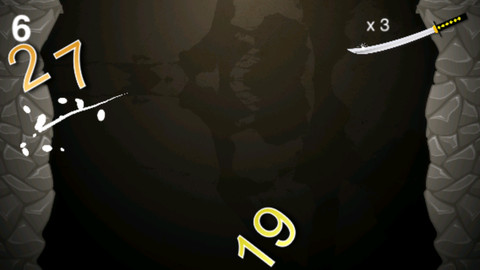
FREE again for a limited time – Factor Samurai, a fun game to practice multiplication/division while looking for prime factors. The goal of the game is to cut falling numbers down to their prime numbers. So if the number 14 is on the screen, it would be cut once to become 2 and 7. If the number 18 is on the screen, it would be cut twice – first to 3 and 6 and then the 6 would be cut to 2 and 3. The game has three levels – grasshopper, apprentice, and master. The speed of the falling numbers increases in each level. Once a player has cut 3 numbers that are already prime, the game is over. The score (showing how many numbers were cut down to their prime) is displayed! There is an option to play the game through the Game Center. This educational app is fun – a game that helps kids with an important math standard!
Common Core Standards met:
- 4.OA.4 Find all factor pairs for a whole number in the range 1–100. Recognize that a whole number is a multiple of each of its factors. Determine whether a given whole number in the range 1–100 is a multiple of a given one-digit number. Determine whether a given whole number in the range 1–100 is prime or composite.
Love to Count by Pirate Trio
This iPhone/iPad app is FREE today. Designed for 4 – 7 years olds, it introduces math concepts (such as counting, ordering, addition, subtraction, shapes) using a pirate theme. Kids earn and collect rewards for their treasure chest as they progress through the 700 math tasks included in this app. More than one child can be added to the program and parents/teachers can monitor their children’s progress. The statistics section shows what tasks have been completed and which were completely correctly on the first attempt. Nicely done app!
Common Core Standards met:
- K.CC.2 – Correctly name shapes regardless of their orientations or overall size.
- K.CC.4 – Understand the relationship between numbers and quantities; connect counting to cardinality.
- K.OA.1 – Represent addition and subtraction with objects, fingers, mental images, drawings, sounds (e.g., claps), acting out situations, verbal explanations, expressions, or equations.
- K.G.2. – Correctly name shapes regardless of their orientations or overall size.
Recommended!
Kids Zoo
Kids Zoo introduces your child to 45 different animals from 4 different categories: wild, farm, birds, and water. It is very easy to use – just tap. First tap the category you want to explore, then tap an animal. A photo of the animal appears. You can tap the photo for another photo of the same animal. Tap the speaker next to the animal’s name and it is pronounced. Tap the sound icons to hear the sound that the animal makes. There are two sound icons for each animal (one blue and one pink) but no explanation of the difference. The most interesting thing about this app is that there are connections to 30 LIVE webcams at zoos all around the world. You can see the polar bear at the San Diego Zoo, the tiger at the London Zoo, etc. if you connect at the right time. Since these zoos are all over the world, the animals may be sleeping, the time zones may not match up, etc. Another potential issue is the speed/quality of your connection. I was able to connect to several webcams but was not fortunate enough to see any real action. Interesting to explore – if you have a great connection!
This app for the iPhone/iPad is FREE for a limited time.
Pocketbooth – the photobooth that fits in your pocket
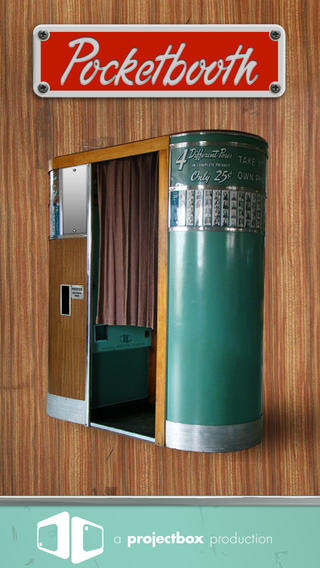
FREE today – Pocketbooth – the photobooth that fits in your pocket, an app that turns your iPhone/iPad into a 1950s-era vintage photobooth. Pocketbooth takes a series of photos (a few seconds apart) to create photo strips of your special events. The app includes five photo effects (1975, antique, B&W, color, sepia), two paper types, and two border styles. There are additional filters/borders available as in-app purchases. Pocketbooth can use either the front or the rear facing camera of your device. Photo strips can be shared via Facebook, Twitter, email, or they can be saved to your camera roll. They can be printed on a wireless printer or you can have them professionally printed/mailed to your friends for an additional charge. Pocketbooth was chosen Starbuck’s App of the Week, featured as “New and Noteworthy” by Apple, and listed as one of 2010’s Hottest Apps – iTunes Rewind. What a fabulous app to have for your next birthday party, family reunion, etc.
And teachers… how cool would it be to have a photobooth in your classroom? It would be perfect for taking pictures of special events – Dr. Seuss Day, St. Patrick’s Day, Halloween, Wacky Hair Day, Silly Hat Day, etc. The kids could help make the props. 🙂 It would also be great for special projects – animal reports (kids dress as their animal), biographies (kids dress as their person), the 100th day (kids dress as if they are 100 years old), etc. How fun!!
Download link: https://itunes.apple.com/us/app/pocketbooth-photobooth-that/id385145330?mt=8&uo=4
Tellagami
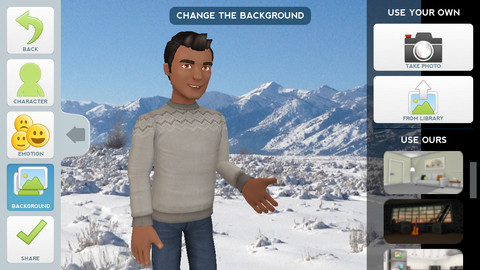
Currently FREE, Tellagami (rhymes with origami) is a unique storytelling app. Short stories called gamis are easy to create. First you select and customize a character by choosing his/her skin tone, eye color, hair color, and clothing. Then you choose an emotion – happy, sad, surprised, angry, scared, silly. Next you choose a background from the app, from your photo library, or create one by using your camera. You are now ready to create your gami. You can record your gami in you own voice or choose the text button to type in what your character will say – the limit is 450 characters. Gamis can be shared via email, messaging, Facebook, or Twitter.
This educational app is fabulous!! Its uses are only limited by your imagination!! Kids can use gamis to introduce themselves at the beginning of the year. They can customize gamis to look like themselves and be reporters, scientists, teachers, etc. They can create the character (and setting) from a book they are reading. They can message or email a parent to explain what they are learning in class. Teachers could use gamis as interactive exit slips. The list is endless. Kids will LOVE creating gamis!
SlateMath for Kids – Kindergarten and 1st Grade Games
SlateMath for Kids – Kindergarten and 1st Grade Games is a FREE educational app with 38 educational activities that prepare kids for kindergarten/first grade math. I found out about this app from one of my readers. Great suggestion – it’s a hidden gem! All of the games are presented in a travel book so kids learn about the world as they complete the varied math activities. They travel to Scotland, Norway, Germany, Czech Republic, Switzerland, Italy, Greece, Russia, Spain, and Sweden – how fun! Skills presented include: counting, writing digits, ordering, addition, patterns, odd/even numbers, and problem solving. Kids are rewarded with fireworks when they answer questions correctly and helped when they miss questions. Written directions can be easily switched to 25 different languages. The app permits multiple users with each user’s progress tracked in his/her travel book. I love the travel theme and the variety of well-developed, age-appropriate activities that this app provides. Check it out! 🙂
Download link: https://itunes.apple.com/us/app/slatemath-for-kids-kindergarten/id589371294?mt=8&uo=4
Weird But True
Did you know that hippo’s lips are about two feet wide? Get ready to learn all sorts of wacky facts with this app. Just updated and FREE – Weird But True, an e-book from National Geographic Kids. Over 625 kid-friendly, wacky facts are presented in a fun & interactive way. Kids can swipe to move from fact to fact or shake their device to generate a random fact. Sound effects and surprises add to the fun! There is a fact finder which kids can use to locates facts by subject – animals, weather, space, etc. The app also includes a “Weird-O-Meter” which kids can use to rate the level of weirdness for each fact. Additional fact packs are available as in-app purchases – $.99 each. This app won the Spring 2012 Parents’ Choice Award and was chosen as New & Noteworthy, What’s Hot, & Staff Favorites by Apple. Kids will LOVE this app. 🙂
Highly recommended!
Halftone
FREE for a limited time – Halftone, a photography app with many educational uses. Named by Apple as a favorite photo app of 2011, Halftone makes it easy to turn your photos into vintage-looking comics that your friends and family will love! It’s simple to add paper styles, captions, speech balloons, graphic stamps, and fonts to your photos. Because it is so easy to use, this app would be great for creating the art to go with classroom projects – stories, book reports, newsletters, etc. Lots of creative uses for this educational app!
Alphabet – Educational Letter Bubble Activity Game
FREE again – Alphabet – Educational Letter Bubble Activity Game from Ellie’s Games (normally $1.99). This educational app uses bright colors and a simple interface to teach young children to recognize the alphabet from A to Z. Kids learn to recognize both upper and lower case letters by popping colorful dots in order. The app has three levels of difficulty – choosing from 4 letters, 9 letters, or 16 letters. Kids can work on all upper case letters, all lower case letters or a mixed letters. There are also settings for sound, hinting, and enabling vibrations (iPhone only). This simple but visually appealing game is sure to help your little one learn the ABCs.