0

Montessori Numberland HD

Numberland

Montessori Numberland HD – FREE today. This educational app helps young children (ages 3 – 5) learn the numbers from 0 – 9. The app consists of 10 interactive scenes which are meant to be explored. For instance – the number 7 is a beach scene with 7 umbrellas, 7 palm trees, 7 shells, 7 balls, 7 crabs. As they explore, kids learn the name of the number, how to write the number, and how to count to that number. The app uses number rods to help kids understand the concept of quantity. There is also an opportunity for kids to practice writing and counting numbers on their own. And… kids can create artwork, practice numbers, etc. in the “draw” section of the app then take a photo to share! Ready to learn the numbers in a different language? The app can be switched to English, Dutch, French, German, Italian, Japanese, Simplified Chinese, or Spanish. Featured in Apple’s “New & Noteworthy”, this educational app is well designed and it does a nice job of helping young kids learn and understand numbers. Don’t miss it! 🙂

Download link: https://itunes.apple.com/us/app/montessori-numberland-hd/id388154228?mt=8&uo=4
0

Day One (Journal/Diary)

day 1

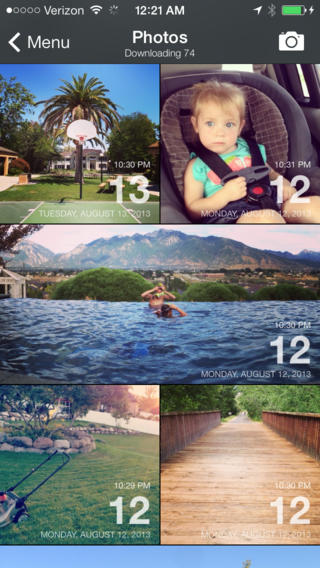
FREE for one day – Day One (Journal/Diary), an easy-to-use journal writing app. With Day One you and your kids can record life as you live it – with photos and text. Each entry automatically tracks time & date, location, and weather. You can browse past entries on a calendar, a timeline, maps, and more. You can also create tags and hashtags so that you can search your entries by keywords later. The app syncs with your other iOS devices using Dropbox or iCloud. There are also options for sharing.  How fun for you and your kids to journal about your vacation, journal about the books that you’ve read, journal about life with your new puppy, journal about summer activities, etc. Make journal writing a part of your daily routine then share with your family & friends – authentic learning at its best!  🙂

Download link: https://itunes.apple.com/us/app/day-one-journal-diary/id421706526?mt=8&uo=4

0

Real Fireworks

Real Fireworks

FREE today only and just in time for the 4th of July – Real Fireworks Artwork 4-in-1 HD. So how real are they? My dog is a believer. 🙂 He did not enjoy the realistic sounds (which can be disabled). The main features of this app are customizable (tail length, explosion size, particle size, gravity, color mode) fireworks, an interactive visualizer, a wallpaper maker, and a drawing pad. If the weather is not cooperating on the 4th, kids (and adults) will have fun creating their own indoor fireworks. If you have an Apple TV, you can connect it to your iPad 2 (or later) and watch fireworks on your TV. Classroom teachers could use this app to celebrate the class doing well on a test, earning class points for good behavior, etc. Fun stuff!!

Real Fireworks Artwork 4-in-1 HD 2012 - Play Awesome Light Show, Enjoy Fun Visualizer, Make Cool Wallpapers and Draw Amazing Art with Colors & Glow - INNOVATTY, LLC

0

Toddler Tap!

FREE from June 30 to July 6 – Toddler Tap!, an educational app for your youngest iPad user. The app is very simple to use. Kids tap an object and the object is named. There are 8 categories of words – colors, numbers, shapes, letters, vegetables, fruits, pets, vehicles, instruments, and home. The app is visually appealing – uncluttered pages of simple and colorful drawings. The voice can be turned on/off and the language can be switched from English to Spanish. There is also the option to print the pictures. Parents/teachers can create magnets or stickers for sorting and classifying activities. Check it out while it is FREE. 🙂

Download link: https://itunes.apple.com/us/app/toddler-tap!/id579523195?mt=8&uo=4

0

Musical Paint

Musical Paint

FREE for a limited time – Musical Paint a creative, multi-sensory app for the iPhone/iPad. Kids are welcomed into an art museum by a friendly blue walrus with a French accent. There is also an ensemble of  lively musicians (underwater animals) at the museum. Kids are invited to paint a picture on a canvas. Each color is a musical tone so when the kids paint, they are painting music! If the child chooses to save his/her painting, it is hung in the museum – a very cute feature. They even get to sign their work. Kids can also share their paintings via email. What fun it would be for kids to send Grandma a picture of their masterpiece that is in a museum!! The app also has a lesson plan section for teachers & parents. Nicely done app for younger kids!!

Musical Paint - Building Blocks Media LLC

0

Water Cycle HD

water cycle

FREE today only – Water Cycle HD, the 2014 winner of American Association of School Librarians Best Apps for Teaching & Learning in the STEM Category. If your child ever wonders about clouds, this is the educational app for him/her! It explores the 4 main stages of the water cycle through readings, photos, and videos. The videos are excellent. They were chosen from a variety of well-respected sources – Disney(Bill Nye), NASA, Carnegie Institution, and more. There is also a “Did You Know?” section which is full of fun facts such as… The heaviest hailstones weigh about 1.1 pounds. And, fog is a type of stratus cloud. The app can be used with different levels of kids. Older students can read & explore on their own. Younger students can turn on text narration with the “Read to Me” button. There is also a game for kids to play that tests their knowledge of the water cycle. This app is nicely done – great to add to your science collection!

Download link: https://itunes.apple.com/us/app/water-cycle-hd/id574353460?mt=8&uo=4

0

My Incredible Body – A Kid’s App to Learn about the Human Body

my incredible body

FREE again for a limited time – My Incredible Body – A Kid’s App to Learn about the Human Body. This educational app takes kids inside the body to see how everything works. Kids start by choosing an area to explore – brain & nerves, digestion, lungs & air, skeleton, kidneys & urine, senses, muscles, or circulation. Each of the 8 content areas provides information in a variety of engaging ways. Kids can watch short movies & animations that explain the different functions of the body. 3D models can be rotated or zoomed to allow kids to see inside the body and discover how body parts work together. Kids will spend hours reading and listening to all sorts of fun facts about their bodies. For example: extraocular muscles control eye movements and are the busiest muscles in the body. This app is fabulous – it’s easy to use, visually appealing, engaging, and full of information. Kids will LOVE it!

Download link: https://itunes.apple.com/us/app/my-incredible-body-kids-app/id853953105?mt=8&uo=4

0

Solar Walk – 3D Solar System Model

6 million users can’t be wrong!

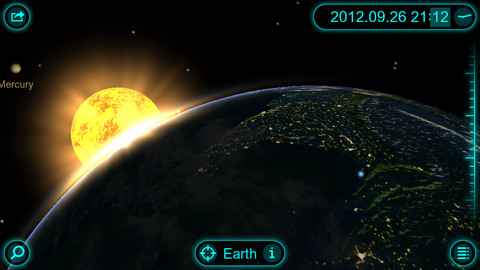
FREE again, today only – Solar Walk – 3D Solar System Model for the iPhone/iPad. This educational app has you zooming through space to learn about our solar system and the Milky Way galaxy. Winner of a Parent’s Choice Gold Award and chosen by Apple as one of the Best Apps for 3 years in a row, this 3D model of the solar system will fascinate kids of all ages. This app features information about each of our planets (general information, figures, internal structure, & science missions), the planets’ moons (general information & figures), comets, dwarf planets and asteroids. Information and pictures of 8 satellites (such the Hubble Telescope and the ISS) are also included. 8 movies to explain some of Earth’s phenomena are included: Size Comparison, Earth’s Cycles, Solar Eclipse, Moon Phases, Tidal Phenomena, Major Circles of Latitude, Constellations, and Cassini-Huygens. The app permits you to zoom in for a close up view of each planet, moon, etc. or zoom out to get a view of our entire galaxy. If it’s in our solar system, you are going to be able to view it and learn about it with this app! Beautifully done. 🙂

Solar Walk - 3D Solar System model - Vito Technology Inc.

1

Spelling Star

spelling star

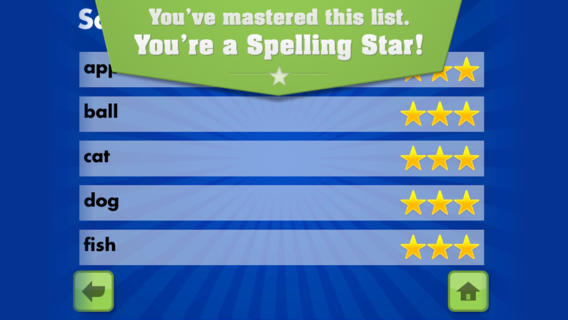
FREE for  limited time – Spelling Star, an educational app for practicing spelling lists. The app is simple to use – just type in and record the words. You may also include sentences to clarify the words’ meanings. Kids must spell each word correctly three times to become a Spelling Star.  Words are presented in random order. As kids practice, they can get a hint – a quick look at the word spelled correctly. When they spell a word without a hint, they earn a star. Spelling Star provides feedback after each word is spelled with the option to “try again” when an error is made. This educational app is great for home and/or school. Parents can use it to input spelling lists for multiple kids. Kids may enjoy inputting their own lists at the beginning of the week which would be GREAT practice! Teachers can create lists on one device and share those lists with anyone who has the Spelling Star app. Simple to use, effective, and tracks progress – what more do you need? 🙂

Download link: https://itunes.apple.com/us/app/spelling-star/id557070660?mt=8&uo=4

0

3rd Grade Vocabulary Prep

vocab

FREE for a limited time – 3rd Grade Vocabulary Prep, an educational app designed to improve children’s vocabulary. Here’s how it works… Before entering students’ names, teachers are asked to enter an administrative password. The administrative feature permits teachers to review their students’ scores and track individual student improvement. The app also generates a “most difficult words for this student” list so teachers can see where individuals are having difficulty. Once the student names have been entered, kids can begin to study. There are 10 words to study at each level. Kids click on each word to hear its pronunciation, meaning, and a sample sentence. I love that the words are used in context! They can go through the lesson as often as needed to learn the words. There are 2 quizzes to take to make sure that students are making progress. If a student misses a word on one of the practice quizzes, the word goes back in the deck for further review. A test must be passed (90%) in order to move to the next level. Teachers can send emails to parents that provide specific test results or that recap the child’s progress to date. Check it out while it is free. 🙂

Download link: https://itunes.apple.com/us/app/3rd-grade-vocabulary-prep/id416481779?mt=8&uo=4