0

DIY Sun Science & DIY Nano

sun

FREE science app – DIY Sun Science  teaches kids about the science of the sun. Funded by the NASA and developed by Berkeley’s Lawrence Science Hall, this educational app is the second in a series of FREE science apps. It includes 12+ hands-on activities, live images of the sun from NASA’s satellite, videos of the sun, and more. Each activity starts with a summary which gives an overview of the activity, the time it will take to complete (prep – clean-up), and the suggested age group. Next, there is a materials list. All items are inexpensive and widely available. Then there is a series of step-by-step directions – with pictures. Finally, there is an explanation of “what’s going on” in the activity. Related videos are at the bottom of the page so that your child can learn more. This app is very well-organized, easy to use, and provides a wonderful introduction to sun science. The best part about the app is that it gives kids and adults the opportunity to learn something new together which is fabulous!

Download link: https://itunes.apple.com/us/app/diy-sun-science/id836712493?mt=8&uo=4

Also check out DIY Nano, the first app in this FREE series. It was recently updated to include 3 new hands-on activities and 8 new nanotechnology videos!

DIY Nano

FREE science app – DIY Nano teaches kids (and their adults) about the nanoscale. Funded by the National Science Foundation and developed by Berkeley’s Lawrence Science Hall, this educational app provides a series of activities and videos about nanoscale science, engineering, and technology. There are 12 hands-on activities in this app. Each one starts with a summary which gives an overview of the activity, the time it will take to complete (prep – clean-up), and the suggested age group. Next, there is a materials list. All items are inexpensive and widely available. Then there is a series of step-by-step directions – with pictures. Finally, there is an explanation of “what’s going on” in the activity. Related videos are at the bottom of the page so that your child can learn more. This app is very well-organized, easy to use, and provides a wonderful introduction to the world of nanoscale science. The best part about the app is that it gives kids and adults the opportunity to learn something new together. How exciting is that?!?

DIY Nano HD - The Lawrence Hall of Science

0

Find the Synonym

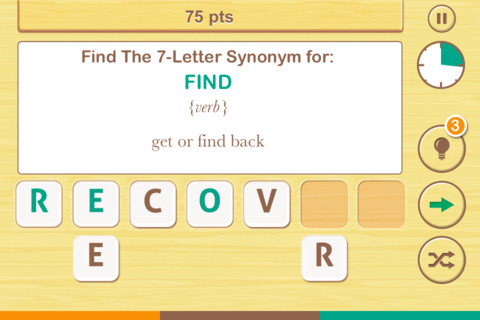
FREE  – Find the Synonym, an app designed for the iPhone/iPad. This app is listed as a game rather than an educational app but it would be great for kids in upper elementary school/junior high. A word is shown with its part of speech and definition. Kids are challenged to create a 4 – 7 letter synonym of that word using the letters provided. Points are awarded based on the length of the word, the time involved, whether clues are used, and/or if any mistakes are made. Badges are earned as the game is played. It’s simply designed  – not a lot of bell & whistles but it is heavy on content. There are a total of 1600 synonyms in the app. After you find 250 of them, the antonyms are unlocked. There are 700 antonyms in the app.

I realize that this app was not necessarily designed for students but it could easily be used for educational purposes. More flexibility in the settings would make it more suitable for classroom use. I could not find a way to restart the game. The game picks up where it left off & points are cumulative, so only one person can play. Also, having access to both synonyms and antonyms would be a plus. Regardless, I am sure that teachers will come up with creative ways to use this resource. 🙂

Recommended!

Find The Synonym - FreshLogo

0

Ed Emberley’s Shake & Make

ed

FREE for a limited time – Ed Emberley’s Shake & Make, a puzzle app for kids. Ed Emberley, an American illustrator, is best known for his work in children’s books. His  instructional drawing books use numbers, letters, and shapes to teach elementary kids how to draw. I have been a fan of his work since the 70s when I bought his Great Thumbprint Drawing Book to use in my classroom. It’s one of those books that I keep, in spite of its age & condition. Kids love his books!

This fun app brings the artwork of Ed Emberley to life as kids race against the clock to put his drawings back together. First kids study the drawing. Then they shake their device so that the pieces fall to the bottom. The object of the game is to put the drawing back together in 60 seconds or less. There is a “hint” button that gives kids another peek if needed but they lose 5 seconds if they use it. More difficult sets of puzzles unlock as kids correctly solve the puzzles. The app helps to build visual memory and it encourages kids to create their own art  – LOVE it!!

Download link: https://itunes.apple.com/us/app/ed-emberleys-shake-make/id433890924?mt=8&uo=4

0

Brainfeed – Educational Videos for Kids

brain

FREE (with in-app purchases) – Brainfeed – Educational Videos for Kids, a collection of 1000+ educational videos for kids (7+), tweens, teens, and life-long learners. The videos in this collection were picked by a team of educators from around the globe. To be included in the app, the video had to be: under 10 minutes, documentary style, curriculum-based, entertaining & engaging, visually stimulating, age-appropriate, and child-friendly. The videos are categorized by topic: This is Your World, Tech & Design, English, Arts & Music, The Human Body, Social Studies, Math, and Make Your Future. I watched several videos (Yellowstone Super Volcano, The Evolution of Life on Earth, Fun with Fractals, and How the Brain Works) and enjoyed all of them. The free version includes more than 100 titles – a great  introduction to what the subscription ($14.99) has to offer. Teachers, this app could be a great source of video clips  to supplement your curriculum. You can contact team@brainfeed.org to request a discounted teachers’ version to use in the classroom. Parents, your kids (and you) can learn interesting things about the world in your home, on the road, or any place that has a 3G or wireless connection. And, new videos added each week to spark children’s curiosity about their world. What a great resource!

Download link: https://itunes.apple.com/us/app/brainfeed-educational-videos/id727189716?mt=8&uo=4

0

Science 360 for iPad

Science 360

FREE from the National Science Foundation comes Science 360 for iPad – scientific images and videos from around the world. This educational app covers a range of topics and breaking news from NSF-funded institutions.  New content is added weekly. Users can browse the app’s unique 360 display board to learn about something new or they can find specific content by searching keywords. It’s easy to save images and videos for later use right within the app – perfect for teachers who are gathering resources for a unit. The quality of the images is spectacular and they are available in HD for download to your iPad. Keep abreast of the latest scientific discoveries with this app – a great resource!!

Download link: https://itunes.apple.com/us/app/science360-for-ipad/id439928181?mt=8&uo=4

0

MyScript Calculator

myscript

Named by Apple as 1 of  10 Apps That WOW and FREE  – MyScript Calculator is an amazing app. It performs mathematical operations literally by hand! You write the problem … it solves the problem! The app is very simple to use. Just write the mathematical equation on the screen. MyScript technology converts the symbols and numbers to digital text and delivers the answers. It supports the following operations: basic operations (+, -, x, ÷, +/‒, 1/x), additional operations ( %, √, x!, |x|), powers/exponentials (ℯx, xy , x2), trigonometry, and more. Winner of the Mobile App Showdown at CES 2013, MyScript Calculator has been redesigned to work with iOS7. The update also allows automatic calculation to be disabled and replaced by a “calculate” button. Love this app – numbers have to be written somewhat legibly for it to work. 🙂

MyScript Calculator - Vision Objects

0

Color Uncovered & Sound Uncovered

Color Uncovered

Sound Uncovered

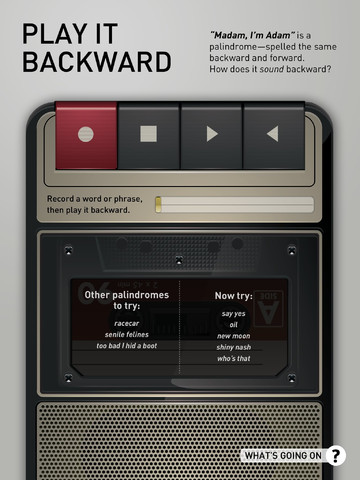
Two FABULOUS & FREE educational apps from the Exploratorium!! Both interactive books contain illusions, articles, and videos. These apps make science fun by answering questions like – What color is a whisper? Are there secret messages in music played backward? Kids will love the illusions and you won’t believe these apps are FREE! Very interesting –  for kids AND their parents/teachers.

Color Uncovered   Color Uncovered - Exploratorium          Sound Uncovered   Sound Uncovered - Exploratorium

0

Squiggles, Let’s Color, Miku’s Picnic, and Lazoo Zoo

The FAB 4 (for young kids) – FREE and fabulously creative apps from Lazoo.

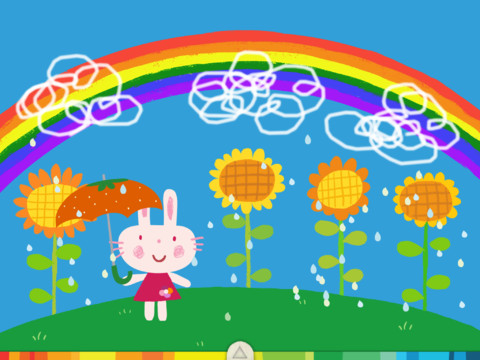
Squiggles is a FREE educational app for the iPad and it is ADORABLE!  Kids are encouraged to draw squiggles to create: rain clouds (to water flowers), waves (to help fish swim), wool (on sheep), cotton candy, etc. Once the squiggles are drawn, they press GO and the drawings come alive. The app includes an interactive storybook and an animated short which introduces the characters – Bobu, the monkey & Miku, the rabbit. It also includes 14 squiggle-ready drawing pages as well as a blank page for your child to create his/her own pictures. Tools included are stickers, markers, paint, chalk, a ketchup bottle, as well as 10 colors & a mystery color wheel. Work can be saved into the gallery of the parents’ section by pressing the piggy bank. This app is super cute!! It encourages children to be imaginative & creative – it’s one of my favorites! 🙂

Highly recommended!

Squiggles! - Lazoo Worldwide, Inc

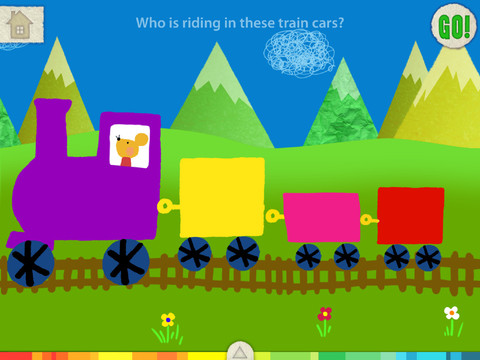
FREE for a limited time – Let’s Color, another educational app that encourages creativity! The app includes an animated short in which the characters – Bobu, the monkey & Miku, the rabbit use their imaginations to turn triangles into a strawberry, a dog, a mountain, etc. Then kids are encouraged to color different things to complete a page: what is coming out of a hose, who is riding in the train, etc. Once the coloring is completed, they press GO and the drawings come alive. There are 17 coloring pages as well as a blank page for your child to create his/her own pictures. Additional coloring pages can be purchased within the app. Tools included are stickers, markers, paint, chalk, a ketchup bottle, as well as 10 colors & a mystery color wheel. Work can be saved into the gallery of the parents’ section by pressing the piggy bank. Another super cute app from Lazoo, a developer that encourages imagination and creativity. :)

Highly recommended!

Let's Color! - Lazoo Worldwide, Inc

Miku's Picnic

Also FREE for a limited time – Miku’s Picnic, an adorable interactive story designed to support creative thinking. Kids join Bobu, the monkey & Miku, the rabbit on a chase after some jumping beans. The two need help capturing the beans before they bounce away! Along the way kids learn about using their imaginations and creative problem solving as the Bobu & Moku use “Squiggles” to… make a car go faster, make springs to get to the top of a tree, make binoculars to look for the beans, make a rocket zoom to the moon, and more. This educational app has 2 reading modes – “Read to Me” and “Read it Myself” as well as an option to record your own voice as the narrator. The story ends with a link to the FREE Squiggles app for kids so kids can “take a turn” drawing. I love the way Miku’s Picnic encourages kids to use their imaginations to solve problems!

Download link: https://itunes.apple.com/us/app/lazoo-mikus-picnic/id652945863?mt=8&uo=4

Lazoo ZooFREE for a limited time  – Lazoo Zoo, another fabulous educational app from the developers of Squiggles. KIds help out with snack time at the zoo where there are 10 animals (lion, ape, chameleon, giraffe, hippo, whale, crocodile, crab, bird, & penguins) to feed. But Lazoo Zoo is not your ordinary zoo, so its animals react in extraordinary ways – the giraffe’s spots change according to what it’s fed, the ape tosses the food it doesn’t like to others, and more! Kids can even create their own foods to feed the animals. And, Lazoo Zoo has a photo booth where kids can snap their picture with their favorite animals. How cute is that?! 🙂 Check out the trailer at: http://www.youtube.com/watch?v=L564yPHM3No&feature=youtu.be

Download link: https://itunes.apple.com/us/app/lazoo-zoo/id727786503?mt=8&uo=4

0

Trading Cards

trading cards

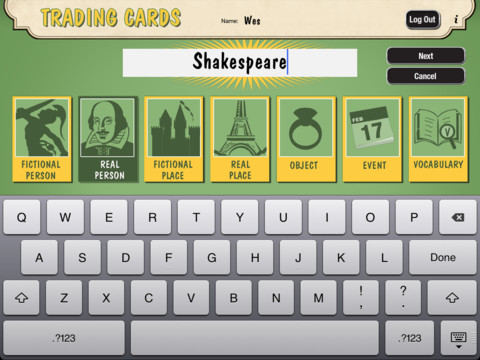
Fabulous educational app!!! ReadWriteThink’s Trading Cards is powerful FREE app developed by the International Reading Association. This educational app provides a unique way for kids to share their understanding of topics, generate their own study aids, create a fictional world to use in their writing, make their own trading cards, and more. There are 7 categories of cards available within the app: fictional person, real person, fictional place, real place, object, event, and vocabulary. Kids start by choosing a category and typing in the title of the card. Each category has specific questions which help kids create information-rich trading cards. Images can be added by using the device’s camera or by accessing pictures in the photo library. Kids can also sort their cards into collections such as characters from a book, heroes or villains, landmarks, the 50 states, vocabulary by subject, etc. The possibilities are endless! Cards can be shared via email, saved to the photo library, or printed on a wireless printer. And… the kid appeal is tremendous. Kids will LOVE trading their cards with their classmates. 🙂

Highly recommended!!

Trading Cards - International Reading Association

0

Learn with Homer

Learn with Homer

Listed as “New & Noteworthy” in August 2013, Learn with Homer is an educational reading app for kids 3 – 6. Its FREE download includes 30 stories and lessons with additional content available through in-app purchases. The app was updated on February 6, 2013. The update includes a FREE Presidential Pack featuring lessons on Presidents Washington, Jefferson and Lincoln. 

Homer, a gray pigeon, resides in an interactive world designed to help kids learn to read. The fun starts in the Hat Shop where kids have photos taken in the “thinking caps” of their choice. Kids then proceed to a carousel which features every part of the app: Story Time, Learn to Read, Discover the World, Draw a Picture, Songs & Rhymes, Record Your Voice, and U.S. Presidents. There kids choose where to begin their reading adventure. The Learn to Read lessons teach phonemes (sounds) in sequence, then words, then sentences in a sequential, step-by-step reading program. The Story Time section is divided into categories – Homer stories, poetry, folktales, first readers. It includes some free stories with many more offered as in-app purchases. Discover the World is a series of adventures in science, history, art, etc. designed to increase kids’ basic knowledge and vocabularies. The drawing & recording tools help kids develop their expressive skills. There is also a parent website to track children’s progress and/or download printables & book recommendations. This educational app seems to have it all – a well-designed, comprehensive approach to learning to read with real kid appeal!

For more information go to Homer: Parent Resources.

Download link: https://itunes.apple.com/us/app/learn-with-homer/id601437586?mt=8&uo=4