0

Brainfeed – Educational Videos for Kids

brain

FREE (with in-app purchases) – Brainfeed – Educational Videos for Kids, a collection of 1000+ educational videos for kids (7+), tweens, teens, and life-long learners. The videos in this collection were picked by a team of educators from around the globe. To be included in the app, the video had to be: under 10 minutes, documentary style, curriculum-based, entertaining & engaging, visually stimulating, age-appropriate, and child-friendly. The videos are categorized by topic: This is Your World, Tech & Design, English, Arts & Music, The Human Body, Social Studies, Math, and Make Your Future. I watched several videos (Yellowstone Super Volcano, The Evolution of Life on Earth, Fun with Fractals, and How the Brain Works) and enjoyed all of them. The free version includes more than 100 titles – a great  introduction to what the subscription ($14.99) has to offer. Teachers, this app could be a great source of video clips  to supplement your curriculum. You can contact team@brainfeed.org to request a discounted teachers’ version to use in the classroom. Parents, your kids (and you) can learn interesting things about the world in your home, on the road, or any place that has a 3G or wireless connection. And, new videos added each week to spark children’s curiosity about their world. What a great resource!

Download link: https://itunes.apple.com/us/app/brainfeed-educational-videos/id727189716?mt=8&uo=4
0

Pan: The Fearless Beribot and Pan: Chasing the Keeper

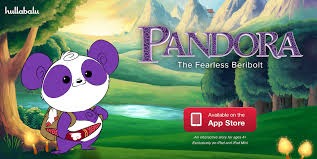
Pan: The Fearless Beribot and Pan: Chasing the Keeper are currently FREE. These e-books are the first two in a series about Pan, a sweet purple panda on a quest to find her family. Both apps are beautifully illustrated and full of animations & interactivity. Kids can tap, swipe, and tilt their way through the story to uncover many interactive surprises. Highlighted text helps early readers follow along with the narration. Also, pictures of the characters appear next to the text to indicate who is speaking. The app is professionally narrated with great sound effects and original music. No wonder the first Pan book was named as “New & Noteworthy” by Apple – these apps are beautifully done!!

Download links: https://itunes.apple.com/us/app/pan-the-fearless-beribolt/id648998642?mt=8&uo=4 AND https://itunes.apple.com/us/app/pan-chasing-the-keeper/id729686081?mt=8&uo=4

0

Oh No Fractions!

on no fractrions

Updated again! This app keeps getting better and better because the developer encourages teacher input. How wonderful is that –  a developer willing to listen to teachers’ needs!

Oh No Fractions! is a great FREE iPhone/iPad app for comparing and exploring fractions. The app is simple to use – kids just swipe to the right or the left to indicate whether one fraction is “greater than” or “less than” or “equal to” a second fraction. As they work, kids can tap above each fraction to see if it can be reduced/simplified – a great feature. But, one of the best features of this app is the “peek”/”prove it” feature. Kids can use a manipulative to “peek” at an answer before they commit to it or they can use the manipulative to “prove” their answer later. This feature is fabulous because it allows the child to visualize his/her answer. Kids can also use this app to practice finding the common denominator. Then they can use it for addition, subtraction, multiplication, and division of fractions. The app also generates corresponding decimals/percentages for each answer. What a great tool for helping kids to understand fractions!! It’s no wonder that it received the 2013 Children’s Technology Review Editor’s Choice Award.

Common Core Standards met:

  • 3.NF.3 – Explain equivalence of fractions and compare fractions by reasoning about their size. Understand two fractions as equivalent (equal) if they are the same size. Recognize and generate simple equivalent fractions, e.g., 1/2 = 2/4, 4/6 = 2/3).

Oh No Fractions! - Curious Hat Lab - Curious Hat

0

Cursive Writing HD

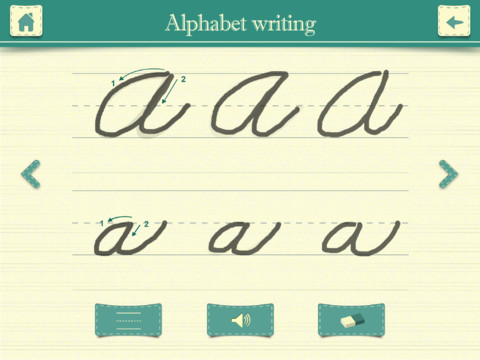
FREE again – Cursive Writing HD normally sells for $.99. This educational app shows kids how to write in cursive utilizing three modes. In the abc mode, both upper case and lower case letters are taught. Kids are shown how to trace each letter using the proper stroke sequence. This section of the app is very well-done.

In the word mode, kids are shown how letters combine to form 234 words. Then in the sentence mode kids can practice writing one of the 3 sentences provided. Or, they can type in their own sentence which is converted to cursive. What a great idea! But… the letter style (in both the word mode and the sentence mode) is not the same as the letter style of the abc mode. For example, the lower case o and b become very loopy. Many of the upper case letters are formed in completely different way than they were taught in the abc mode. Many words are not started on the base line.

After teaching cursive writing for 30 years, I know that the biggest challenge is teaching kids to properly connect the letters. This app does a nice job of teaching the individual letters in the abc mode but I have some concerns about the letter style in the word mode & the sentence mode.

Cursive Writing HD - Jiwoo Studio

0

Math Animations Grades (1 – 8)…

math animations

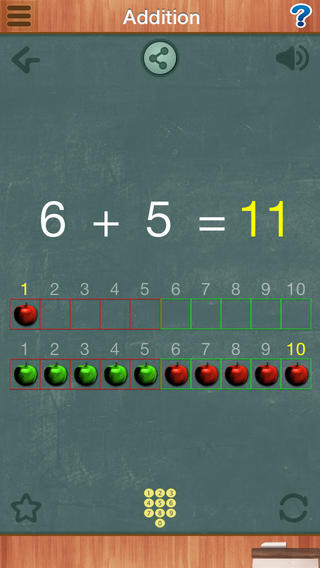
FREE for a limited time – Math Animations (Grades 1-8): Includes numbers, decimals, fractions, addition, subtraction, multiplication, division, geometry (perimeter and area of parallelograms, triangles, trapezoids), measurement, algebra. Elementary and Middle School Mathematics. The title says it all! The purpose of this app is to show kids how math works – visually. The app features 55 animations that explain everything from counting to beginning algebra. There are no words used. Math concepts are visually explained in step-by-step illustrations. If you have kids that need to “see” how things work, you may want to add this app to your list of teaching resources!

Download link: https://itunes.apple.com/us/app/math-animations-grades-1-8/id579825429?mt=8&uo=4

0

Scruffy Kitty

scruffy kitty

FREE today – Scruffy Kitty, an interactive story about an adorable stray cat. Kids will enjoy this brightly illustrated tale with fun interactions on every page. The story is professionally narrated in 5 languages: English, French, Dutch, Spanish, and Japanese – perfect for kids who are bilingual or learning another language. The app also includes a sticker page. Kids can use stickers to create a picture then save their creation into the photo library. Check out the story of this cute little kitty today. 🙂

Download link: https://itunes.apple.com/us/app/scruffy-kitty/id393514552?mt=8&uo=4

0

Sandbox and RabbleBrowser

FREE again for a limited time – 2 great web browsing/sharing tools from Float Mobile Learning. Check them out while they are FREE. 🙂

sandbox

Sandbox Web Browser allows teachers/administrators to customize the appearance of the user interface on students’ devices. By using Sandbox, teachers can restrict students to a predetermined list of websites (called a whitelist) – perfect for classroom research. Bookmarks for approved sites can also be added. A passcode is set to prevent students from changing the settings. Sandbox also returns to a preset home page when the device goes idle. This app can be used to configure an individual device or it can be used to configure multiple devices by using a property list file. The app includes extensive instructions for configuring Sandbox to meet the specific your needs. It also includes instructions for restricting access to Safari, the App Store, You Tube, and other built-in apps through your device.

Download link: https://itunes.apple.com/us/app/sandbox-web-browser/id562054411?mt=8&uo=4

rabble

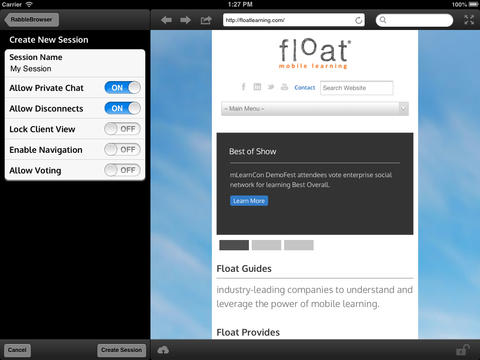
RabbleBrowser is a collaborative web browsing and file sharing tool. A teacher or student leader can facilitate a shared web-browsing/file-sharing experience with an unlimited number of locally connected others in their group. Other features of this app include: integrating chats, saving bookmarks, sharing of personal files, social sharing via email/Facebook/Twitter, and printing. This app looks fantastic for teacher collaboration – meetings, professional development days, college classes, etc.

Download link: https://itunes.apple.com/us/app/rabblebrowser/id432616026?mt=8&uo=4

0

Bord

bod

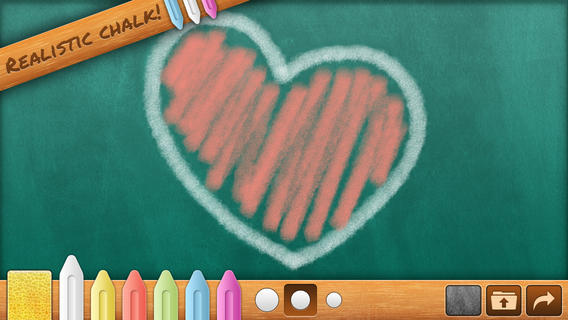
FREE for a limited time – Bord, a chalkboard simulator without the dust! Kids can take a chalkboard with them where ever they go – to practice letters/ numbers, math equations, spelling words, or to simply color/draw. They can create using six colors and three thicknesses of chalk. There is even a sponge for erasing which leaves subtle traces of chalk. Creations can be posted to social media (Facebook, Twitter), emailed, or saved to photos. There are some parental controls (for non-readers) that are built-in. When attempting to email or post to Facebook/Twitter, the app asks you to swipe right with two fingers. All in all, Bord is aesthetically pleasing  & simple to use. It would be great for a long ride in a car, waiting at the doctor’s office, in a restaurant, etc.

Download link: https://itunes.apple.com/us/app/bord/id398467374?mt=8&uo=4

0

Spelling Test by FunExam.com

spelling test

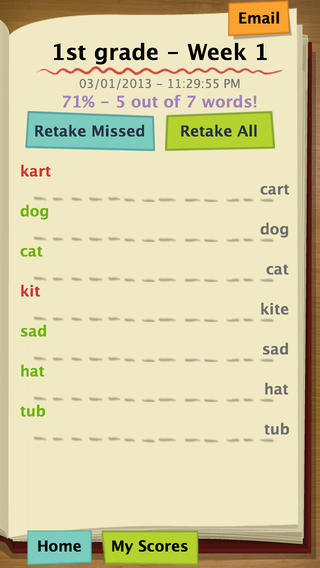
FREE for a limited time  – Spelling Test by FunExam.com, a cool tool for improving spelling test scores. To use this app you must create a free account by submitting your email and a password. Then you can begin creating your tests. First you name your test – short a words, days of the week, first grade/week 1, sight words/list 1, etc. I would make the name match the lesson so that your data is more meaningful. Then you type in the words – the app is case-sensitive. If you enter a proper noun, the app is going to mark it wrong without a capital letter. 🙂 Then you record the words. The app gives you enough time to also include the words’ meanings or sentences using the words – perfect for homonyms. That’s it – easy!!

Once your test has been created, kids can practice. They simply click on the test they would like to take. The words are pronounced and the kids spell them by typing them in. The app grades the test as you go  – correct words are shown in green, incorrect words in red. The correct spelling of each word is also shown. When the test is complete, the final score is shown in two ways – 5/7 and 71%. Kids are given the option of retaking the missed words or retaking all of the words. The results can be emailed. This app is fantastic – easy to use and it tracks progress. Kids would love creating their own test at the beginning of the week. Teachers could use it for phonics lessons, to teach homonyms, and more. Older students could us this app for science vocabulary, to learn foreign language words, etc. There are lots of applications (beyond spelling) for this app. Just use a bit of imagination – LOVE it!!

Download link: https://itunes.apple.com/us/app/spelling-test-free-by-funexam.com/id426041393?mt=8&uo=4

0

Science 360 for iPad

Science 360

FREE from the National Science Foundation comes Science 360 for iPad – scientific images and videos from around the world. This educational app covers a range of topics and breaking news from NSF-funded institutions.  New content is added weekly. Users can browse the app’s unique 360 display board to learn about something new or they can find specific content by searching keywords. It’s easy to save images and videos for later use right within the app – perfect for teachers who are gathering resources for a unit. The quality of the images is spectacular and they are available in HD for download to your iPad. Keep abreast of the latest scientific discoveries with this app – a great resource!!

Download link: https://itunes.apple.com/us/app/science360-for-ipad/id439928181?mt=8&uo=4