0

Kids Zoo

Kids Zoo introduces your child to 45 different animals from 4 different categories: wild, farm, birds, and water. It is very easy to use – just tap. First tap the category you want to explore, then tap an animal. A photo of the animal appears. You can tap the photo for another photo of the same animal. Tap the speaker next to the animal’s name and it is pronounced. Tap the sound icons to hear the sound that the animal makes. There are two sound icons for each animal (one blue and one pink) but no explanation of the difference. The most interesting thing about this app is that there are connections to 30 LIVE  webcams at zoos all around the world. You can see the polar bear at the San Diego Zoo, the tiger at the London Zoo, etc. if you connect at the right time. Since these zoos are all over the world, the animals may be sleeping, the time zones may not match up, etc. Another potential issue is the speed/quality of your connection. I was able to connect to several webcams but was not fortunate enough to see any real action. Interesting to explore – if you have a great connection!

This app for the iPhone/iPad is FREE for a limited time.

Kids Zoo - Zhan Tian

2

My Incredible Body – A Kid’s App to Learn about the Human Body

my incredible body

FREE today only – My Incredible Body-A Kid’s App to Learn about the Human Body. This educational app takes kids inside the body to see how everything works. Kids start by choosing an area to explore – brain & nerves, digestion, lungs & air, skeleton, kidneys & urine, senses, muscles, or circulation. Each of the 8 content areas provides information in a variety of engaging ways. Kids can watch short movies & animations that explain the different functions of the body. 3D models can be rotated or zoomed to allow kids to see inside the body and discover how body parts work together. Kids will spend hours reading and listening to all sorts of fun facts about their bodies. For example: extraocular muscles control eye movements and are the busiest muscles in the body. This app is fabulous – it’s easy to use, visually appealing, engaging, and full of information. Kids will LOVE it!

Download link: https://itunes.apple.com/us/app/my-incredible-body-kids-app/id853953105?mt=8&uo=4

2

Hooked on Phonics Learn to Read Classroom Edition

phonics

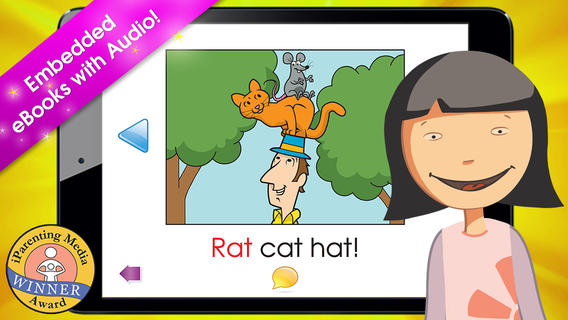
FREE today only – Hooked on Phonics Learn to Read Classroom Edition. This app is normally $49.99 but FREE today (May 6, 2014) in honor of National Teacher’s Day. The classroom edition comes with 12 units and 36 e-books. The 36 e-books have controlled vocabulary – 100% decodable for students who have completed the lessons. Each lesson has music videos that teach the phonemes for that lesson. They feature catchy tunes that teach each letter’s sound & examples of words starting with the letter – great for beginning readers. Kids then practice blending & building words. Finally they read 3 stories featuring the words they just practiced. Students earn trophies and points as they move through the lessons. Check out this app for beginning and/or struggling readers while it’s FREE!

Download link: https://itunes.apple.com/us/app/hooked-on-phonics-learn-to/id806401149?mt=8&uo=4

0

Pocketbooth – the photobooth that fits in your pocket

pocketbooth

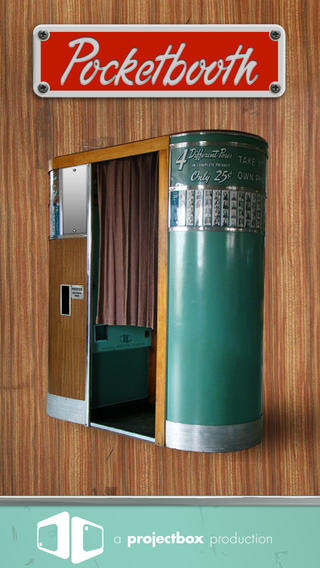
FREE today – Pocketbooth – the photobooth that fits in your pocket, an app that turns your iPhone/iPad into a 1950s-era vintage photobooth. Pocketbooth takes a series of photos (a few seconds apart) to create photo strips of your special events. The app includes five photo effects (1975, antique, B&W, color, sepia), two paper types, and two border styles. There are additional filters/borders available as in-app purchases. Pocketbooth can use either the front or the rear facing camera of your device. Photo strips can be shared via Facebook, Twitter, email, or they can be saved to your camera roll. They can  be printed on a wireless printer or you can have them professionally printed/mailed to your friends for an additional charge. Pocketbooth was chosen Starbuck’s App of the Week, featured as New and Noteworthy” by Apple, and listed as one of 2010’s Hottest Apps – iTunes Rewind. What a fabulous app to have for your next birthday party, family reunion, etc.

And teachers… how cool would it be to have a photobooth in your classroom? It would be perfect for taking pictures of special events – Dr. Seuss Day, St. Patrick’s Day, Halloween, Wacky Hair Day, Silly Hat Day, etc. The kids could help make the props. 🙂 It would also be great for special projects – animal reports (kids dress as their animal), biographies (kids dress as their person), the 100th day (kids dress as if they are 100 years old), etc. How fun!!

Download link: https://itunes.apple.com/us/app/pocketbooth-photobooth-that/id385145330?mt=8&uo=4

0

SlateMath for Kids – Kindergarten and 1st Grade Games

slate math

SlateMath for Kids – Kindergarten and 1st Grade Games is a FREE educational app with 38 educational activities that prepare kids for kindergarten/first grade math. I found out about this app from one of my readers. Great suggestion – it’s a hidden gem! All of the games are presented in a travel book so kids learn about the world as they complete the varied math activities. They travel to Scotland, Norway, Germany, Czech Republic, Switzerland, Italy, Greece, Russia, Spain, and Sweden – how fun! Skills presented include: counting, writing digits, ordering, addition, patterns, odd/even numbers, and problem solving. Kids are rewarded with fireworks when they answer questions correctly and helped when they miss questions. Written directions can be easily switched to 25 different languages. The app permits multiple users with each user’s progress tracked in his/her travel book. I love the travel theme and the variety of well-developed, age-appropriate activities that this app provides. Check it out! 🙂

Download link: https://itunes.apple.com/us/app/slatemath-for-kids-kindergarten/id589371294?mt=8&uo=4

0

Cursive Writing Wizard – Trace Letters & Words

handwriting

FREE today – Cursive Writing Wizard – Trace Letters & Words, a fabulous app for teaching kids how to write in cursive. Start by choosing one of the 4 available fonts: Zaner Bloser, D’Nealian, French Cursive, or French Cursive 2. Then kids are ready to start tracing using animated stickers with fun sound effects. They can trace shapes, upper case letters, lower case letters, numerals, or words. The app has two modes: free or 5 stars. In free mode, kids trace the letters with all of the parameters selected. By selecting the “gear” button, the app’s parameters can be  customized to fit each child’s needs – letter size, difficulty, style (stickers or pen), show/hide model, allow to stop between key points, tracing speed, etc. In the 5 star mode, kids trace each letter 5 times – each step is more challenging. Detailed reports are provided showing what kids have completed. Teachers/parents can replay and export tracings to view a chid’s progress – wow! And, the app permits unlimited users – perfect for the classroom.

After teaching cursive writing for 30 years, I know that the biggest challenge is teaching kids to properly connect the letters. This app does a fabulous job!! There is a list of 3-letter words and often confused letters for kids to practice. But the best part of this app is the ability to add new lists. Kids’ names can be added. Lists of words with difficult connections can be added. Weekly spelling lists can be added. There are so many possibilities for meaningful practice of cursive writing. Don’t miss out on this one – it’s the best cursive writing app that I have seen to date!

Download link: https://itunes.apple.com/us/app/cursive-writing-wizard-trace/id757843896?mt=8&uo=4

1

Trading Cards

trading cards

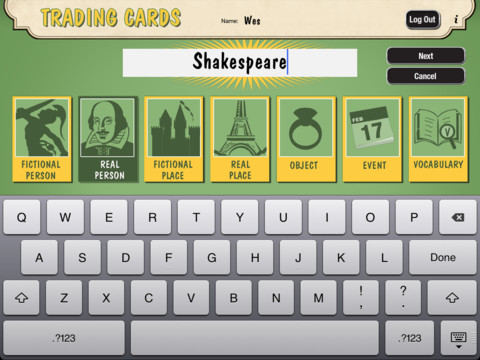
Fabulous educational app!!! ReadWriteThink’s Trading Cards is powerful FREE app developed by the International Reading Association. This educational app provides a unique way for kids to share their understanding of topics, generate their own study aids, create a fictional world to use in their writing, make their own trading cards, and more. There are 7 categories of cards available within the app: fictional person, real person, fictional place, real place, object, event, and vocabulary. Kids start by choosing a category and typing in the title of the card. Each category has specific questions which help kids create information-rich trading cards. Images can be added by using the device’s camera or by accessing pictures in the photo library. Kids can also sort their cards into collections such as characters from a book, heroes or villains, landmarks, the 50 states, vocabulary by subject, etc. The possibilities are endless! Cards can be shared via email, saved to the photo library, or printed on a wireless printer. And… the kid appeal is tremendous. Kids will LOVE trading their cards with their classmates. 🙂

Highly recommended!!

Trading Cards - International Reading Association

0

Squeebles Maths Bingo

squeebles

FREE for  limited time – Squeebles Maths Bingo, a super-cute, educational app for practicing math facts. The Maths Monster has scared away all of the Squeeble customers from Ruby’s ice cream parlor. And if that wasn’t bad enough… he has stolen all of her ice cream ingredients! Kids help Ruby recover her ingredients (and customers) by solving addition, subtraction, multiplication, & division problems in a fun bingo game. One kids have earned back some of the ingredients, they create ice cream concoctions using over 200 unique ingredients. The Squeeble customers rate each ice cream treat. Kids will find out that some of the Squeebles like some very strange flavors and/or combinations – like brussel sprout ice cream with sugar mice or orange ice cream with pea soup sauce. There are over 3 million combinations! The app is perfect for the classroom because an unlimited number of players can be registered. The app keeps track of stats (number correct & percentage) for each player. In the settings, teachers/parents can differentiate the level of difficulty for individual players. Ice ream ratings are shown as decimals or whole numbers – opening up opportunities to have kids collect & report data. Wouldn’t it be fun to have kids construct bar graphs of the results? It’s no wonder that Squeebles games have been featured on BBC Radio, in The Daily Telegraph, The Observer, and The Guardian. It’s fun, educational, and standards-based!

Common Core Standards met:

  • 1.OA.6 – Add and subtract within 20, demonstrating fluency for addition and subtraction within 10.
  • 2.OA.2 – Fluently add and subtract within 20 using mental strategies. By end of Grade 2, know from memory all sums of two one-digit numbers.
  • 3.OA.7 – Fluently multiply and divide within 100, using strategies such as the relationship between multiplication and division or properties of operations. By the end of Grade 3, know from memory all products of two one-digit numbers.

Download link: https://itunes.apple.com/us/app/squeebles-maths-bingo/id580882257?mt=8&uo=4

0

Professor Garfield Fact or Opinion

professor garfieldProfessor Garfield Fact or Opinion is a FREE educational app. The comic teaches kids why it is important to know difference between fact and opinion, especially when using the internet. Garfield’s friend, Nermal, gets an F on his report about goats because it includes facts & opinions. With the help of Professor Garfield, Nermal learns that not all information on the internet is true. He learns that fact is “something that can be proven to be true” and an opinion is “something that someone believes but cannot be proven.” Nermal learns how important it is to read with a questioning mind. After reading the comic strip, kids practice what they have learned by helping Nermal write a report about school lunches and by feeding facts to the Fact-Bot. I love this app! Kids start learning about fact vs opinion in second/third grade but many of them struggle with the concept. This app presents the content in a fun way then gives students the opportunity to apply what they have learned. It does a fabulous job of teaching kids an important element of critical reading – in my opinion. 🙂

Download link: https://itunes.apple.com/us/app/professor-garfield-fact-or/id401257010?mt=8&uo=4


0

Gorilla Band 3D

gorilla

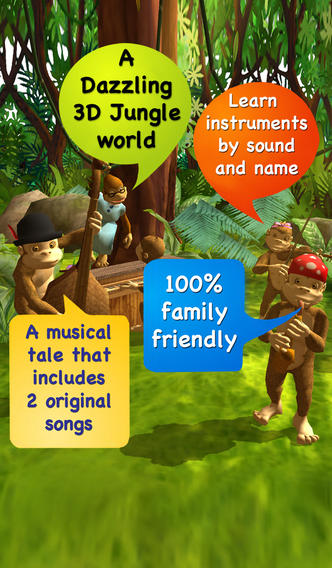
FREE for a limited time – Gorilla Band 3D, an adorable storybook app from the developers of Ten Giggly Gorillas. Kids enter a 3D jungle to interact with cute gorillas and learn about instruments in this musical tale about the formation of the Gorilla Band of Miss McCann. The story, told in rhyme, has “read to me” or “read myself” options. Readers play an active role as the tale unfolds. Every gorilla on every page has something to say. The more kids tap, the more the gorillas yap! Little ones will be delighted. The developers included 2 original soundtracks  – 1 upbeat and 1 for bedtime. After reading the story, kids can enter the studio section to identify instruments by sound and name. There is also a link to the Gorilla Band Dance on You Tube for kids & parents to watch together. The link has to be held down for 3 seconds to prevent kids getting to You Tube on their own. Gorilla Band is loaded with kid-appeal. It’s no wonder that it was listed as New & Noteworthy by Apple.

Download link: https://itunes.apple.com/us/app/gorilla-band-3d-story-book/id662788357?mt=8&uo=4