Posted last year but still relevant… 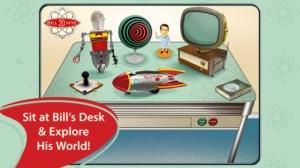
A great FREE educational app is Bill Nye The Science Guy. 2013 was Bill Nye’s 20th Anniversary and Disney celebrated with the release of this educational app. Kids scan their thumbs to gain entrance to Nye Labs – a scientifically fascinating place. There they can play games, watch clips from their favorite shows, try some experiments, and more. When I was still teaching, I frequently used Bill Nye’s materials. My students loved his energetic, fun videos and often begged to watch them again! It’s no wonder he is the winner of 38 Emmys. This app takes kids to a place where science rules!!
Download link: https://itunes.apple.com/us/app/bill-nye-the-science-guy/id652548755?mt=8&uo=4
 Two FABULOUS & FREE educational apps from the Exploratorium – Color Uncovered and Sound Uncovered. Both interactive books contain illusions, articles, and videos. These apps make science fun by answering questions like – What color is a whisper? Are there secret messages in music played backward? Kids will love the illusions and you won’t believe these apps are FREE! Very interesting – for kids AND their parents/teachers.
Color Uncovered: https://itunes.apple.com/us/app/color-uncovered/id470299591?mt=8&uo=4
Sound Uncovered: https://itunes.apple.com/us/app/sound-uncovered/id598835017?mt=8&uo=4
 FREE from the National Science Foundation comes Science 360 for iPad – scientific images and videos from around the world. This educational app covers a range of topics and breaking news from NSF-funded institutions. New content is added weekly. Users can browse the app’s unique 360 display board to learn about something new or they can find specific content by searching keywords. It’s easy to save images and videos for later use right within the app – perfect for teachers who are gathering resources for a unit. The quality of the images is spectacular and they are available in HD for download to your iPad. Keep abreast of the latest scientific discoveries with this app – a great resource!!
Download link: https://itunes.apple.com/us/app/science360-for-ipad/id439928181?mt=8&uo=4
 One of my favorite FREE resources… WORLD BOOK – This Day in History for iPad is a great FREE resource for the classroom. Historical events for the day are displayed on a calendar page. You can click on links to related media such as articles, photos/illustrations, music, speeches and more! When I was teaching, I had students do “morning work” (correct punctuation, capitalization, & spelling in two sentences) while I took attendance, did lunch count, etc. This educational app would have been perfect for that daily assignment because I always used information about something interesting that happened that day. After correcting the sentences, the kids and I would discuss the history of that day. I was always amazed at how well kids retained what we had discussed during the opening minutes of every day. Throughout the year they would often remark, “We learned about that in our morning work.” You may want to try making this educational app part of your classroom’s morning routine. 🙂

 FREE – Wonderopolis, a fabulous educational app. Explore Wonderopolis (the website) with your mobile device.
Wonderopolis (Wonderopolis | Where the Wonders of Learning Never Cease) is a fantastic website that provides a daily Wonder of the Day®. A fun & intriguing question is featured every day. The website/app includes a written explanation of the answer, vocabulary words, and a gallery of images & videos – all to foster learning and inspire curiosity about the Wonder of the Day®. Other daily features include a “Try It Out” section which suggests activities based on the day’s question, a “Still Wondering” section which gives additional/related information, and a quiz. There is even a section for teachers/parents called the “Educator Sandbox” with additional resources and opportunities to connect with the Wonderopolis community. It’s such a fascinating and wonderful resource – I enjoy reading it myself!
Using this website/app would be a fabulous addition to a daily classroom routine. Kids could read (or listen to) the daily Wonder of the Day® as part of their independent work time. They could journal about what they learned and/or what they are still wondering about. A class discussion could be scheduled for later. What a great way to encourage THINKING! Wonderopolis is a fabulous resource to ignite the natural curiosity and imagination of kids!
Download link: https://itunes.apple.com/us/app/wonderopolis/id505247028?mt=8&uo=4
 BrainPOP has been around for more than a decade as an educational website. The site features short animated movies – 750+ lessons covering science, social studies, math, art & music, etc. The content is geared for grades 4 and above but I found that many movies were also suitable for third graders. When I was in the classroom, it was one of my favorite online resources.
Now you can download the BrainPOP Featured Movie, the educational app for FREE! Your child can learn something new every day. After watching the daily movie there is a short interactive quiz. And… if your child can’t get enough of this app, there are two subscription options: $1.99 per month/ 4 movies & quizzes a day OR $6.99 per month/full access.
Teachers could add the BrainPOP movie of the day to their daily routine. Watch it at a transition time – right before lunch, after lunch, while waiting for buses to called, etc. Interesting and educational!!
 Also available for FREE is BrainPOP Jr. Movie of the Week, another educational app. Every week Annie and Moby (two lovable characters) help 5 to 9 year olds learn about a different subject. There is also a quiz and activities to accompany each animated movie. BrainPOP Jr. has been on the web since 2006 delivering content for younger students in science, social studies, reading, writing, math, and more.
Again, teachers could add the BrainPOP Jr. Movie of the Week to their routine. Start your Monday off with the “Movie of the Week” or use it on Friday. BrainPOP gives teachers another way spark kids interest in learning!
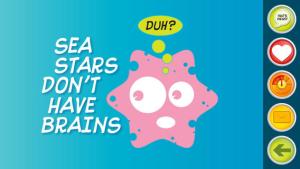 Did you know that hippo’s lips are about two feet wide? Get ready to learn all sorts of wacky facts with this app. Just updated and FREE – Weird But True, an e-book from National Geographic Kids. Over 625 kid-friendly, wacky facts are presented in a fun & interactive way. Kids can swipe to move from fact to fact or shake their device to generate a random fact. Sound effects and surprises add to the fun! There is a fact finder which kids can use to locates facts by subject – animals, weather, space, etc. The app also includes a “Weird-O-Meter” which kids can use to rate the level of weirdness for each fact. Additional fact packs are available as in-app purchases – $.99 each. This app won the Spring 2012 Parents’ Choice Award and was chosen as New & Noteworthy, What’s Hot, & Staff Favorites by Apple. Kids will LOVE this app. :
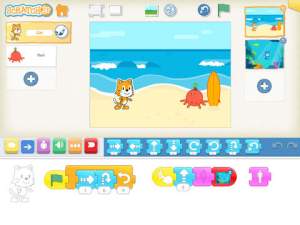 FREE app – ScratchJr is designed to teach kids how to code their own stories and/or games. Specifically developed for younger children, ScratchJr is based on Scratch programming language (http://scratch.mit.edu) which is used by millions around the world. The app includes an introduction video and examples of sample projects. Once the add button is pressed, the app opens to a page with a friendly looking cat in a blank square surrounded by programming tools. Then the fun begins. Kids snap together programming blocks to make the cat move – forward, backward, right, left, hop, etc. They can choose to add a setting to their story/game by selecting one of the twenty-eight different backgrounds. They can add additional characters and/or objects to their scenes. They can make their character talk either by using word bubbles or by recording their own voices. They can control timing, speed, and the sequencing of events. The app can be simple but it becomes more complex as kids start to figure things out. For example, they can learn to program multiple characters to move in sequence, move together, etc. Kids can also add themselves to the story. They simply choose one of the fifteen “faceless” characters then add in their own face using the iPad’s built-in camera. How cool is that? As kids learn to program, they are also learning to problem solve, design projects, and be creative on the computer. LOVE this app!
Download link: https://itunes.apple.com/us/app/scratchjr/id895485086?mt=8&uo=4
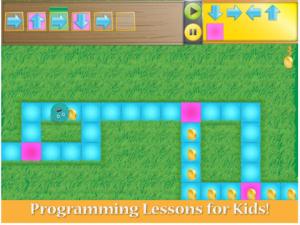 FREE for iPad – Kodable, an introduction to programming for kids 5+. The fuzzFamily has crashed their spaceship on Smeeborg. Kids help the fuzzes through Smeeborg’s mazes by creating drag & drop instructions for them to follow. As they code, kids need to remember that fuzzes follow instructions exactly as they are written. After coding the instructions, kids hit play to watch the fuzzes roll through the maze. They are rewarded with stars, coins, and extra members of the fuzzFamily if they are successful. This educational app comes with 45 free levels which become progressively more difficult. Additional content is available as an in-app purchase.
Download link: https://itunes.apple.com/us/app/kodable/id577673067?mt=8&uo=4
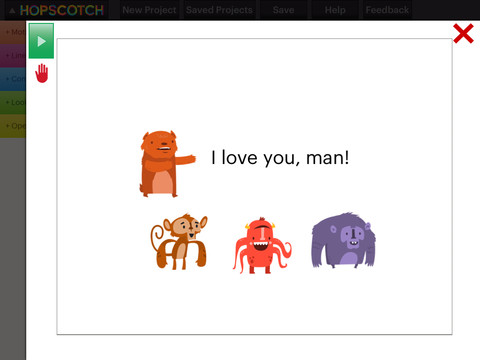
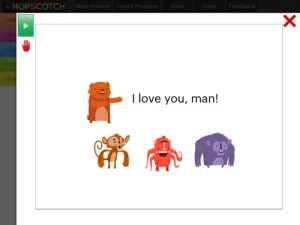 Hopscotch HD is an educational app that teaches kids how to program their own games and animations! Introduce kids to computer science with this app. 🙂 Kids drag and drop “method blocks” into scripts. When they are done, they can press play to see their code in action! Why teach kids coding? According to the developer – there will be about 1.4 million computer jobs by 2020 and only 400,000 computer science students. Many coders first fell in love with coding when they were 8-12 year old children. Hopscotch is based on a visual programming language named Scratch which was developed by MIT. It promotes STEM education (science, technology, engineering and math) in a fun way – by making coding kid-friendly! LOVE it!!
Download link: https://itunes.apple.com/us/app/hopscotch-hour-code-edition!/id617098629?mt=8&uo=4
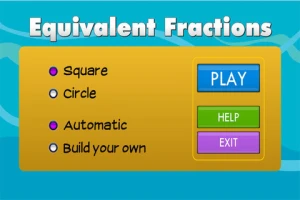 From the National Council of Teachers of Mathematics comes a FREE app called Equivalent Fractions. Kids create equivalent fractions by dividing and shading squares or circles. Circles can be divided into 24ths. Squares can be divided into 144ths. In the play mode, a fraction is shown and kids must create 2 additional fractions that are equivalent. All 3 fractions must have different denominators. The app also places the fractions on a number line – a great visual for comparing! There is also a “build your own” mode which would be fabulous to use for guided exploration & practice. Kids could also use this section as a virtual manipulative when working independently. This app is an excellent resource for the classroom !!
Common Core Standards met:
3.NF.3 – Explain equivalence of fractions and compare fractions by reasoning about their size. Understand two fractions as equivalent (equal) if they are the same size, or the same point on a number line. Recognize and generate simple equivalent fractions, e.g., 1/2 = 2/4, 4/6 = 2/3). Explain why the fractions are equivalent, e.g., by using a visual fraction model.
Download link: https://itunes.apple.com/us/app/equivalent-fractions/id548051011?mt=8&uo=4
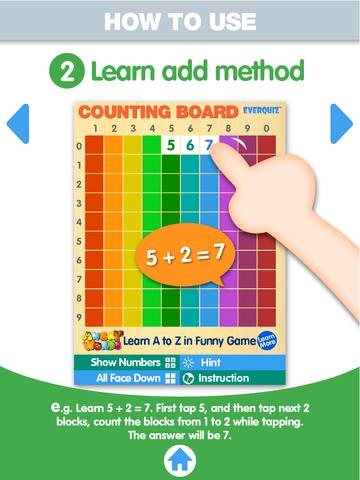
 Another FREE app is Counting Board HD, a colorful number grid that can be used to help kids learn basic number concepts. The app is advertised as being suitable for 2 to 4 year olds but it can also used with older students. I frequently used number grids with third graders. Number grids help kids see patterns and visualize math concepts. With younger children, the app can be used for counting to 100 – by ones, fives, tens. Younger kids can also learn basic addition and subtraction by using the app to count up or count back. With older kids, number grids can be used to teach: greater than and less than, how to find missing addends, place value concepts, skip counting, and more! The app can be used with the numbers showing or hidden and the pronunciation can be on or off. The app simple to use, visually appealing, and useful for so many math lessons. I love this app! It’s so much easier than dragging out the laminated number grids and counters. 🙂
Common Core Standards met:
K.CC.1. Count to 100 by ones and by tens.
K.CC.2. Count forward beginning from a given number within the known sequence (instead of having to begin at 1).
1.NBT.5. Given a two-digit number, mentally find 10 more or 10 less than the number, without having to count; explain the reasoning used.
1.NBT.6. Subtract multiples of 10 in the range 10-90 from multiples of 10 in the range 10-90 (positive or zero differences), using concrete models or drawings and strategies based on place value, properties of operations, and/or the relationship between addition and subtraction; relate the strategy to a written method and explain the reasoning used.
3.OA. 9. Identify arithmetic patterns (including patterns in the addition table or multiplication table), and explain them using properties of operations.
Download link: https://itunes.apple.com/us/app/counting-board/id450751745?mt=8&uo=4
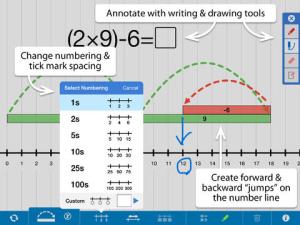 Number Line, by the Math Learning Center is a fantastic FREE app that will help kids visualize number patterns and understand number operations. The app is well-designed with several useful features. The number line can be set by ones, twos, fives, tens, twenty-fives, and hundreds. It can also be customized to show multiples of any whole number from 1 to 100. This feature is perfect for skip counting and/or for visualizing multiplication. The app permits kids to add and manipulate forward & backward jumps – a great feature for teaching addition & subtraction. This feature also helps kids visualize multiplication as repeated addition of the same number and division as repeated subtraction of the same number. Teachers are able to hide or reveal numbers on the number line. This feature can be used to challenge kids to apply what they know in order to figure out the missing number/numbers. Teachers can also use this feature to teach kids how to solve more difficult patterns that are missing several numbers; such as 4, __, __, 16. Kids can use the drawing tools to show what they know. They can write equations and expressions with the text tool. They can screen shot their work and use it as an exit slip after a lesson. Add this one to your virtual toolkit today – “seeing math” helps kids understand it. 🙂
Download Link: https://itunes.apple.com/us/app/number-line-by-math-learning/id751816884?mt=8&uo=4
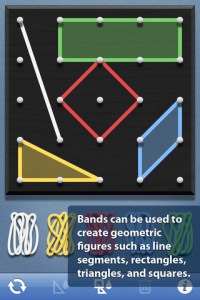 Geoboard by The Math Learning Center (a nonprofit organization dedicated to K – 12 education) is a FREE app that turns your iPhone/iPad into a virtual geoboard. Geoboards can be used as tools to teach mathematical concepts such as polygons, perimeter, area, line segments, angles, congruent shapes, symmetry, fractions, etc. Shapes are created by stretching bands on the geoboard’s pegs. There are 5 colors of bands in the iPhone version and 8 in the iPad version. There is also a tool to fill in shapes. On the iPad version, you can switch from the standard 25 peg board to a 150 peg board to create more complex shapes. This is a great app with the potential to be used in so many ways.
Download link: https://itunes.apple.com/us/app/geoboard-by-math-learning/id519896952?mt=8&uo=4
 FREE for the iPad, Virtual Manipulatives contains math manipulatives for teaching fractions, decimals, and percents. Included are tiles/circles divided into halves, thirds, fourth, fifths, sixths, eighths, tenths, and 12ths AND their corresponding decimals and percentages! The manipulatives are color coded across the settings so that 1/2 is blue as is .50 and 50%. Kids drag tile pieces onto the work area to compare fractions/decimals/percentages. In the settings you can change from tiles to circles, make the pieces transparent, and hide the numbers on the pieces. Completed work can be easily saved to photos. Finding equivalent fractions has never been so slick – WOW!!
Common Core Standards:
3.NF.3 – Explain equivalence of fractions in special cases, and compare fractions by reasoning about their size. Understand two fractions as equivalent (equal) if they are the same size, or the same point on a number line.
4.NF.1 – Explain why a fraction a/b is equivalent to a fraction (n × a)/(n × b) by using visual fraction models, with attention to how the number and size of the parts differ even though the two fractions themselves are the same size. Use this principle to recognize and generate equivalent fractions.
Download link: https://itunes.apple.com/us/app/virtual-manipulatives!/id471341079?mt=8&uo=4
 Fractions by Brainingcamp, an excellent educational app for teaching fractions. The app covers 7 topics: introduction to fractions, equivalent fractions, common denominators, comparing/ordering fractions, adding/subtracting fractions, multiplying fractions, and dividing fractions. Each topic includes: a narrated lesson (with visual models), virtual manipulatives for kids to explore, practice questions to check understanding, and a challenging game for additional practice. Kids earn badges as they work through the components of each topic.
WOW – I love everything about this app. The lessons are wonderful. The manipulatives are designed to promote understanding of the concepts presented. The practice questions give students and their teachers a check of their understanding. And, the challenging games helps kids further master the topic. It would be a fabulous for grades 3 and beyond!
Common Core State Standards met:
3.NF.1. Understand a fraction 1/b as the quantity formed by 1 part when a whole is partitioned into b equal parts; understand a fraction a/b as the quantity formed by a parts of size 1/b.
3.NF.3 – Explain equivalence of fractions and compare fractions by reasoning about their size. Understand two fractions as equivalent (equal) if they are the same size. Recognize and generate simple equivalent fractions, e.g., 1/2 = 2/4, 4/6 = 2/3).
4.NF.3 – a. Understand addition and subtraction of fractions as joining and separating parts referring to the same whole.
5.NF.3 – Interpret a fraction as division of the numerator by the denominator (a/b = a ÷ b).
Download link: https://itunes.apple.com/us/app/fractions-by-brainingcamp/id471353363?mt=8&uo=4


















 appydazeblog