0

Slice Fractions

slice fractions

On sale for only $.99  – Slice Fractions was recently listed as one of Apple’s Best of 2014: Apps. Kids learn about fractions as they slice through ice and lava to clear a path for a cute mammoth. Along the way they collect silly hats for the mammoth to wear. As they solve the app’s 90+ physics puzzles, they are exposed to key concepts of fractions – partitioning, equivalent fraction, numerator/denominator notation, ordering, subtracting from a whole, etc. Kids will enjoy learning about fractions in this wordless environment that seems more like a game than math lessons. I love that the app encourages kids to be problem solvers. Its replay button permits them to try each puzzle again and again until they figure it out. Hints are only given when support is needed. The end result is that kids are learning through discovery!  It’s no wonder that this app has received so many accolades: Apple Editor’s Choice, Editor’s Choice for Excellence in Design: Children’s Technology Review, Winner of a Parents’ Choice Gold Award 2014, Gold Medal Winner 2014: International Serious Play Awards, and Best Family Friendly Game 2014: Indie Prize Showcase Awards.

Common Core State Standards met:

  • 2.G.2. Partition a rectangle into rows and columns of same-size squares and count to find the total number of them.
  • 2.G.3. Partition circles and rectangles into two, three, or four equal shares, describe the shares using the words halves, thirds, half of, a third of, etc., and describe the whole as two halves, three thirds, four fourths. Recognize that equal shares of identical wholes need not have the same shape.
  • 3.NF.1. Understand a fraction 1/b as the quantity formed by 1 part when a whole is partitioned into b equal parts; understand a fraction a/b as the quantity formed by a parts of size 1/b.
  • 3.NF.3 – Explain equivalence of fractions and compare fractions by reasoning about their size. Understand two fractions as equivalent (equal) if they are the same size. Recognize and generate simple equivalent fractions, e.g., 1/2 = 2/4, 4/6 = 2/3).
  • 4.NF.2. Compare two fractions with different numerators and different denominators, e.g., by creating common denominators or numerators, or by comparing to a benchmark fraction such as 1/2.
  • 4.NF.3b. Decompose a fraction into a sum of fractions with the same denominator in more than one way, recording each decomposition by an equation.

Download link: https://itunes.apple.com/us/app/slice-fractions/id794730213?mt=8&uo=4

0

Poetics – create, write and share visual poetry

poeticsPoetics – create, write and share visual poetry, is FREE again. Writing visual poetry is easy with Poetics. The app combines photographic imagery and moveable text. Just choose a picture from your camera roll and write how it makes you feel – a word, a caption, or a poem. Or you can write a poem then search for the perfect image to accompany it. Words can be scaled, rotated, etc. as they are placed on the page. The app saves each project as it is being created. Finished poetry can be shared on Instagram, Facebook, postcards, and more. Kids could use Poetics to create and share postcards or journal entries of their summer activities. How fun!!

Direct Link https://itunes.apple.com/us/app/poetics-create-write-share/id543995959?mt=8&uo=6&at=&ct=

0

Tiny Hands Connect the Dots

tiny hands dot to dot

The FULL version of Tiny Hands Connect the Dots is now FREE. This app is designed for kids 3+ who are learning numbers and how to count (under 20). There are twelve puzzles with multiple parts. Kids complete each part by connecting the numbered dots in order. The app counts aloud as the numbers are connected. There is also an option to turn the voice off for older children. Completed parts are dragged to build an object. When all parts of the object are connected, the scene is animated. Dot-to-dot puzzles helps kids develop eye-hand coordination and visual perception. The app’s artwork is cute and colorful – sure to appeal to little ones. Sound effects add to the fun. My kids would have loved this app because they liked connecting dots and predicting what would appear. Take advantage of downloading this app today while the FULL version is FREE!

Direct Link: https://itunes.apple.com/us/app/tinyhands-connect-dots-full/id957328778?mt=8

0

Counting Board

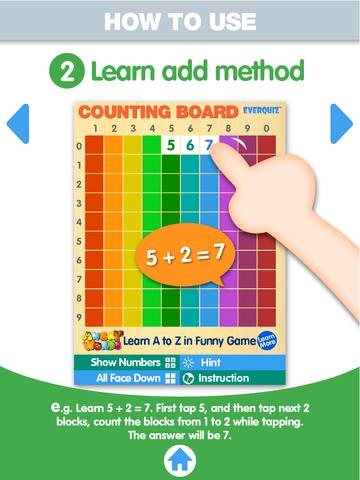
counting boardFREE and fabulous – Counting Board HD, a colorful number grid that can be used to help kids learn basic number concepts. The app is advertised as being suitable for 2 to 4 year olds but it can also used with older students. I frequently used number grids with third graders. Number grids help kids see patterns and visualize math concepts. With younger children, the app can be used for counting to 100 – by ones, fives, tens. Younger kids can also learn basic addition and subtraction by using the app to count up or count back. With older kids, number grids can be used to teach: greater than and less than, how to find missing addends, place value concepts, skip counting, and more! The app can be used with the numbers showing or hidden and the pronunciation can be on or off. The app simple to use, visually appealing, and useful for so many math lessons. I love this app! It’s so much easier than dragging out the laminated number grids and counters. 🙂

Common Core Standards met:

  • K.CC.1. Count to 100 by ones and by tens.
  • K.CC.2. Count forward beginning from a given number within the known sequence (instead of having to begin at 1).
  • 1.NBT.5. Given a two-digit number, mentally find 10 more or 10 less than the number, without having to count; explain the reasoning used.
  • 1.NBT.6. Subtract multiples of 10 in the range 10-90 from multiples of 10 in the range 10-90 (positive or zero differences), using concrete models or drawings and strategies based on place value, properties of operations, and/or the relationship between addition and subtraction; relate the strategy to a written method and explain the reasoning used.
  • 3.OA. 9. Identify arithmetic patterns (including patterns in the addition table or multiplication table), and explain them using properties of operations.

Download link: https://itunes.apple.com/us/app/counting-board/id450751745?mt=8&uo=4

0

Tiny Hands Raccoon Treehouse

raccoon treehouseFREE for a limited time – the FULL version of Tiny Hands Raccoon Treehouse, an adorable app for 3+ preschoolers. Kids sort, match, and classify items using their shapes, patterns, colors, etc. The app features twelve rooms of everyday objects familiar to children. In the bathroom, kids match shapes to the missing tiles on the wall. In the living room and the playroom, they use logic to put things in place. In the backyard, fruits are picked by color. In the garage, tools are sorted by size. I especially like the kitchen where kids have to place items in the refrigerator or cupboards. The rubber duckie won’t stay in the frig if kids try to put him there. Each room presents a different age-appropriate challenge. The artwork is cute and colorful – sure to be appealing to little ones. Sound effects add to the fun. Kids will love helping the raccoons do their chores! Take advantage of downloading this app today while the FULL version is FREE!

Direct Link: https://itunes.apple.com/us/app/tinyhands-raccoon-treehouse/id872578866?mt=8

0

Number Line, by the Math Learning Center

number lineNumber Line, by the Math Learning Center is a fantastic FREE app that will help kids visualize number patterns and understand number operations. The app is well-designed with several useful features. The number line can be set by ones, twos, fives, tens, twenty-fives, and hundreds. It can also be customized to show multiples of any whole number from 1 to 100. This feature is perfect for skip counting and/or for visualizing multiplication. The app permits kids to add and manipulate forward & backward jumps – a great feature for teaching addition & subtraction. This feature also helps kids visualize multiplication as repeated addition of the same number and division as repeated subtraction of the same number. Teachers are able to hide or reveal numbers on the number line. This feature can be used to challenge kids to apply what they know in order to figure out the missing number/numbers. Teachers can also use this feature to teach kids how to solve more difficult patterns that are missing several numbers; such as 4, __, __, 16.  Kids can use the drawing tools to show what they know. They can write equations and expressions with the text tool. They can screen shot their work and use it as an exit slip after a lesson. Add this one to your virtual toolkit today – “seeing math” helps kids understand it. 🙂

Download Link: https://itunes.apple.com/us/app/number-line-by-math-learning/id751816884?mt=8&uo=4

0

Hands-On Equations 1 – The Fun Way to Learn Algebra

hands-onOn sale for only $.99 – Hands-On Equations 1 – The Fun Way to Learn Algebra. This educational app introduces algebra to elementary and middle school students. Dr. Henry Borenson developed and received a patent for Hand-On Equations after teaching math to both low-achieving & Math Olympiad students in New York City. His Hands-On Equations program uses physical game pieces on a balance to represent algebraic equations. Hands-On Equations, Level 1 consists of 6 lessons and a review lesson. Each lesson begins with a video introduction that is followed by two examples and ten exercises. In the first lesson, students use a guess-and-check strategy to figure out the value of pawn that makes the sides balance. In lesson 2, students place the game pieces on the balance scale to represent both sides of the equation. Each lesson becomes more challenging. This method is fantastic for young students who are learning algebra as well as older students who have struggled with algebra. The visual representation of the equations will help all students understand key concepts of algebra. Check it out while it’s FREE. If you like what you see, Hands-On Equations 2 and Hands-On Equations 3 are available for $3.99 each. 🙂

Download link: https://itunes.apple.com/us/app/hands-on-equations-1-fun-way/id505948222?mt=8&uo=4

0

Tiny Airport

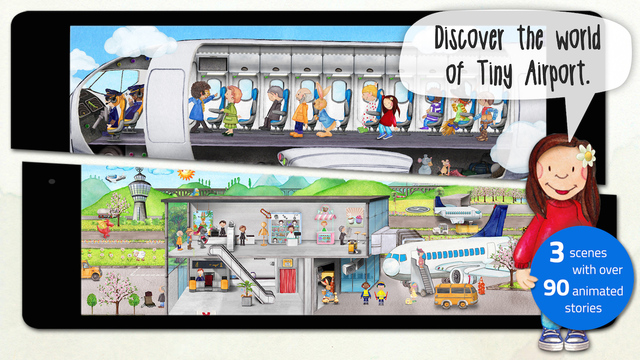
tiny airportFREE for a limited time – Tiny Airport, an interactive seek & find book. Preschoolers tap their way through three interactive scenes (full of fun sounds) to learn about the airport. First they arrive by taxi, check-in, and go through the security check. In scene two, they wait at the departure gate, board, and take-off. In scene three, they are airborne with the other passengers. They even get to fly the plane. There are 90 hidden adventures to uncover with fun, extra surprises in each scene. The app features lots of detail which makes it perfect for storytelling. If you are planning a trip to the airport, get this app to introduce your child to what he/she may experience. 🙂

Download link: https://itunes.apple.com/us/app/tiny-airport-toddlers-seek/id900006134?mt=8 

0

Artkive

Now that it is summer, you may want to create a digital book of your child’s latest year in school. You can use Artkive, a productivity app, to do so. You may have heard of  this app because it has been featured on THE TODAY SHOW and in Real Simple magazine.

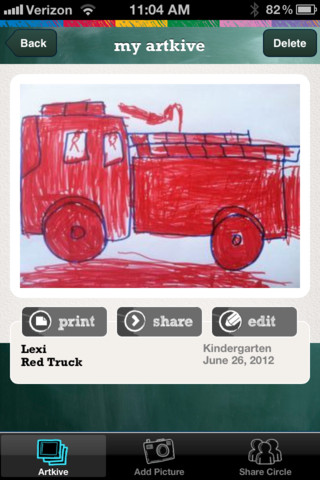
Artkive makes it easy to digitally store, share, and print your children’s artwork/schoolwork. Originally released on August 11, 2012  – this app for the iPhone/iPad is FREE again. It is very easy to use…. First you create an account. Then enter the first names of your children. Take photos of their artwork/schoolwork or upload existing photos from your camera roll. Tag the photo with a child’s name, age or grade, the date, and a title. So simple! You can then share their art with family & friends. You will also be able to have Artkive create digital books & other products using your child’s artwork/schoolwork. You can even order a few holiday presents while you’re at it. 🙂 Artkive makes it easy to collect, store, and share your children’s artwork.

What a great idea! As a parent, you can use it to create books for your children, of any age. I plan to make gift books for my adult children of the art/work that I have saved for years – yay, no more clutter!! As a teacher, you could use it to create digital portfolios of children’s work. Lots of possibilities with this one…. try it yourself while it is free!

To learn more @ http://www.artkiveapp.com/

Artkive - The Kive Company

0

Dino-Store Storybook

dino-store

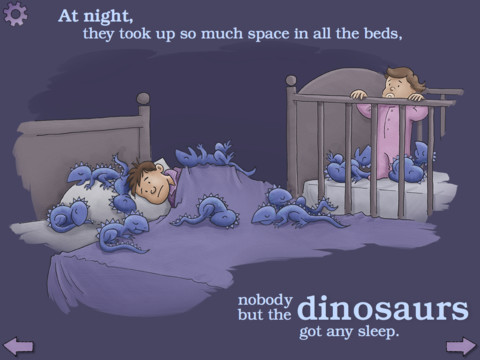
FREE for a limited time – Dino-Store, a funny interactive story for early readers. Leo and his father go to the store to get eggs and chose a carton of HUGE ones. 12 baby dinosaurs hatch out and that’s where the fun begins! Kids can choose to follow along or read on their own as they enjoy the cute illustrations and fun interactions. And…the story line leaves it open for a sequel! This book would be great for teaching story sequence or as a springboard to writing about the dinosaurs’ further adventures.

Dino-Store Storybook - Bluemarker