0

Small Science Experiments HD AND Small Chemistry Experiments HD

experiments

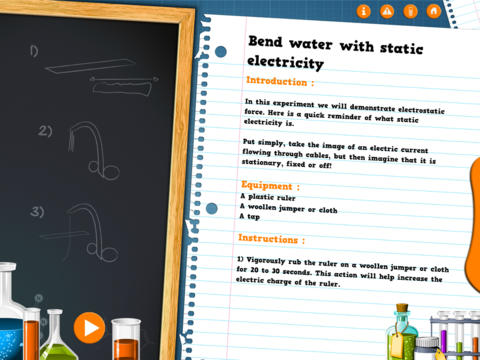
FREE again for a limited time – Small Science Experiments HD. This educational app features fun, easy science experiments for kids to do at home. Each experiment is written up with 4 parts: introduction, equipment, instructions, and explanation. The experiments are also demonstrated in step-by-step videos. There are a total of 25 experiments. Some examples are: make an engine with a candle, turn a tea bag into a rocket, extract DNA from a pear, make a mini jet boat from a chemical reaction. As you can tell from the titles, these experiments need to be done under the supervision of an adult. A warning to that effect is included in the app. The app also includes a quiz with a limited number of multiple choice questions such as: Who invented the first electric battery? and What was the first name of Einstein? Personally, I would skip the quiz. I think kids would benefit more from journaling about their experiments – what they observed, what they learned, etc. Check it out for your budding scientist!

Download link: https://itunes.apple.com/us/app/small-experiments-hd/id586218241?mt=8&uo=4

Also FREE – Small Chemistry Experiments HD. This educational app features more fun & easy experiments for kids to do at home. Just like Small Science Experiments HD, each experiment in this app is written up with 4 parts: introduction, equipment, instructions, and explanation. The experiments are also demonstrated in step-by-step videos. There are a total of 10 experiments. Some examples are: making magic ink, dissolving an eggshell, making a soap powered boat. These experiments are also meant to be done under the supervision of an adult. This app also includes a short quiz. Again, I would recommend that kids journal about their experiments rather than take the quiz. I love that these apps encourage adults and kids to do the experiments together – how fun!  🙂

Download link: https://itunes.apple.com/us/app/small-chemistry-experiments/id689598627?mt=8&uo=4

0

Scribble Press

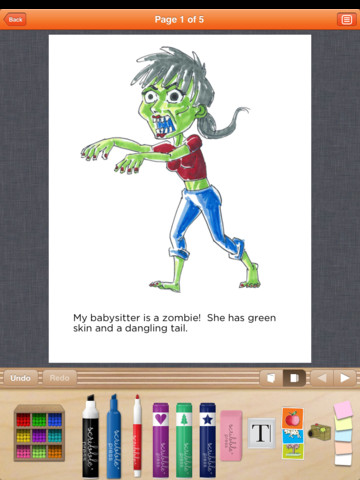
On sale for $1.99 – Scribble Press is one of the best kids’ writing apps for the iPad. This educational app helps kids to “imagine, create and publish” their stories. Kids can begin with one of the 50 story templates available within the app or they can write an original story.  You can create your own drawings using the 500+ markers, stamps, and stickers in this app. You can also take your own photos or upload existing photos/art for your story. With all of that flexibility the sky is the limit as far as what kids can create – story books, travel journals, cookbooks, nature guides, etc.

After creating the story, kids can customize the cover and add information about the author. Books can be shared in a variety of ways – via email, via Facebook, to the Scribble Press public gallery, or to iBooks to be read and reread later.

Scribble Press - Scribble Press

0

Popboardz

Popboardz

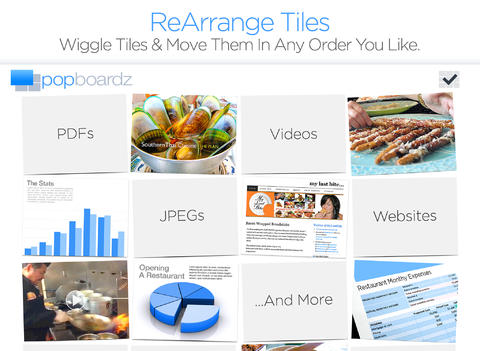
FREE for a limited time – Popboardz, a productivity tool that normally sells for $4.99.  Popboardz makes it easy to organize, store, and present information. Each board is a grid with 16 spaces for content so that all of your PDFs, images, videos, websites, can be arranged on one screen. The design of Popboardz makes it easy to gear your presentation towards the needs of a specific group. First, load a board with all of your materials on any given topic. Then as you teach/present, you can click on the grid spaces that contain the examples, information, or links most suitable for that particular group. You can skip information that is too easy or too difficult. You can change the order of your presentation. Popboardz gives your teaching/presentations flexibility!

This app would be fabulous to use in the classroom. A teacher could organize all his/her digital resources for a unit on one board. That board can be saved so it is always ready to present! It’s easy to edit and/or rearrange boards so that lessons can be tweaked as new resources become available. Students could also use Popboardz – to organize information, to present projects, to give reports, and more. What a great educational app!

Download link: https://itunes.apple.com/us/app/popboardz/id563989511?mt=8&uo=4

0

SlateMath for Kids – Kindergarten and 1st Grade Games

slate math

SlateMath for Kids – Kindergarten and 1st Grade Games is a FREE educational app with 38 educational activities that prepare kids for kindergarten/first grade math. I found out about this app from one of my readers. What a great suggestion – it’s a hidden gem! All of the games are presented in a travel book so kids learn about the world as they complete the varied math activities. They travel to Scotland, Norway, Germany, Czech Republic, Switzerland, Italy, Greece, Russia, Spain, and Sweden – how fun! Skills presented include: counting, writing digits, ordering, addition, patterns, odd/even numbers, and problem solving. Kids are rewarded with fireworks when they answer questions correctly and helped when they miss questions. Written directions can be easily switched to 25 different languages. The app permits multiple users with each user’s progress tracked in his/her travel book. I love the travel theme and the variety of well-developed, age-appropriate activities that this app provides. Check it out! 🙂

Download link: https://itunes.apple.com/us/app/slatemath-for-kids-kindergarten/id589371294?mt=8&uo=4

0

18 Apps for Beginning Readers

spelling-magic

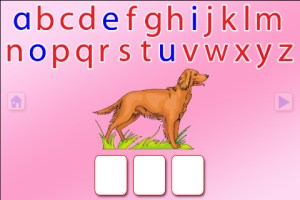
Moveable Alphabet option from ABC Spelling Magic

Wow!! Preschool University has 12 phonics/spelling apps available for FREE again. There are links to all below. I have them grouped by the skills that they teach and from easiest to most difficult. The first group teaches letter sounds.

  • ABC Magic Phonics – initial letter sounds, 1 picture for each letter       ABC MAGIC PHONICS - PRESCHOOL UNIVERSITY
  • ABC Magic 2 –  initial letter sounds, 4 pictures for each letter       ABC MAGIC 2 - PRESCHOOL UNIVERSITY
  • ABC Magic 3 Line Match – Kids apply what they know about sounds by matching. There are 2 modes: matching 2 pictures with the same beginning sounds or matching letters to a picture that starts with that sound.       ABC MAGIC 3 Line Match - PRESCHOOL UNIVERSITY
  • ABC Magic 4  – Kids are given a letter and they must find pictures of 3,6,or 9 items that begin with that sound.       ABC MAGIC 4 - PRESCHOOL UNIVERSITY
  • ABC Magic 5 Letter Sound Matching – Kids match sounds in 2 modes: picture to letter or letter to picture. As kids become more advanced, you can increase their number of choices (4, 6, or 9) and increase the number of matches per round (5,10,15,20,or 25). ABC MAGIC 5 Letter Sound Matching - PRESCHOOL UNIVERSITY
  • ABC Magic 6 – is the same as Sound Beginnings (follows #8).
  • ABC Magic 7 Memory Match – A matching game with 2 options: match letter to letter or match picture to picture. Letter sounds and picture names are pronounced with the option of turning the sounds off. Grids of 12, 16, or 20 are available.       ABC MAGIC 7 Memory Match - PRESCHOOL UNIVERSITY
  • ABC Magic 8 Sound Matching – This app is an extension of ABC Magic 7. It’s another matching game with 2 options: letter to picture having that beginning sound or picture to another picture with the same beginning sound. Letter sounds and picture names are pronounced with the option of turning the sounds off. Grids of 12, 16, or 20 are available.       ABC MAGIC 8 Sound Matching - PRESCHOOL UNIVERSITY
  • Sound Beginnings – This app is the most advanced of the letter sound teaching apps. It is called sound beginnings but actually teaches beginning, middle, and ending sounds. There are two options: a picture to letter and letter to picture. As kids become more advanced, you can increase their number of choices (3,4, or 5) and increase the number of matches per round (5,10,15,20,or 25). Awesome practice for beginning readers!!       SOUND BEGINNINGS - PRESCHOOL UNIVERSITY

The second group of apps uses letter sounds to spell words that phonetically regular. There are 2 ways to use each of these apps. Word Jumble provides the  child with the letters of the word and the child puts them in order. Moveable Alphabet (the more difficult option) has the entire alphabet across the top of the page and the child must find the correct letters to spell the word. If a child touches a picture, the app reads the word. If a child touches a letter, the app gives the sound for that letter. Each vowel is taught in isolation but there is also a shuffle option which provides mixed practice. Vowels are printed in blue and consonants are in red so you can reinforce the CVC (consonant, vowel, consonant) pattern.

  • ABC Spelling Magic Short Vowels – teaches short vowels       ABC SPELLING MAGIC Short Vowel Words - PRESCHOOL UNIVERSITY
  • ABC Spelling Magic 2 Consonant Blends – teaches consonant blends and consonant clusters       ABC SPELLING MAGIC 2 Consonant Blends - PRESCHOOL UNIVERSITY
  • ABC Spelling Magic 3 Blends & Syllables – GREAT practice spelling multi-syllable words       ABC SPELLING MAGIC 3 Blends and Syllables - PRESCHOOL UNIVERSITY
  • Sentence Reading Magic – Kids built 2 or 3 words sentences using phonetically regular words.       SENTENCE READING MAGIC - PRESCHOOL UNIVERSITY

Common Core Standards met:

  • K. RF.3 – Know and apply grade-level phonics and word analysis skills in decoding words. Demonstrate basic knowledge of one-to-one letter-sound correspondences by producing the primary sound or many of the most frequent sounds for each consonant. Associate the short sounds with common spellings (graphemes) for the five major vowels.

These educational apps from Preschool University provide good practice for preschoolers and early readers!!
super readers

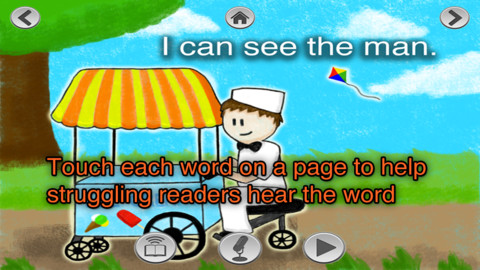
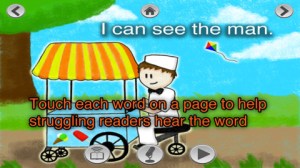
Currently $2.99 – Super Readers, an animated storybook app for early readers! This educational app uses the Dolch sight words in 10 vocabulary controlled stories at 5 different reading levels: kindergarten, beginning first, middle first, end of first, and beginning second. Kids can choose to have the stories read to them with automatic text highlighting or they can touch individual words to have them read. Another great feature – kids can record themselves reading the book and then play it back. What a wonderful confidence builder for little ones trying to build their fluency!!

Common Core Standards met:

  • K.RF.3 – Know and apply grade-level phonics and word analysis skills in decoding words. c. Read common high-frequency words by sight (e.g., the, of, to, you, she, my, is, are, do, does).

Download link: https://itunes.apple.com/us/app/super-readers-dolch-sight/id560348568?mt=8&uo=4

Learn with HomerListed as “New & Noteworthy” in August 2013, Learn with Homer is an educational reading app for kids 3 – 6. Its FREE trial download includes multiple stories and lessons with additional content available through in-app purchases. The app was updated on February 5, 2015. Learn with Homer now includes 50+ reading skills that help get kids ready for kindergarten and first grade.

Homer, a gray pigeon, resides in an interactive world designed to help kids learn to read. The fun starts in the Hat Shop where kids have photos taken in the “thinking caps” of their choice. Kids then proceed to a carousel which features every part of the app: Story Time, Learn to Read, Discover the World, Draw a Picture, Songs & Rhymes, Record Your Voice, and U.S. Presidents. Kids choose where to begin their reading adventure. The Learn to Read lessons teach phonemes (sounds) in sequence, then words, and then sentences. These lessons provide a sequential, step-by-step reading program. The Story Time section is divided into categories – Homer stories, poetry, folktales, first readers. It includes some free stories with many more offered as in-app purchases. Discover the World is a series of adventures in science, history, art, etc. designed to increase kids’ basic knowledge and vocabularies. The drawing & recording tools help kids develop their expressive skills. There is also a parent website to track children’s progress and/or download printables & book recommendations. This educational app seems to have it all – a well-designed, comprehensive approach to learning to read with real kid appeal!

Download link: https://itunes.apple.com/us/app/learn-homer-reading-educational/id601437586?mt=8&uo=4

gappy

Currently $2.99 – Gappy’s First Words. This educational app has beginning readers constructing 200+ three-letter words – 174 of the words following the CVC pattern. There are also 37 three-letter sight words included. Kids start with basic letter and sound identification then progress to making words. As they work through the app, kids earn parts to redesign Gappy’s house – with over 700 possible combinations. Parents can disable the music, change letters from upper case to lower case, and control the number of word lists used in the settings. I like that the app varies which letters (beginning, middle, end) of the words are missing in the easy levels. In the medium level, two letters are missing and in the hard level, all letters are missing. Kids are gradually learning to spell – nicely done for little readers. 🙂

Download link: https://itunes.apple.com/us/app/gappys-first-words/id614840334?mt=8&uo=4
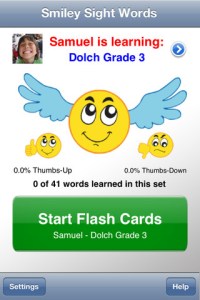
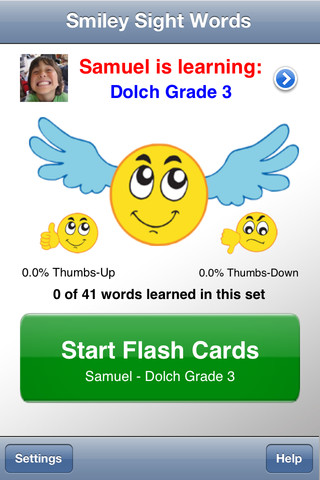
Smiley Sight WordsCurrently $1.99 – Smiley Sight Words. This educational app teaches kids 1,600 common sight words compiled from high frequency lists such as Dolch, Fry, Pinnell-Fountas, UK, and others. Why learn sight words? Over half of the words we read each day are sight words! For early readers, this percentage is much greater. Many of these words do not follow the rules of phonics and/or cannot be represented by pictures. In order to read fluently, students should learn to read these words “by sight.”

The app is very simple to use. First enter the students’ names and pictures. In the settings you can enter up to 40 students – perfect for a classroom teacher or an intervention specialist! Next you choose a list of words for each child to work on. There are 40 sets of Smiley Words (the 1000 most frequently used words), 18 sets of Dolch words, 10 sets of Fry words, 10 sets of UK words, 12 sets of AU color-coded words, plus 11 additional sets (upper case letters, lower case letters, number words, color words, etc.). There is also the option of making customized lists by mixing and matching words from other lists within the app. The app is ready to use! It displays one flashcard at a time. Tap the word to hear an American-English pronunciation. Then rate the ability to read the word with a thumbs up or a thumbs down. To be proficient, 3 thumbs up need to be collected for each word! The app generates a progress report at the end of the session which can be saved to photos. Once saved, it can be printed or emailed. The progress report is stated positively – Thumbs up % Pretty slick! This app makes it easy for teachers to provide individualized practice and keep track of their students’ progress. 🙂

Download link: https://itunes.apple.com/us/app/smiley-sight-words/id361006388?mt=8&uo=4

word wizard

Currently $2.99… Word Wizard – Talking Movable Alphabet. This educational app features advanced text to speech capabilities to help kids with reading and spelling. Emergent readers can utilize the phonics movable alphabet to explore and play with words and sentences. As they do so, the app pronounces and spell-checks their work. Consonant letters are blue and vowels are red – helping kids to become aware of the differences. The short pronunciation of the vowels is featured as the letters are moved onto the board. Once a word is spelled, the app changes the vowel’s pronunciation for that word if necessary. If a word is not recognized by the app, it is still pronounced (according to the rules of phonics) but it is highlighted in red. How cool is that?!

Word Wizard can also be used for spelling practice. The app features lists of words – more than 1,400 words in all. I love that it includes the 1000 most frequently used words. Learning to recognize these words is important to a child’s overall reading fluency. The app also lets you add your own word lists. Teachers can add in their weekly spelling list and track the progress of their students. Reports can be emailed from teacher to parent or from parent to teacher. There are lots of possibilities for using this app – teach letter sounds, explore word patterns, small group word building, spelling practice, the list goes on… It’s no wonder that this app was featured in the New York Times, featured by Apple as “New and Noteworthy” and named a winner of a Parents’ Choice Award.

Download link: https://itunes.apple.com/us/app/word-wizard-talking-movable/id447312716?mt=8&uo=4

Fry WordsCurrently FREE  – Fry Words, an educational app that teaches sight words from the Fry Word List. The Fry Instant Word List contains 1000 words arranged by their order of frequency in printed materials. In order to build reading fluency, it is important for early readers to recognize these words by sight. It is suggested that first graders learn the first 100 words, second graders learn the second 100 words, and third graders learn the third 100 words. The remaining words on the list should be mastered by the end of fifth grade.

The app presents the word in a manageable fashion – lists of 10 words. There is a learning mode and a quiz mode. In the learning mode, words are presented one at a time. In the quiz mode, kids have to choose the correct word from a list of 2 – 6 words. The app permits you or your child to pronounce/record the words in your own voice – a great option for kids working on articulation. This is a nice app for helping kids learn important sight words. If it only kept track of what was mastered – now THAT would be fabulous!

Download link: https://itunes.apple.com/us/app/fry-words/id470926345?mt=8&uo=4

0

Toontastic

Toontastic is now 100% FREE! Launchpad Toys has joined Google to create even more amazing tools for kids. To celebrate, every playset and feature has been unlocked for kids to create their own adventures.

toontastic

Parents and teachers love Toontastic and kids can’t stop creating! Named by the NY Times as one of Top Ten iPad educational apps of 2011, Toontastic is a fabulously creative app for kids that is now 100% FREE! Kids can draw, animate and share their own cartoons using this educational app. To create their storyline, kids use a “story arc” which includes a scene, conflict, challenge, climax, and resolution. The app includes fifty scenes (North Pole, Dr. Crankenstein’s Lab, The Pawspital, Pirate’s Cove, etc.) to spark kids’ imaginations. They can use backgrounds and characters from the app or they can create their own backgrounds and characters with the drawing tools that are provided. Over fourteen million cartoons have been created in 200+ countries. Unleash your child’s creativity with this great educational app!!

Here is a link to more information: Toontastic: Play, Create, Learn on the iPad!.

The possibilities for creating stories with this educational app are endless. A child’s work can be shared with parents, grandparents, other classes, etc. Toontastic = fantastic!!

Toontastic - Launchpad Toys

Toontastic Jr. Pirates

Toontastic Jr. Pirates is also FREE. This storytelling app, from the creators of Toontastic, has kids creating their own pirate cartoons. They start by choosing a beginning, middle, and ending for their story. Then they add animation  by moving the characters and recording their voices at the same time. The educational app features twelve story starter videos and a cast of characters to get kids started. If kids would like to create a story with friends or family, they can utilize StoryShare, a new feature in Toontastic Jr. which is very cool! It enables kids to talk & create stories with friends or family anywhere in the world! Yo, ho, ho… how fun is that??

Toontastic Jr. Pirates - for iPad - Launchpad Toys

0

Math Bingo Games – A Racing Game for Kids

math bingoFREE for a limited time… Math Bingo Games – A Racing Game for Kids. This educational app is geared towards elementary students who are learning addition, subtraction, multiplication and division. The app features two math games: Math Race and Math Bingo. In Math Race, kids solve math problems before their cars crash into barricades. In Math Bingo, kids look for math answers on Bingo cards. The Bingo game is ends if five mistakes are made. Both games have three level of difficulty: easy, medium, and hard. Kids earn stars for successfully completing the games. They may use these stars to play a just-for-fun race game on a famous track!

The app is great for shared iPads. It permits you to create five player profiles. Each player can create his/her own custom avatar. The app generates reports on accuracy and time spent. It separates the data by operation but it does not show the child’s level within each operation. Check out this fun app for practicing basic math!

Common Core Standards met:

  • 1.OA.6 – Add and subtract within 20, demonstrating fluency for addition and subtraction within 10.
  • 2.OA.2 – Fluently add and subtract within 20 using mental strategies. By end of Grade 2, know from memory all sums of two one-digit numbers.
  • 3.OA.7 – Fluently multiply and divide within 100, using strategies such as the relationship between multiplication and division or properties of operations. By the end of Grade 3, know from memory all products of two one-digit numbers.

Download link: https://itunes.apple.com/us/app/math-bingo-games-racing-game/id415231843?mt=8&uo=4

0

Cursive Writing HD

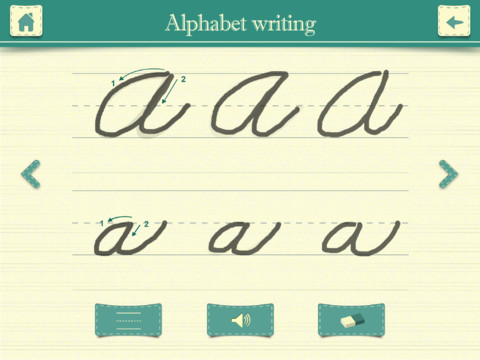
FREE again – Cursive Writing HD normally sells for $.99. This educational app shows kids how to write letters and words in cursive. In the abc mode, both upper case and lower case letters are taught. Kids are shown how to trace each letter using the proper stroke sequence. This section of the app is very well-done.

In the word mode, kids are shown how letters combine to form 144 words. Or, they can type in their own words which are converted to cursive – a great idea. BUT, the two modes are not consistent in their teachings. In the word mode,  the lower case o and b are very loopy, the lower case p loses its loop below the line, and the lower case e is formed differently. Most upper case letters are written differently than they were taught in the abc mode. The abc mode teaches that fifteen lower case letters begin on the base line but the word mode does not show words starting with those letters beginning on the base line. If you choose to use the word mode, make sure kids understand the differences.

Cursive Writing HD - Jiwoo Studio

0

TeleStory

telestory

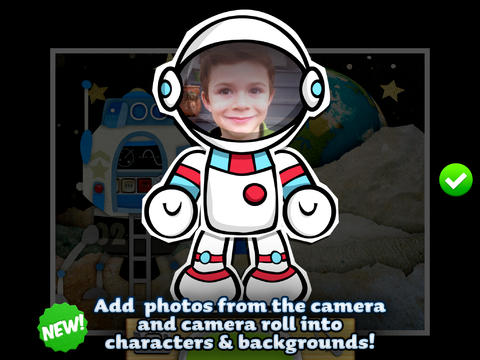
FREE for a limited time – Telestory, another fabulously creative app from Launchpad Toys, the creators of Toontastic. Kids can write, direct, and star in their own TV shows with this educational app. Kids choose a theme to start: The News, Star Adventure, Eye Spy, or their own creation. Then they mix and match scenes to create their story. Next they craft a script using the prompts within the app or their own ideas. Then it’s time for the show! Kids choose one of fifty digital costumes for their performance.They perform and record their show which includes animated scenes and special effects. Recordings can be saved to the camera roll to be shared with classmates, family, and friends. How fun!!

Teachers, check out “The News” theme for use in your classroom. Kids can choose to be different types of reporters: The Beat, The Sports Roundup, The News Desk, The Weather, The Critic, or The Eye in the Sky. Then the learning begins. They could choose to read, summarize and report about current events. Or, they could choose to learn the science behind the weather so that they can explain it to their viewers. Or they could choose to write reviews of the literature that they are reading. Telestory News is a great tool for getting kids excited about non-fiction. Make it a part of your weekly routine with a new show rolled out every Friday. 🙂

Download link: https://itunes.apple.com/us/app/telestory/id915378506?mt=8&uo=4

0

3 FREE Apps from the National Council of Teachers of Mathematics

equivalent fractionsFrom the National Council of Teachers of Mathematics comes a FREE app called Equivalent Fractions. Kids create equivalent fractions by dividing and shading squares or circles. Circles can be divided into 24ths. Squares can be divided into 144ths. In the play mode, a fraction is shown and kids must create 2 additional fractions that are equivalent. All 3 fractions must have different denominators. The app also places the fractions on a number line – a great visual for comparing! There is also a “build your own” mode which would be fabulous to use for guided exploration & practice. Kids could also use this section as a virtual manipulative when working independently. This app is an excellent resource for the classroom!

Common Core Standards met:

  • 3.NF.3 – Explain equivalence of fractions and compare fractions by reasoning about their size. Understand two fractions as equivalent (equal) if they are the same size, or the same point on a number line. Recognize and generate simple equivalent fractions, e.g., 1/2 = 2/4, 4/6 = 2/3). Explain why the fractions are equivalent, e.g., by using a visual fraction model.

Equivalent Fractions - National Council of Teachers of Mathematics

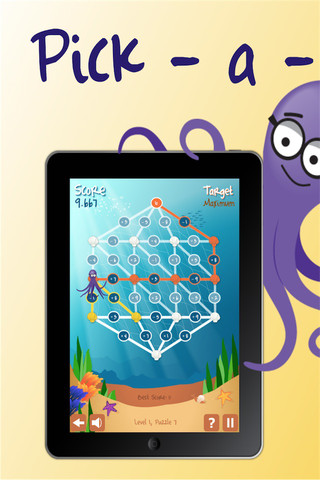
Pick a PathPick-a-Path is another FREE math game from the National Council of Teachers of Mathematics. Kids help Okta the octopus reach a target number by choosing the best path from the top maze to the bottom of a maze. There are 7 different levels with 7 puzzles in each level. The puzzles start with basic operations then move to fractions, negative numbers, decimals, and other more difficult skills. Kids have to plan out a strategy to reach the target which can be a specific value, a minimum value, or a maximum value. This app provides a lot of good skills practice. And… as an extra added bonus, kids have to think of a strategy!

Pick-a-Path - National Council of Teachers of Mathematics

Math concentration

Math Concentration was developed by the National Council of Teachers of Mathematics for students from preschool through fifth grade. It’s a classic matching game that can be played by one or two players. There are six levels of play – numbers 1- 6, numbers 1 – 10, shapes, multiplication, fractions, and percentages & fractions. In all levels, numbers are represented in different ways – written names, digits, pictures, etc. The game also has two modes – a transparent board (for younger students) or a fully covered board. The game is simple to play and kids earn socks for completing all of the matches on the board. 🙂

Download link: https://itunes.apple.com/us/app/math-concentration/id458437534?mt=8&uo=4