0

Toontastic

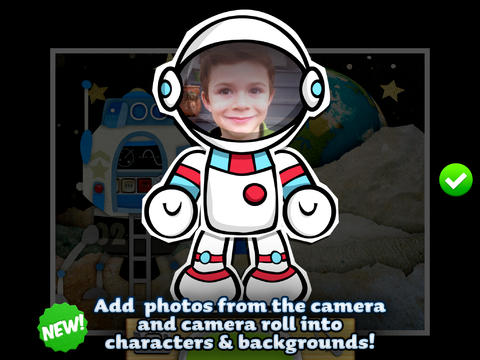
Toontastic is now 100% FREE! Launchpad Toys has joined Google to create even more amazing tools for kids. To celebrate, every playset and feature has been unlocked for kids to create their own adventures.

toontastic

Parents and teachers love Toontastic and kids can’t stop creating! Named by the NY Times as one of Top Ten iPad educational apps of 2011, Toontastic is a fabulously creative app for kids that is now 100% FREE! Kids can draw, animate and share their own cartoons using this educational app. To create their storyline, kids use a “story arc” which includes a scene, conflict, challenge, climax, and resolution. The app includes fifty scenes (North Pole, Dr. Crankenstein’s Lab, The Pawspital, Pirate’s Cove, etc.) to spark kids’ imaginations. They can use backgrounds and characters from the app or they can create their own backgrounds and characters with the drawing tools that are provided. Over fourteen million cartoons have been created in 200+ countries. Unleash your child’s creativity with this great educational app!!

Here is a link to more information: Toontastic: Play, Create, Learn on the iPad!.

The possibilities for creating stories with this educational app are endless. A child’s work can be shared with parents, grandparents, other classes, etc. Toontastic = fantastic!!

Toontastic - Launchpad Toys

Toontastic Jr. Pirates

Toontastic Jr. Pirates is also FREE. This storytelling app, from the creators of Toontastic, has kids creating their own pirate cartoons. They start by choosing a beginning, middle, and ending for their story. Then they add animation  by moving the characters and recording their voices at the same time. The educational app features twelve story starter videos and a cast of characters to get kids started. If kids would like to create a story with friends or family, they can utilize StoryShare, a new feature in Toontastic Jr. which is very cool! It enables kids to talk & create stories with friends or family anywhere in the world! Yo, ho, ho… how fun is that??

Toontastic Jr. Pirates - for iPad - Launchpad Toys

0

Mitzi’s World

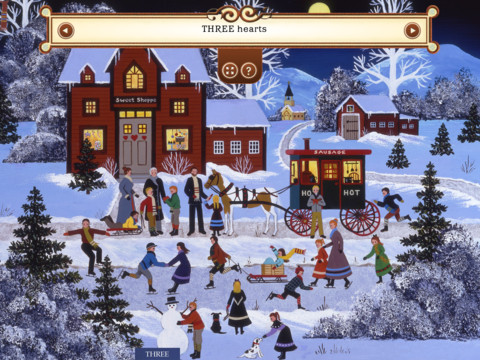
Mitzi's WorldFREE today… Mitzi’s World by Deborah Raffin –  a seek and discover book. Kids follow Mitzi, the spotted dog, through 15 different town and country scenes drawn by American folk artist Jane Wooster Scott. Along the way, they look for Mitzi and 150 other items such as 4 small red birds, a snowman, 13 dogs, etc. Kids can zoom in for a closer look or get a hint when they cannot find an item. This app provides hours of fun for kids as they count, differentiate colors, built vocabulary, and learn about the seasons. If you love the “Hidden Pictures” page of Highlights magazine, you will love this educational app for kids. 🙂

Mitzi's World HD - Auryn Inc.

0

Math Bingo Games – A Racing Game for Kids

math bingoFREE for a limited time… Math Bingo Games – A Racing Game for Kids. This educational app is geared towards elementary students who are learning addition, subtraction, multiplication and division. The app features two math games: Math Race and Math Bingo. In Math Race, kids solve math problems before their cars crash into barricades. In Math Bingo, kids look for math answers on Bingo cards. The Bingo game is ends if five mistakes are made. Both games have three level of difficulty: easy, medium, and hard. Kids earn stars for successfully completing the games. They may use these stars to play a just-for-fun race game on a famous track!

The app is great for shared iPads. It permits you to create five player profiles. Each player can create his/her own custom avatar. The app generates reports on accuracy and time spent. It separates the data by operation but it does not show the child’s level within each operation. Check out this fun app for practicing basic math!

Common Core Standards met:

  • 1.OA.6 – Add and subtract within 20, demonstrating fluency for addition and subtraction within 10.
  • 2.OA.2 – Fluently add and subtract within 20 using mental strategies. By end of Grade 2, know from memory all sums of two one-digit numbers.
  • 3.OA.7 – Fluently multiply and divide within 100, using strategies such as the relationship between multiplication and division or properties of operations. By the end of Grade 3, know from memory all products of two one-digit numbers.

Download link: https://itunes.apple.com/us/app/math-bingo-games-racing-game/id415231843?mt=8&uo=4

0

Cursive Writing HD

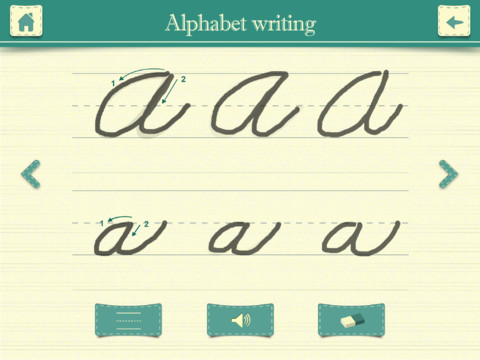
FREE again – Cursive Writing HD normally sells for $.99. This educational app shows kids how to write letters and words in cursive. In the abc mode, both upper case and lower case letters are taught. Kids are shown how to trace each letter using the proper stroke sequence. This section of the app is very well-done.

In the word mode, kids are shown how letters combine to form 144 words. Or, they can type in their own words which are converted to cursive – a great idea. BUT, the two modes are not consistent in their teachings. In the word mode,  the lower case o and b are very loopy, the lower case p loses its loop below the line, and the lower case e is formed differently. Most upper case letters are written differently than they were taught in the abc mode. The abc mode teaches that fifteen lower case letters begin on the base line but the word mode does not show words starting with those letters beginning on the base line. If you choose to use the word mode, make sure kids understand the differences.

Cursive Writing HD - Jiwoo Studio

0

TeleStory

telestory

FREE for a limited time – Telestory, another fabulously creative app from Launchpad Toys, the creators of Toontastic. Kids can write, direct, and star in their own TV shows with this educational app. Kids choose a theme to start: The News, Star Adventure, Eye Spy, or their own creation. Then they mix and match scenes to create their story. Next they craft a script using the prompts within the app or their own ideas. Then it’s time for the show! Kids choose one of fifty digital costumes for their performance.They perform and record their show which includes animated scenes and special effects. Recordings can be saved to the camera roll to be shared with classmates, family, and friends. How fun!!

Teachers, check out “The News” theme for use in your classroom. Kids can choose to be different types of reporters: The Beat, The Sports Roundup, The News Desk, The Weather, The Critic, or The Eye in the Sky. Then the learning begins. They could choose to read, summarize and report about current events. Or, they could choose to learn the science behind the weather so that they can explain it to their viewers. Or they could choose to write reviews of the literature that they are reading. Telestory News is a great tool for getting kids excited about non-fiction. Make it a part of your weekly routine with a new show rolled out every Friday. 🙂

Download link: https://itunes.apple.com/us/app/telestory/id915378506?mt=8&uo=4

0

Use Your Handwriting GOLD

Use yourUse Your Handwriting

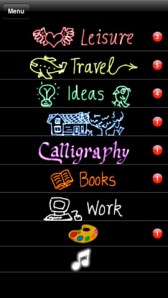
FREE for a limited time… a “productivity” app called Use Your Handwriting GOLD. This app normally sells for $9.99 and it has LOTS of potential for classroom/kid use! You can use your finger to write notes, messages, lists, etc. on your device (iPhone/iPad) screen. You can choose 5 different styles of writing in 22 different colors – there is even a rainbow option! Notes, lists, etc. are saved into categories – which you set. This app is great for kids because writing is not confined to a limited space – the app will move the writing to the left so a line can be completed. After “done” is tapped, the app shrinks the writing and adds it to the area above!

There are SO many uses for this app. Kids could use this app to take notes in class – choosing different color for each subject. They could write poetry in color! Teachers could have their students use this app to create exit slips. Or, students could use the app to take notes, respond to what they’ve read, etc. Younger students could practice their cursive writing with this app. Anything created in the app can be emailed/messaged to the teacher. At home, your kids can use the app to write thank you notes to grandparents which can be delivered via email or MMS. And the BEST part of this app is that it preserves the child’s drawings & handwriting! VERY cool!!

Use Your Handwriting GOLD - Gee Whiz Stuff

0

Khan Academy

khan (new)

A fabulous educational app just got better!!

Khan Academy is an amazing FREE educational app! Whoever said the best things in life are FREE was absolutely correct. With Khan Academy students can learn almost anything and the app is completely FREE! It has a library of over 5,000 videos which covers a wide range of subjects such as K – 12 math, biology, chemistry, the humanities, and more. And now, Khan Academy‘s iPad app includes over 150,000 interactive, Common Core aligned math exercises with instant feedback and step-by-step hints. Kids can review what they are learning in school or practice at their own pace.

With Khan Academy, anyone can review a subject that they have already studied or they can choose to learn something completely new! Videos can be watched online or downloaded to watch offline. All videos are subtitled so that students can read along, skip ahead, or go back. If students log in to their Khan Academy account, they can track their progress. The app gives credit for watching the videos and allows students to see their achievements. Badges and points are earned for learning. Teachers can access their students’ data – as a class or individually. Khan Academy is an incredible resource for all kinds of learners – students, teachers, principals, home-schoolers, adults returning to school, and lifelong learners. It is truly one of the best educational apps available – at any price!

Khan Academy - Khan Academy

0

Snowflake Station

Snowflake Station

Happy Winter!!

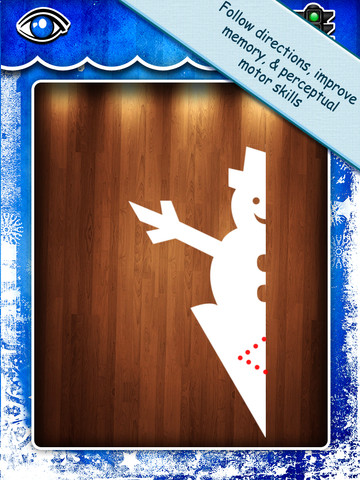
Purple glittery snowflakes – this great educational app is only $.99!! Snowflake Station for the iPad helps kids discover the beauty of symmetry – a key concept in math, science, art, & architecture. The app has 3 sections: Trace a Flake, Creation Station, and Make it Snow. Trace a Flake includes step-by-step instructions for cutting 36 different snowflakes/other symmetrical shapes. In the Creation Station, kids create their own flakes/shapes. There are six different folds, 10 different colored paper, and 10 different colors of glitter to choose from. Kids make “cuts” with their fingers. The tape button works as an undo button. Kids can monitor their progress in the upper left hand corner of the cutting board. Creations can be saved to use in the “Make it Snow” section of the app which does exactly that! Kids use their creations to make it snow in a photo of their choosing. They can use the iPad’s camera to take a picture or use an already saved photo from the camera roll. There are also 10 winter scenes included in the app. Another option in this app is the ability to set up a Juddly (a safe, secure email) account for your child to share his/her creations with you. Very creative & very fun – all while learning about symmetry. 🙂

Common Core Standards:

  • 1.G.3 – Partition a shape into four equal shares, describe the shares using the words halves, fourths, and quarters, and use the phrases half of, fourth of, and quarter of. Describe the whole as two of, or four of the shares. Understand for these examples that decomposing into more equal shares creates smaller shares.
  • 4.G.3. Recognize a line of symmetry for a two-dimensional figure as a line across the figure such that the figure can be folded along the line into matching parts. Identify line-symmetric figures and draw lines of symmetry.

Not only does this app meet CCSS in math, it can also be used in creative writing – The Day It Snowed Orange, Alien Invasion, etc. What a great educational app!

Snowflake Station - Mrs. Judd's Games, LLC

0

3 FREE Apps from the National Council of Teachers of Mathematics

equivalent fractionsFrom the National Council of Teachers of Mathematics comes a FREE app called Equivalent Fractions. Kids create equivalent fractions by dividing and shading squares or circles. Circles can be divided into 24ths. Squares can be divided into 144ths. In the play mode, a fraction is shown and kids must create 2 additional fractions that are equivalent. All 3 fractions must have different denominators. The app also places the fractions on a number line – a great visual for comparing! There is also a “build your own” mode which would be fabulous to use for guided exploration & practice. Kids could also use this section as a virtual manipulative when working independently. This app is an excellent resource for the classroom!

Common Core Standards met:

  • 3.NF.3 – Explain equivalence of fractions and compare fractions by reasoning about their size. Understand two fractions as equivalent (equal) if they are the same size, or the same point on a number line. Recognize and generate simple equivalent fractions, e.g., 1/2 = 2/4, 4/6 = 2/3). Explain why the fractions are equivalent, e.g., by using a visual fraction model.

Equivalent Fractions - National Council of Teachers of Mathematics

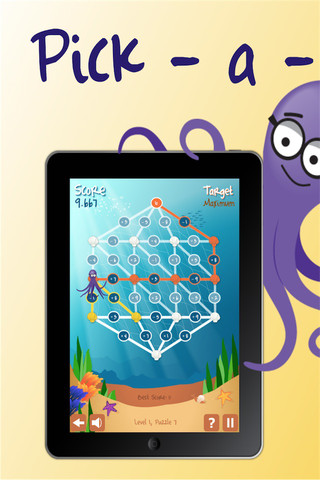
Pick a PathPick-a-Path is another FREE math game from the National Council of Teachers of Mathematics. Kids help Okta the octopus reach a target number by choosing the best path from the top maze to the bottom of a maze. There are 7 different levels with 7 puzzles in each level. The puzzles start with basic operations then move to fractions, negative numbers, decimals, and other more difficult skills. Kids have to plan out a strategy to reach the target which can be a specific value, a minimum value, or a maximum value. This app provides a lot of good skills practice. And… as an extra added bonus, kids have to think of a strategy!

Pick-a-Path - National Council of Teachers of Mathematics

Math concentration

Math Concentration was developed by the National Council of Teachers of Mathematics for students from preschool through fifth grade. It’s a classic matching game that can be played by one or two players. There are six levels of play – numbers 1- 6, numbers 1 – 10, shapes, multiplication, fractions, and percentages & fractions. In all levels, numbers are represented in different ways – written names, digits, pictures, etc. The game also has two modes – a transparent board (for younger students) or a fully covered board. The game is simple to play and kids earn socks for completing all of the matches on the board. 🙂

Download link: https://itunes.apple.com/us/app/math-concentration/id458437534?mt=8&uo=4

0

6 FREE Apps to Encourage Lifelong Learning

Winter blahs? Try adding one or more of these apps to your daily classroom routine. Students will love learning something new each day!

This Day in HistoryOne of my favorite FREE resources… WORLD BOOK  – This Day in History for iPad is a great FREE resource for the classroom. Historical events for the day are displayed on a calendar page. You can click on links to related media such as articles, photos/illustrations, music, speeches and more! When I was teaching, I had students  do “morning work” (correct punctuation, capitalization, & spelling in two sentences) while I took attendance, did lunch count, etc. This educational app would have been perfect for that daily assignment because I always used information about something interesting that happened that day. After correcting the sentences, the kids and I would discuss the history of that day. I was always amazed at how well kids retained what we had discussed during the opening minutes of every day. Throughout the year they would often remark, “We learned about that in our morning work.” You may want to try making this educational app part of your classroom’s morning routine. 🙂

WORLD BOOK - This Day in History for iPad - Software MacKiev

WonderopolisFREE – Wonderopolis, a fabulous educational app. Explore Wonderopolis (the website) with your mobile device.

Wonderopolis (Wonderopolis | Where the Wonders of Learning Never Cease) is a fantastic website that provides a daily Wonder of the Day®.  A fun & intriguing question is featured every day. The website/app includes a written explanation of the answer, vocabulary words, and a gallery of images & videos – all to foster learning and inspire curiosity about the Wonder of the Day®. Other daily features include a “Try It Out” section which suggests activities based on the day’s question, a “Still Wondering” section which gives additional/related information, and a quiz. There is even a section for teachers/parents called the “Educator Sandbox” with additional resources and opportunities to connect with the Wonderopolis community. It’s such a fascinating and wonderful resource – I enjoy reading it myself!

Using this website/app would be a fabulous addition to a daily classroom routine. Kids could read (or listen to) the daily Wonder of the Day® as part of their independent work time. They could journal about what they learned and/or what they are still wondering about. A class discussion could be scheduled for later. What a great way to encourage THINKING! Wonderopolis is a fabulous resource to ignite the natural curiosity and imagination of kids!

Download link: https://itunes.apple.com/us/app/wonderopolis/id505247028?mt=8&uo=4

BrainPOP has been around for more than a decade as an educational website. The site features short animated movies – 750+ lessons covering science, social studies, math, art & music, etc. The content is geared for grades 4 and above but I found that many movies were also suitable for third graders. When I was in the classroom, it was one of my favorite online resources.

Now you can download the BrainPOP Featured Movie, the educational app for FREE! Your child can learn something new every day. After watching the daily movie there is a short interactive quiz. And… if your child can’t get enough of this app, there are two subscription options: $1.99 per month/ 4 movies & quizzes a day OR $6.99 per month/full access.

Teachers could add the BrainPOP movie of the day to their daily routine. Watch it at a transition time – right before lunch, after lunch, while waiting for buses to called, etc. Interesting and educational!!

BrainPOP Featured Movie - BrainPOP®

Also available for FREE is BrainPOP Jr. Movie of the Week, another educational app. Every week Annie and Moby (two lovable characters) help 5 to 9 year olds learn about a different subject. There is also a quiz and activities to accompany each animated movie. BrainPOP Jr. has been on the web since 2006 delivering content for younger students in science, social studies, reading, writing, math, and more.

Again, teachers could add the BrainPOP Jr. Movie of the Week to their routine. Start your Monday off with the “Movie of the Week” or use it on Friday. BrainPOP gives teachers another way spark kids interest in learning!
BrainPOP Jr. Movie of the Week - BrainPOP®

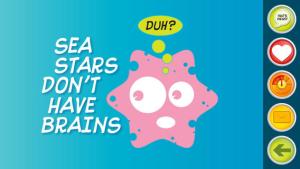
weirdDid you know that hippo’s lips are about two feet wide? Get ready to learn all sorts of wacky facts with this app. Just updated and FREE – Weird But True, an e-book from National Geographic Kids. Over 625 kid-friendly, wacky facts are presented in a fun & interactive way. Kids can swipe to move from fact to fact or shake their device to generate a random fact. Sound effects and surprises add to the fun! There is a fact finder which kids can use to locates facts by subject – animals, weather, space, etc. The app also includes a “Weird-O-Meter” which kids can use to rate the level of weirdness for each fact. Additional fact packs are available as in-app purchases –  $.99 each. This app won the Spring 2012 Parents’ Choice Award and was chosen as New & Noteworthy, What’s Hot, & Staff Favorites by Apple. Kids will LOVE this app. 🙂
Weird But True - National Geographic Society

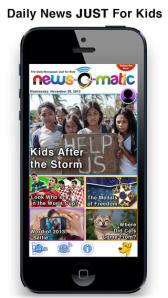
newsCheck out a FREE trial of News-o-Matic, an educational newspaper app for kids 7 – 11 years old. A new edition is published every Monday through Friday. Each edition features 5 articles from the news – sports, science, world news, wacky events, etc. The articles are kid-friendly and age-appropriate. Kids can read on their own or have the articles read to them. Important vocabulary words are underlined and linked to their definitions. The articles also include fun facts, a map for locating where the news is happening, videos, and games. Once registered, kids can connect to the News Room to draw pictures, express opinions, or ask questions about the news. This app helps kids become informed citizens of the world!

The FREE trial lasts for 2 weeks. After that, you must subscribe: yearly – $19.99. monthly – $1.99, or weekly – $0.99. If you subscribe before the end of your free trial, you get a special rate. Teachers, there is also a News-o-Matic School Edition. It comes with a teacher’s guide which includes discussion prompts, comprehension questions, Lexile reading levels, and more. And, it’s a great resource for non-fiction reading!

Download link: https://itunes.apple.com/us/app/news-o-matic-daily-reading/id578023255?mt=8&uo=4